Skip to content
OnMSFT.com
  • Home
  • About
  • Contact
  • Windows
  • Surface
  • Xbox
  • How-To
  • OnPodcast
  • Edge
  • Teams
  • Gaming
Menu
  • Home
  • About
  • Contact
  • Windows
  • Surface
  • Xbox
  • How-To
  • OnPodcast
  • Edge
  • Teams
  • Gaming
  1. Home
  2. Build 2023: Microsoft 365 Copilot coming to Edge, getting new plugins

Build 2023: Microsoft 365 Copilot coming to Edge, getting new plugins

admin admin
May 23, 2023
2 min read

\n

Amidst the electrifying atmosphere of Build 2023, Microsoft has made a groundbreaking announcement that is set to redefine the way we work and interact with technology. The integration of Microsoft 365 Copilot into Microsoft Edge, the AI-powered web browser, has taken center stage, showcasing the immense potential of combining advanced language models and data integration. This innovative development promises to empower users with unparalleled capabilities, providing seamless assistance and transforming the work experience.

\n

Microsoft 365 Copilot Arriving on Microsoft Edge

\n

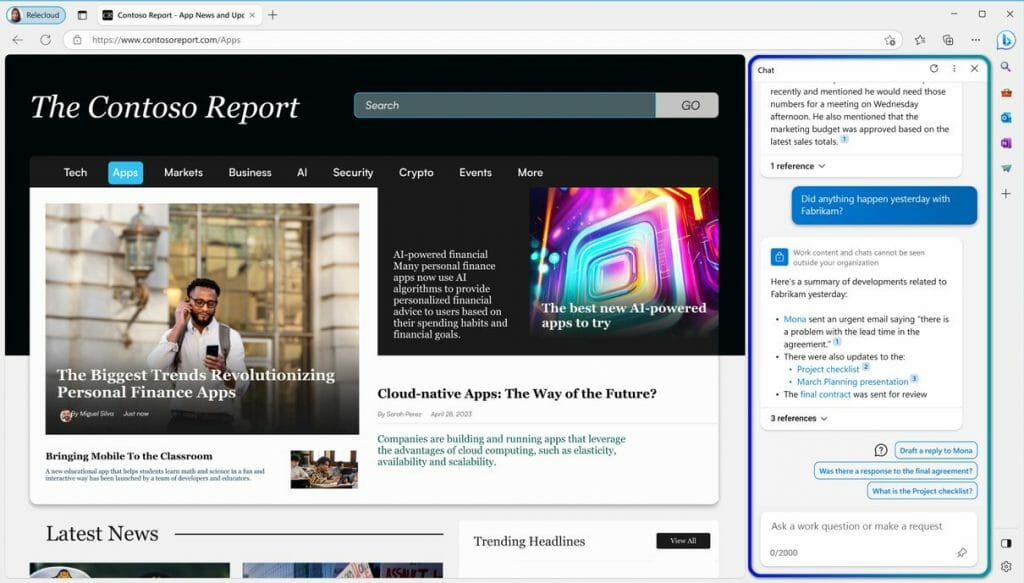
Microsoft is set to integrate Microsoft 365 Copilot, currently in a private preview phase, directly into Microsoft Edge, the AI-driven web browser. This integration aims to bring enhanced work-related functionalities to the Edge sidebar, allowing users to access powerful tools for answering questions, completing tasks, and more.
\nmicrosoft 365 copilot
\n

The introduction of Microsoft 365 Copilot will introduce novel features that harness the capabilities of large language models (LLMs), leveraging data from Microsoft Graph and the Microsoft 365 suite of applications. Users will have the ability to input natural language requests such as, “Inform my team about the updates we made to the product strategy today.” In response, Copilot will generate a status update based on the morning’s meetings, emails, and chat conversations. By seamlessly integrating with Edge, Copilot becomes even more intuitive as it follows the context of users’ browsing activities, providing more accurate answers. For instance, when viewing a file shared by a colleague, a user can simply inquire, “What are the key insights from this document?”

\n

\n

\n

\n

\n

\n

\n

\n

\n

\n

\n

\n

\n

\n

Previously, Copilot was announced to be available on Microsoft Teams, Microsoft365.com, and Bing for users signed into their work accounts. With the inclusion of Edge, Microsoft reiterates its commitment to delivering these capabilities while ensuring data security and privacy within enterprise settings. To utilize Microsoft 365 Copilot, users must be signed into their Azure Active Directory (Azure AD) account.

\n

Conclusion

\n

As Build 2023 continues, the unveiling of Microsoft 365 Copilot’s integration into Microsoft Edge marks a significant milestone in the realm of productivity tools. Microsoft’s commitment to delivering cutting-edge solutions that prioritize data security and privacy remains unwavering. With the ability to generate comprehensive updates, answer complex queries, and provide valuable insights, Microsoft 365 Copilot revolutionizes the way we navigate and engage with our work. Embrace this transformative technology and unlock a new era of efficiency and productivity.

\n

\n

Check out more from OnMSFT.com!

\n

\n

Share this article:
Previous Article Build 2023: OpenAI’s ChatGPT to use Bing as its default search experience Next Article Build 2023: Microsoft Store is adding an AI Hub, expanding Store Ads

Related Articles

PowerToys 0.75 released; Environment Variables editor is here

October 31, 2023

Former Halo developer Bungie announces layoffs in wake of game delays

October 31, 2023

Siemens and Microsoft partner to bring GenAI to industries worldwide

October 31, 2023

Leave a Comment Cancel reply

Your email address will not be published. Required fields are marked *

Recent Posts

  • PowerToys 0.75 released; Environment Variables editor is here
  • Former Halo developer Bungie announces layoffs in wake of game delays
  • Siemens and Microsoft partner to bring GenAI to industries worldwide
  • 43 Microsoft Edge keyboard shortcuts to remember for stylish and speedy web surfing
  • Here is what’s coming to (and leaving) Xbox Game Pass soon

Recent Comments

No comments to show.

Archives

  • October 2023
  • September 2023
  • August 2023
  • July 2023
  • June 2023
  • May 2023
  • April 2023
  • March 2023
  • February 2023
  • January 2023
  • December 2022
  • November 2022
  • October 2022
  • September 2022
  • August 2022
  • July 2022
  • June 2022
  • May 2022
  • April 2022
  • March 2022
  • February 2022
  • January 2022
  • December 2021
  • November 2021
  • October 2021
  • September 2021
  • August 2021
  • July 2021
  • June 2021
  • May 2021
  • April 2021
  • March 2021
  • February 2021
  • January 2021
  • December 2020
  • November 2020
  • October 2020
  • September 2020
  • August 2020
  • July 2020
  • June 2020
  • May 2020
  • April 2020
  • March 2020
  • February 2020
  • January 2020
  • December 2019
  • November 2019
  • October 2019
  • September 2019
  • August 2019
  • July 2019
  • June 2019
  • May 2019
  • April 2019
  • March 2019
  • February 2019
  • January 2019
  • December 2018
  • November 2018
  • October 2018
  • September 2018
  • August 2018
  • July 2018
  • June 2018
  • May 2018
  • April 2018
  • March 2018
  • February 2018
  • January 2018
  • December 2017
  • November 2017
  • October 2017
  • September 2017
  • August 2017
  • July 2017
  • June 2017
  • May 2017
  • April 2017
  • March 2017
  • February 2017
  • January 2017
  • December 2016
  • November 2016
  • October 2016
  • September 2016
  • August 2016
  • July 2016
  • June 2016
  • May 2016
  • April 2016
  • March 2016
  • February 2016
  • January 2016
  • December 2015
  • November 2015
  • October 2015
  • September 2015
  • August 2015
  • July 2015
  • June 2015
  • May 2015
  • April 2015
  • March 2015
  • February 2015
  • January 2015
  • December 2014
  • November 2014
  • October 2014
  • September 2014
  • August 2014
  • July 2014
  • June 2014
  • May 2014
  • April 2014
  • March 2014
  • February 2014
  • January 2014
  • December 2013
  • November 2013
  • October 2013
  • September 2013
  • August 2013
  • July 2013
  • June 2013
  • May 2013
  • April 2013
  • March 2013
  • February 2013
  • January 2013
  • December 2012
  • November 2012
  • October 2012
  • September 2012
  • August 2012
  • July 2012
  • June 2012
  • May 2012
  • April 2012
  • March 2012
  • February 2012
  • January 2012
  • December 2011
  • November 2011
  • October 2011
  • September 2011
  • August 2011
  • July 2011
  • June 2011
  • May 2011
  • April 2011
  • March 2011
  • February 2011
  • January 2011
  • December 2010
  • November 2010
  • October 2010
  • September 2010

Categories

  • Announcements
  • Deals
  • Developer
  • Editorial
  • Feature
  • Feature stories
  • Hero-post
  • Hotdeals
  • How-to
  • Latest news
  • Microsoft / office 365
  • News
  • Office 365
  • Onpodcast
  • Opinion
  • Our featured post
  • Polls
  • Review
  • Reviews
  • Videos
OnMSFT.com

OnMSFT.com covers Microsoft news, reviews, and how-to guides. Formerly known as WinBeta, we have been your source for Microsoft news since 1998.

Categories

  • Windows
  • Surface
  • Xbox
  • How-To
  • OnPodcast
  • Gaming
  • Edge
  • Teams

Recent Posts

  • PowerToys 0.75 released; Environment Variables editor is here
  • Former Halo developer Bungie announces layoffs in wake of game delays
  • Siemens and Microsoft partner to bring GenAI to industries worldwide
  • 43 Microsoft Edge keyboard shortcuts to remember for stylish and speedy web surfing
  • Here is what’s coming to (and leaving) Xbox Game Pass soon

Quick Links

  • About OnMSFT.com
  • Contact OnMSFT
  • Join Our Team
© 2010–2026 OnMSFT.com LLC. All rights reserved.
About OnMSFT.comContact OnMSFT