Skip to content
OnMSFT.com
  • Home
  • About
  • Contact
  • Windows
  • Surface
  • Xbox
  • How-To
  • OnPodcast
  • Edge
  • Teams
  • Gaming
Menu
  • Home
  • About
  • Contact
  • Windows
  • Surface
  • Xbox
  • How-To
  • OnPodcast
  • Edge
  • Teams
  • Gaming
  1. Home
  2. Intelligent meeting recap ships to general availability for Teams Premium

Intelligent meeting recap ships to general availability for Teams Premium

admin admin
May 31, 2023
3 min read

At the beginning of this year, Microsoft launched Teams Premium in general availability. It’s a new tier built on Microsoft Teams that is designed to enhance the tool’s meeting experience more personalized, intelligent, and secure. The offering is powered by GPT-3.5, OpenAI’s language model.

The Teams Premium Microsoft 365 add-on subscription ships with features such as real-time translation of captions, recommended tasks, personalized highlights customized meeting templates, watermarking, recording capability limiting, branded meetings, and more. And now, Microsoft has announced the general availability of the Intelligent meeting recap feature in Teams Premium.

The COVID-19 pandemic saw a lot of organizations transition to hybrid work in a bid to mitigate the spread of the virus. As such, most of organizations became dependent on online communication tools like Microsoft Teams, though the process hasn’t been as smooth. “55% of people report that next-steps at the end of a meeting are unclear, and 56% report that it’s hard to summarize what happens in a meeting,” explained Microsoft in the blog post.

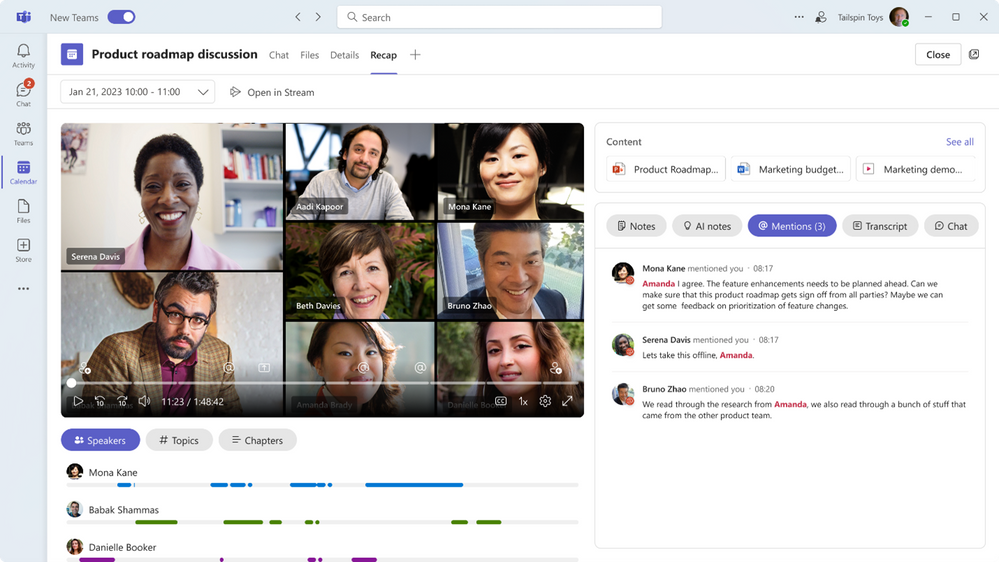
But with the general availability of the Intelligent meeting recap feature in Teams Premium, Microsoft will be able to counter these issues. It generates meeting notes, recommended tasks, and personalized highlights automatically.

Additionally, it will help users cut down on unnecessary administrative work like taking notes or figuring out important takeaways that shift their focus from what truly matters. In turn, you are able to work smarter rather than harder.

What’s more, you can even use the automatically generated meeting notes powered by GPT-3.5 as well as highlights to catch up with important details shared during the meeting in case you were engaged elsewhere at the time.
thumbnail image 3 of blog post titled Intelligent meeting recap in Teams Premium, now available

Additionally, Teams Premium makes it easier for you to quickly review meeting recordings. The offering features a neat tool, AI-generated chapters which splits the recording into sections based on the meeting transcript.

Aside from that, Microsoft has also indicated that it’ll be revamping the meeting recap experience for all Teams users. Users can already catch up on all the meeting contents via the ‘Details’ tab of a meeting which includes links to the meeting transcript, recording, and any manual notes that were taken.

The new meeting recap experience will now be incorporated into the ‘Recap’ tab where users can catch up on meeting recording directly within Teams, as well as provide co-created collaborative meeting notes, meeting transcripts, and content shared. However, it is worth noting that not all Teams users will have access to the AI-powered insights that ship with the intelligent recap feature. You’ll need a Microsoft Teams Premium subscription for that.

To access the Intelligent meeting recap feature and more, Microsoft is offering an introductory fee of $7 per month that will be valid till June 30. From July, users will be required to make a payment of $10 per month. Be sure to check out our detailed post highlighting what Teams Premium is and how you can leverage its capabilities.

via Neowin

Related

Share this article:
Previous Article Here’s what’s new in Microsoft Excel in May 2023 Next Article How to Fix ChatGPT Errors and Make It Work [Solved]

Related Articles

PowerToys 0.75 released; Environment Variables editor is here

October 31, 2023

Former Halo developer Bungie announces layoffs in wake of game delays

October 31, 2023

Siemens and Microsoft partner to bring GenAI to industries worldwide

October 31, 2023

Leave a Comment Cancel reply

Your email address will not be published. Required fields are marked *

Recent Posts

  • PowerToys 0.75 released; Environment Variables editor is here
  • Former Halo developer Bungie announces layoffs in wake of game delays
  • Siemens and Microsoft partner to bring GenAI to industries worldwide
  • 43 Microsoft Edge keyboard shortcuts to remember for stylish and speedy web surfing
  • Here is what’s coming to (and leaving) Xbox Game Pass soon

Recent Comments

No comments to show.

Archives

  • October 2023
  • September 2023
  • August 2023
  • July 2023
  • June 2023
  • May 2023
  • April 2023
  • March 2023
  • February 2023
  • January 2023
  • December 2022
  • November 2022
  • October 2022
  • September 2022
  • August 2022
  • July 2022
  • June 2022
  • May 2022
  • April 2022
  • March 2022
  • February 2022
  • January 2022
  • December 2021
  • November 2021
  • October 2021
  • September 2021
  • August 2021
  • July 2021
  • June 2021
  • May 2021
  • April 2021
  • March 2021
  • February 2021
  • January 2021
  • December 2020
  • November 2020
  • October 2020
  • September 2020
  • August 2020
  • July 2020
  • June 2020
  • May 2020
  • April 2020
  • March 2020
  • February 2020
  • January 2020
  • December 2019
  • November 2019
  • October 2019
  • September 2019
  • August 2019
  • July 2019
  • June 2019
  • May 2019
  • April 2019
  • March 2019
  • February 2019
  • January 2019
  • December 2018
  • November 2018
  • October 2018
  • September 2018
  • August 2018
  • July 2018
  • June 2018
  • May 2018
  • April 2018
  • March 2018
  • February 2018
  • January 2018
  • December 2017
  • November 2017
  • October 2017
  • September 2017
  • August 2017
  • July 2017
  • June 2017
  • May 2017
  • April 2017
  • March 2017
  • February 2017
  • January 2017
  • December 2016
  • November 2016
  • October 2016
  • September 2016
  • August 2016
  • July 2016
  • June 2016
  • May 2016
  • April 2016
  • March 2016
  • February 2016
  • January 2016
  • December 2015
  • November 2015
  • October 2015
  • September 2015
  • August 2015
  • July 2015
  • June 2015
  • May 2015
  • April 2015
  • March 2015
  • February 2015
  • January 2015
  • December 2014
  • November 2014
  • October 2014
  • September 2014
  • August 2014
  • July 2014
  • June 2014
  • May 2014
  • April 2014
  • March 2014
  • February 2014
  • January 2014
  • December 2013
  • November 2013
  • October 2013
  • September 2013
  • August 2013
  • July 2013
  • June 2013
  • May 2013
  • April 2013
  • March 2013
  • February 2013
  • January 2013
  • December 2012
  • November 2012
  • October 2012
  • September 2012
  • August 2012
  • July 2012
  • June 2012
  • May 2012
  • April 2012
  • March 2012
  • February 2012
  • January 2012
  • December 2011
  • November 2011
  • October 2011
  • September 2011
  • August 2011
  • July 2011
  • June 2011
  • May 2011
  • April 2011
  • March 2011
  • February 2011
  • January 2011
  • December 2010
  • November 2010
  • October 2010
  • September 2010

Categories

  • Announcements
  • Deals
  • Developer
  • Editorial
  • Feature
  • Feature stories
  • Hero-post
  • Hotdeals
  • How-to
  • Latest news
  • Microsoft / office 365
  • News
  • Office 365
  • Onpodcast
  • Opinion
  • Our featured post
  • Polls
  • Review
  • Reviews
  • Videos
OnMSFT.com

OnMSFT.com covers Microsoft news, reviews, and how-to guides. Formerly known as WinBeta, we have been your source for Microsoft news since 1998.

Categories

  • Windows
  • Surface
  • Xbox
  • How-To
  • OnPodcast
  • Gaming
  • Edge
  • Teams

Recent Posts

  • PowerToys 0.75 released; Environment Variables editor is here
  • Former Halo developer Bungie announces layoffs in wake of game delays
  • Siemens and Microsoft partner to bring GenAI to industries worldwide
  • 43 Microsoft Edge keyboard shortcuts to remember for stylish and speedy web surfing
  • Here is what’s coming to (and leaving) Xbox Game Pass soon

Quick Links

  • About OnMSFT.com
  • Contact OnMSFT
  • Join Our Team
© 2010–2026 OnMSFT.com LLC. All rights reserved.
About OnMSFT.comContact OnMSFT