
Last year in December, Microsoft refreshed OneDrive’s look on Windows 11 that’s heavily inspired by Windows 11’s design elements and looks a lot more modern. The update was majorly cosmetic as it didn’t add any new features.
Microsoft has since shipped a visual and functional upgrade for the OneDrive app. Users will now be able to access their files on the platform easily while simultaneously maintaining organization. In turn, this will promote efficiency and productivity.
The new upgrade has changed how users will get to interact with OneDrive in multiple ways. Here’s everything you need to know about this update:
New OneDrive Home experience
First up, the update revamped OneDrive’s Home experience and made it easier for users to find files. If you’ve used OneDrive before and have a lot of files and documents stored there, then you must be aware of how tedious it can get when you are looking for a specific file.
The company has launched a new “For You” section in OneDrive’s Home experience that’s powered by AI-powered file recommendations. From this new section, users will be able to easily locate personalized, relevant, and time-sensitive content at the top of the Home experience. Microsoft has indicated that the AI capabilities should be shipping to OneDrive soon.
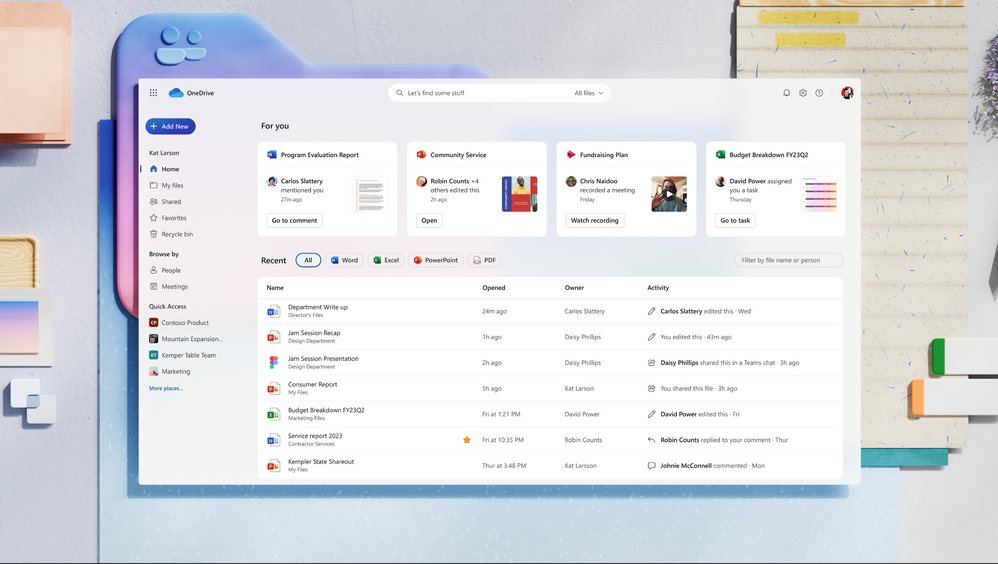
Additionally, the new update has also shipped with “rich, context-based organization, such as views that show you recent, shared, and favorite and files from meetings.” The views are designed to help you jump back to content easily, whereas the inline activity updates will help the user catch up with files at a glance.
Find shared files easily
While OneDrive lets users collaborate on projects efficiently, at times, finding these shared files can be difficult. As such, Microsoft has debuted the new Shared. It’s designed to provide users with one convenient location where they can access all the files that have been shared with them. The feature is expected to start shipping to users this quarter.
Find files with people’s names
Have you found yourself in a situation where you can remember the names of the counterparts you’re collaborating with on a project but can’t recall the file’s name? Well, with this new update, Microsoft is making it easy for you to find these files using the people’s names you’re working with via the new People view.
According to Microsoft:
We’ve created this context-aware, adaptive experience to help you quickly find files you’re working on together. You’ll be able to pin people to top of the view for quick access and activity previews will help keep you up-to-speed on collaboration without having to open the file. We expect to ship this experience later this year.
Use Meetings view to find files from meetings
A lot of information is passed around during meetings including important documents and files, and it may be difficult for you to find these files if you’re not keen. It may require you to sieve through meeting invites, recordings, and chats which takes up a lot of time and resources.
To mitigate this issue, Microsoft has launched Meetings view, a central location where a user can find all the files shared during meetings, including those part of meeting chats, notes, and Loops.

What’s more, the Meetings view allows you to view files that will be part of upcoming meetings. “This view is organized by upcoming meetings followed recent meetings and it brings you all files shared in your meeting even ones you were not able to attend.” The feature is expected to start rolling out later this year.
Find files using the file format
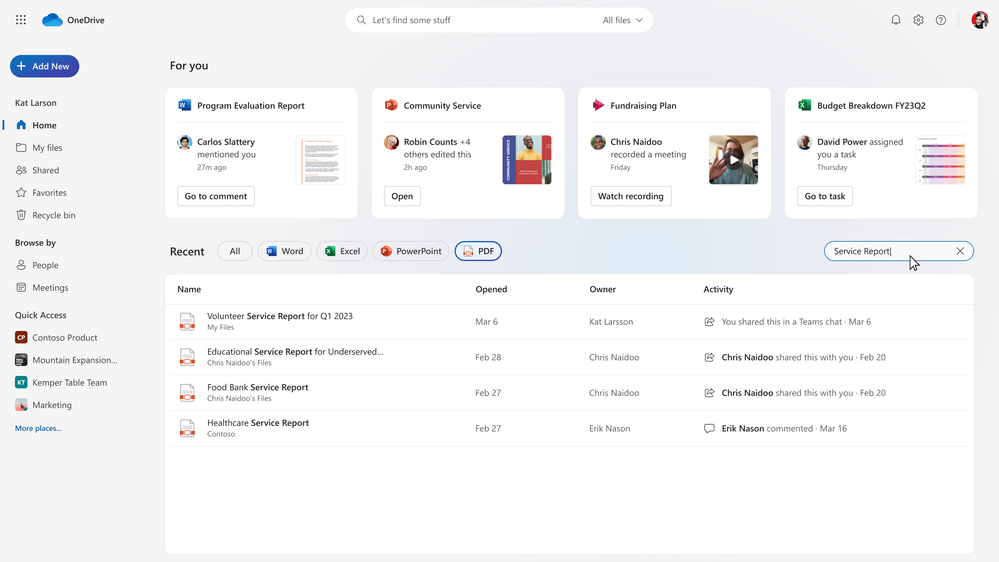
Microsoft is making it possible for users to find files using file types. The company has indicated that it will be incorporating filters designed to help users decipher Word, Excel, PowerPoint, and PDF files from each other.
Colored folders
With this new update, it’s now possible for users to personalize and customize OneDrive. According to Microsoft, once this feature ships, users will be able to change the color of a folder for easy identification and grouping of files and documents.
Favorites and File Shortcuts
Microsoft has also indicated that it will be adding two new ways designed to help users to manage and locate important files. For instance, using the star-tap experience available across Microsoft 365 apps, users will be able to mark important files as favorite files. All files marked as favorite will now appear in one organized view, regardless of the app you were using.
Additionally, users will soon be able to easily get back to shared content using File Shortcut links that can be placed within existing OneDrive folders. The Favorites feature is expected to ship this month while the File Shortcut feature should begin to roll out later this year.
Better OneDrive share experience
Microsoft has decluttered and refreshed the sharing dialog in OneDrive and has now unified the file sharing experience across Microsoft 365. “We’ve also improved the “copy link” experience, so you get a clear on-screen confirmation that the link has been copied, and the confirmation self-dismisses, saving you a click. You’ll see the new sharing dialog later this year,” says Microsoft.
OneDrive in Teams
The changes highlighted above will also be coming to the Files app in Microsoft Teams. Microsoft has indicated that it will provide users with a consistent and similar experience, regardless of whether they are using the OneDrive app on the web or from the Teams app.
While on the Files app in Teams, you’ll be able to access your recent and shared files from your chats, channels, or meetings. The feature is expected to ship to Teams by the end of this year.
Work offline
Microsoft has indicated that there are plans underway that will let users work offline on a OneDrive synced file. The feature dubbed Available when offline will let users make changes on a file offline in your browser. Then, the changes made to the file will sync automatically once you’re back online.
Open in app
While it has been possible for users to option Office files in either the desktop app or browser, the same doesn’t to non-Office files, such as .PDFs, .JPEGs, and MP4s. However, Microsoft has indicated that it is extending this capability to non-Office files via the new Open in App feature, that’s designed to let users launch them in desktop apps to view and make changes. The Open in App feature is expected to ship to general availability later this year in OneDrive & SharePoint web and Microsoft Teams.
Most of these features aren’t yet available but once Microsoft ships them to broad availability, users will be able to interact with files better in OneDrive ultimately promoting productivity and efficiency. Be sure to let us know what you think about these changes in the comments.