Skip to content
OnMSFT.com
  • Home
  • About
  • Contact
  • Windows
  • Surface
  • Xbox
  • How-To
  • OnPodcast
  • Edge
  • Teams
  • Gaming
Menu
  • Home
  • About
  • Contact
  • Windows
  • Surface
  • Xbox
  • How-To
  • OnPodcast
  • Edge
  • Teams
  • Gaming
  1. Home
  2. Geekom AS 6 Review: AMD mini-PC computing for professionals

Geekom AS 6 Review: AMD mini-PC computing for professionals

admin admin
July 25, 2023
7 min read

\n

\n

\n

In this article

\n

\n

  • Stating at $650
  • Look and Feel
  • Performance
  • Summary

\n

Stating at $650

\n

Geekom continues to build on its short reputation of pushing out affordable minicomputers with a multitude of configuration options and support, and the AS 6 R9 would be another in line of wonderful choices, but in fact stands out because of the amount of power and speed built into this particular tiny box.

\n

For the uninitiated, the Geekom AS 6 mini-PC is great little computer that can be placed on any desk or mounted to the back of most monitors for use in service industries, retail, warehousing, construction, banking, or a myriad of other business-specific purposes. However, for those who deal in the world of mini-PCs, the AS 6 is an AMD rival to the Intel NUC 13 Pro for users who are looking to push the power boundaries of Bluetooth speaker-sized computer, and it does so at much lower price tag.

\n

\n

\n

\n

\n

\n

\n

\n

\n

\n

\n

\n

\n

\n

\n

\n

\n

\n

\n

\n

\n

\n

\n

\n

\n

\n

\n

\n

\n

\n

\n

\n

\n

\n

\n

\n

\n

\n

\n

\n

\n

\n

\n

\n

\n

\n

\n

\n

\n

\n

\n

\n

\n

\n

\n

\n

\n

\n

\n

\n

\n

\n

\n

\n

\n

\n

\n

\n

\n

\n

\n

\n

\n

\n

\n

\n

\n

\n

\n

\n

\n

\n

\n

\n

Specs
Geekcom AS 6
Size 120 x 130 x 58 mm (0.9L)
Weight 0.9 kg
CPU AMD Ryzen™ 9 6900HX (8 Cores, 16 Threads, 16MB Cache, 3.3 GHz~ 4.9 GHz)
AMD Ryzen™ 7 6800H (8 Cores, 16 Threads, 16MB Cache, 3.2 GHz~ 4.7 GHz)
cTDP: 35W
Graphics Integrated – AMD Radeon™ Graphics 680M
Memory Dual-channel DDR5-4800 SODIMM, supports up to 32GB
Storage 2 x M.2 2280 PCIe Gen 4×4 SSD , supports up to 2TB (* NVMe only)
1 x 2.5”7mm SATA HDD, supports up to 2TB
Operating System Windows 11 Pro
Bluetooth® Wireless Technology Bluetooth® v5.2
LAN 2.5G LAN (RJ45)
Wireless Network Wi-Fi 6E
Power Supply 20V 7.5A, 150W Power Adapter
I/O Ports Front I/O 1 x USB4 Type-C (Support DP1.4, 7680 x 4320 @60Hz)
\n2 x USB 3.2 Gen1
\n1 x Audio Jack (Line out/Mic in/Headphone out)
\nSide I/O 1 x Kensington Lock
\nRear I/O 1 x USB4 Type-C (Support DP1.4, 7680 x 4320 @60Hz)
\n3 x USB 3.2 Gen1
\n2 x HDMI 2.1 Port (4096 x 2160 @60Hz)
\n1 x Display Port 1.4 (5120 x [email protected])
\n1 x 2.5G RJ45 LAN
\n1 x DC-in
\n1 x Padlock ring
What’s In The Box 1 x AS 6 Mini PC
\n1 x Power Adapter
\n1 x VESA Mount ( 2 packs of screws included)
\n1 x SSD Mounting Screws (2 packs)
\n1 x HDD Mounting Screws (1 pack)
\n1 x Qucik Guide
\n1 x User Manual

\n

Look and Feel

\n

The Geekom AS6 is a small and sleek device that can fit in the palm of your hand. It has a black plastic case with minimal branding and a silver metal stand that can be attached to the bottom or the back of the unit. The front panel has two USB 3.2 ports, one USB 4.0 port, and an audio jack. The rear panel has three more USB 3.2 ports, another USB 4.0 port, two HDMI 2.1 ports, one DisplayPort 1.4 port, one RJ45 LAN port, and one DC-in port. There is also a padlock ring for security purposes.

\n

20230525 145436

\n

The AS 6 is nearly identical to its predecessor the AS 5 in terms of packaging, with the same mini-Xbox One style of venting grooves and mix of matte and polished black tones around the metal chassis encased in plastic. As far as the actual footprint of the AS 6, buyers can take note of its 13 x 12-centimeter presence on any flat surface while weighing 753 grams or about 2lbs in the hand.

\n

The AS6 is easy to set up and use, as it comes with Windows 11 Pro preinstalled and a licensed product key sticker on the bottom. The device also supports VESA mounting, so you can attach it to the back of a monitor or a TV for a clutter-free setup. The AS6 comes with a 150W power adapter, which is relatively large compared to the size of the device.

\n

Compared to its closest rival the Intel NUC 13 Pro which resembles a Geekom Mini IT PC, the AS 6 comes in slightly bigger and more angular.

\n

\n

\n

\n

\n

\n

\n

\n

\n

\n

\n

\n

\n

\n

With the intent of being an understated mini workstation with the ability to be mounted to the back of a monitor or wall, the AS 6’s design offers little to write home about, but there is care and attention paid to the construction of the device that highlights the company’s commitment to performance while acknowledging a buyer’s budget.

\n

Performance

\n

\n

\n
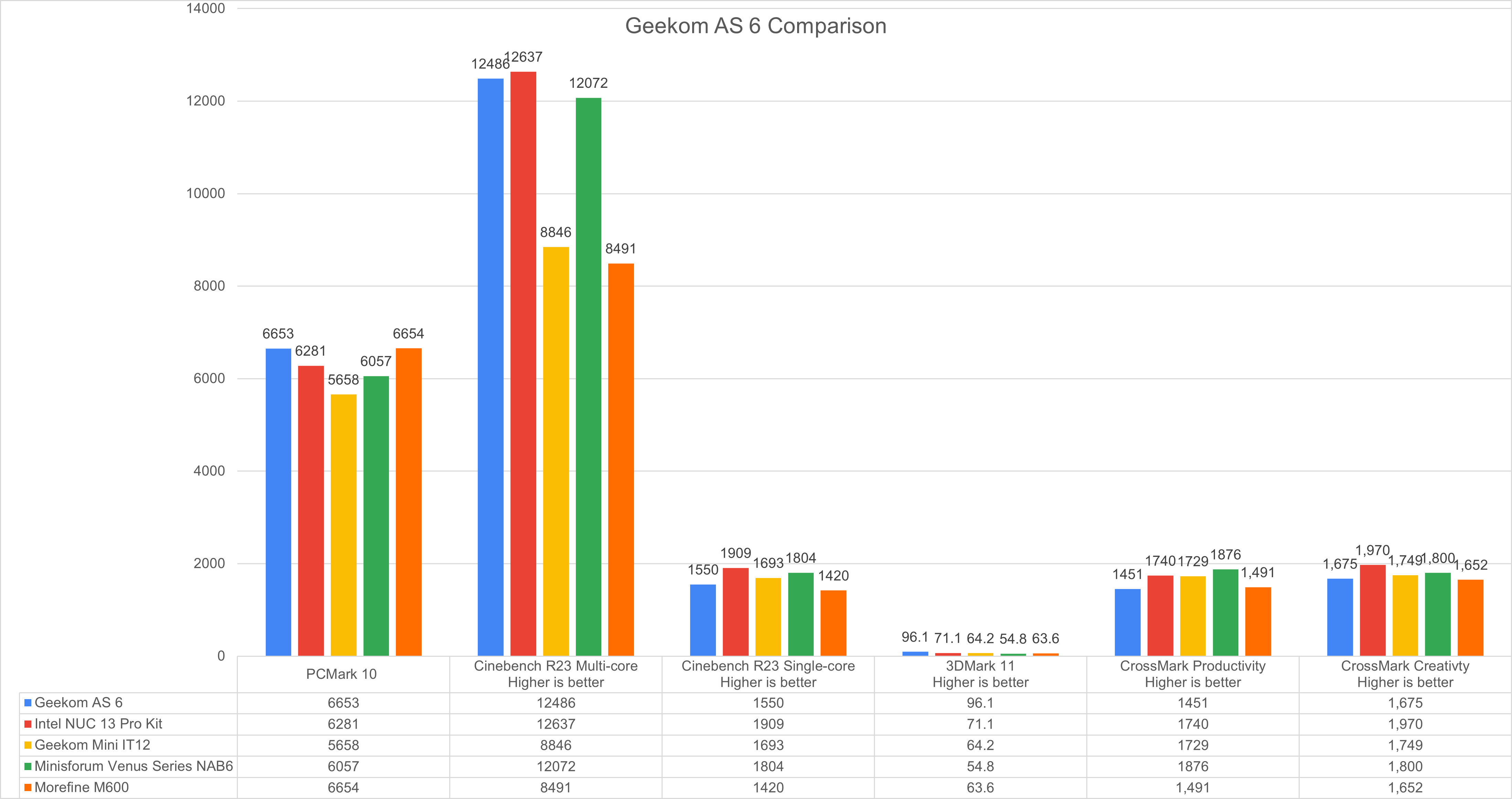
As 6 Benchmarks

\n

\n

The Geekom AS6 is a beast when it comes to performance, as it boasts an AMD Ryzen 9 6900HX processor, which is an octa-core CPU with a base clock of 3.3 GHz and a boost clock of 4.9 GHz. This processor is based on the Zen 3+ architecture and supports DDR5 memory and PCIe 4.0 SSDs. The AS6 also has an AMD Radeon 680M graphics card, which is an integrated GPU with 16 compute units and a clock speed of up to 2.1 GHz. This GPU is comparable to the Nvidia GeForce GTX 1050 Ti in terms of performance and supports up to 8K resolution.

\n

\n

The AS6 comes with 32 GB of DDR5-4800 RAM and a 1 TB PCIe Gen 4 NVMe SSD, which are both upgradeable via two M.2 slots and one SATA bay inside the device. The device also has an Intel WiFi 6E module and a Bluetooth 5.2 chip for wireless connectivity.

\n

20230525 145620

\n

\n

The AS6 handled most tasks I threw at it, whether it was web browsing, office work, video editing, or even some gaming. During my testing it ran multiple applications smoothly and multitask efficiently thanks to its high-end CPU and RAM. It can also play most games at medium to high settings and achieve decent frame rates thanks to its capable GPU. However, some demanding games may require lowering the resolution or the graphics quality to run smoothly.

\n

\n

The AS6 also has excellent connectivity options, as it supports up to four displays via its HDMI, DisplayPort, and USB ports. It also supports Thunderbolt 4 via its USB 4.0 ports, which allowed for fast data transfer and charging of external devices, which was a nice little bonus. The device also has a 2.5 GbE LAN port for wired internet access, which I never truly make use of in my reviews, but it also and supports WiFi 6E for wireless internet access.

\n

\n

The AS6 has some drawbacks when it comes to performance, such as its high-power consumption and heat generation. The device consumes around 150W of power when running at full load, which is quite high for a mini PC. The device also gets very hot when running at full load, reaching temperatures of over 90 degrees Celsius on the CPU and over 80 degrees Celsius on the GPU1. This may affect the longevity and stability of the device in the long run if you’re concerned about such things.

\n

\n

\n

All that to say, keep it in a place where it can vent thoroughly and be prepared to hear a little jet engine whenever you’re about to tax the system with CAD engineering files, larger data transfers, large data visualizations or extensive video and image processing projects.

\n

\n

With the soft pitch to average buyers out of the way, a quick comparison to the NUC 13 Pro might be worth a look at for some.

\n

\n

The AS 6’s AMD Ryzen 9 does lag a bit with single core performance and draws a bit more power during tasks, its 8 cores and 16 threads keeps up with Intel’s 12 cores and 16 threads pretty well while also outperforming when it comes to GPU output. The NUC 13 Pro is hampered by Intel’s Iris Xe Graphics that does an admirable job of supporting 60FPS and 1080p gaming with a handful of titles, but the Radeon 680M integrated option for AMD offers even more performance than the previous Vega 8 iGPU which was already outpacing Intel’s options.

\n

\n

20230525 145519

\n

\n

\n

The Radeon 680M offers similar performance to GTX 1060Ti and better than a GeForce MX450 in some instances. If buyers are looking for similar data processing support such as the NUC 13 Pro as well as a device that can be used for content creation or gaming, the AS 6 would be the preferred choice for the moment.

\n

\n

\n

When it comes to processing, the AS 6 benefits from faster RAM support with its DDR5 at 4800MHz over the NUC’s DDR4 3200MHz memory. Despite the jump from DDR4 to DDR5 being relatively minimal, the benefits become apparent when encoding and rendering projects as well as gaming. Fortunately, for the NUC Pro 13 its support of DDR4 means it can be outfitted with more RAM while the AS 6 maxes out at 32GB of memory, memory that can be easily upgraded thanks to its support of SO-DIMM format.

\n

\n

Summary

\n

The Geekom AS6 is an impressive mini PC that offers desktop-level performance in a pocket-sized form factor. It has a powerful AMD Ryzen 9 processor, a capable Radeon graphics card, plenty of RAM and storage space, and multiple connectivity options. It can handle any task you throw at it, whether it is productivity work or gaming.

\n

However, the AS6 also has some flaws that may deter some users from buying it such as its noisy fan that can be annoying in quiet environments, a high-power consumption that may increase your electricity bill, and a high heat generation that may reduce its lifespan.

\n

\n

\n

\n

\n

\n

\n

\n

\n

\n

\n

\n

\n

\n

I recommend the Geekom AS6 for users who are looking for a mini PC that can offer desktop-level performance without compromising on space or portability. The AS6 is mostly suitable for professionals who need a powerful device for their work-related tasks such as video editing or coding. The AS 6 is also suitable for gamers who want to enjoy their favorite games on a small device that can support multiple displays and high resolutions, but if you’re streaming, just be aware of the fan noise being a prominent guest in your videos.

\n

Author note: Geekom is currently having a summer sale where buyers can get up to $260 off its configurations which brings the cost of the model used in this review down to:

\n

    \n

  • Product link: https://bit.ly/GEEKOMAS6-USA
  • \n

  • $709 after using code:as640a
  • \n

\n

\n

Related

\n

\n

Share this article:
Previous Article A Comprehensive Guide to Windows 11 Dev Home Next Article ESRB seeks FTC approval for facial age estimation AI for digital game purchases

Related Articles

PowerToys 0.75 released; Environment Variables editor is here

October 31, 2023

Former Halo developer Bungie announces layoffs in wake of game delays

October 31, 2023

Siemens and Microsoft partner to bring GenAI to industries worldwide

October 31, 2023

Leave a Comment Cancel reply

Your email address will not be published. Required fields are marked *

Recent Posts

  • PowerToys 0.75 released; Environment Variables editor is here
  • Former Halo developer Bungie announces layoffs in wake of game delays
  • Siemens and Microsoft partner to bring GenAI to industries worldwide
  • 43 Microsoft Edge keyboard shortcuts to remember for stylish and speedy web surfing
  • Here is what’s coming to (and leaving) Xbox Game Pass soon

Recent Comments

No comments to show.

Archives

  • October 2023
  • September 2023
  • August 2023
  • July 2023
  • June 2023
  • May 2023
  • April 2023
  • March 2023
  • February 2023
  • January 2023
  • December 2022
  • November 2022
  • October 2022
  • September 2022
  • August 2022
  • July 2022
  • June 2022
  • May 2022
  • April 2022
  • March 2022
  • February 2022
  • January 2022
  • December 2021
  • November 2021
  • October 2021
  • September 2021
  • August 2021
  • July 2021
  • June 2021
  • May 2021
  • April 2021
  • March 2021
  • February 2021
  • January 2021
  • December 2020
  • November 2020
  • October 2020
  • September 2020
  • August 2020
  • July 2020
  • June 2020
  • May 2020
  • April 2020
  • March 2020
  • February 2020
  • January 2020
  • December 2019
  • November 2019
  • October 2019
  • September 2019
  • August 2019
  • July 2019
  • June 2019
  • May 2019
  • April 2019
  • March 2019
  • February 2019
  • January 2019
  • December 2018
  • November 2018
  • October 2018
  • September 2018
  • August 2018
  • July 2018
  • June 2018
  • May 2018
  • April 2018
  • March 2018
  • February 2018
  • January 2018
  • December 2017
  • November 2017
  • October 2017
  • September 2017
  • August 2017
  • July 2017
  • June 2017
  • May 2017
  • April 2017
  • March 2017
  • February 2017
  • January 2017
  • December 2016
  • November 2016
  • October 2016
  • September 2016
  • August 2016
  • July 2016
  • June 2016
  • May 2016
  • April 2016
  • March 2016
  • February 2016
  • January 2016
  • December 2015
  • November 2015
  • October 2015
  • September 2015
  • August 2015
  • July 2015
  • June 2015
  • May 2015
  • April 2015
  • March 2015
  • February 2015
  • January 2015
  • December 2014
  • November 2014
  • October 2014
  • September 2014
  • August 2014
  • July 2014
  • June 2014
  • May 2014
  • April 2014
  • March 2014
  • February 2014
  • January 2014
  • December 2013
  • November 2013
  • October 2013
  • September 2013
  • August 2013
  • July 2013
  • June 2013
  • May 2013
  • April 2013
  • March 2013
  • February 2013
  • January 2013
  • December 2012
  • November 2012
  • October 2012
  • September 2012
  • August 2012
  • July 2012
  • June 2012
  • May 2012
  • April 2012
  • March 2012
  • February 2012
  • January 2012
  • December 2011
  • November 2011
  • October 2011
  • September 2011
  • August 2011
  • July 2011
  • June 2011
  • May 2011
  • April 2011
  • March 2011
  • February 2011
  • January 2011
  • December 2010
  • November 2010
  • October 2010
  • September 2010

Categories

  • Announcements
  • Deals
  • Developer
  • Editorial
  • Feature
  • Feature stories
  • Hero-post
  • Hotdeals
  • How-to
  • Latest news
  • Microsoft / office 365
  • News
  • Office 365
  • Onpodcast
  • Opinion
  • Our featured post
  • Polls
  • Review
  • Reviews
  • Videos
OnMSFT.com

OnMSFT.com covers Microsoft news, reviews, and how-to guides. Formerly known as WinBeta, we have been your source for Microsoft news since 1998.

Categories

  • Windows
  • Surface
  • Xbox
  • How-To
  • OnPodcast
  • Gaming
  • Edge
  • Teams

Recent Posts

  • PowerToys 0.75 released; Environment Variables editor is here
  • Former Halo developer Bungie announces layoffs in wake of game delays
  • Siemens and Microsoft partner to bring GenAI to industries worldwide
  • 43 Microsoft Edge keyboard shortcuts to remember for stylish and speedy web surfing
  • Here is what’s coming to (and leaving) Xbox Game Pass soon

Quick Links

  • About OnMSFT.com
  • Contact OnMSFT
  • Join Our Team
© 2010–2026 OnMSFT.com LLC. All rights reserved.
About OnMSFT.comContact OnMSFT