Skip to content
OnMSFT.com
  • Home
  • About
  • Contact
  • Windows
  • Surface
  • Xbox
  • How-To
  • OnPodcast
  • Edge
  • Teams
  • Gaming
Menu
  • Home
  • About
  • Contact
  • Windows
  • Surface
  • Xbox
  • How-To
  • OnPodcast
  • Edge
  • Teams
  • Gaming
  1. Home
  2. Dell unveils a new rugged tablet and Threadripper tower

Dell unveils a new rugged tablet and Threadripper tower

admin admin
October 19, 2023
4 min read

\n

As businesses settle into a world powered by generative and pre-generative artificially intelligent led workflows, Dell looks to provide the hardware necessary for developers, engineers, analysts, and researchers need to shape the next wave of applicable technologies with its new Precision 7875 Tower.

\n

Dell Precision 7875 Tower

\n

The Dell Precision 7875 Tower is a new desktop workstation equipped with the latest AMD Ryzen Threadripper Pro 7000 WX-Series processor making it the company’s most scalable AMD-led workstation to date.

\n

AMD’s Pro 7000 WX-Series is built on a 5nm dye and provides up to 96 cores and 192 processing threads built with the AMD Zen 4 architecture which pushes performance through up to 48 PCIe 5.0 lanes similar to the standard 7000 Series processors. Additionally, the Pro 7000 WX-Series offers up to 384MB of L3 cache and eight channels for support of DDR5.

\n

With that said, Dell stuffed this multithreaded hyper chip into its performant single socket Precision workstation to support, “a variety of AI functions, such as model training, GenAI, machine learning and more. It is also a flexible option for a variety of high-end creative applications, including rendering, film production, design analysis, simulation and architecture, engineering and construction (AEC) visualization.”

\n
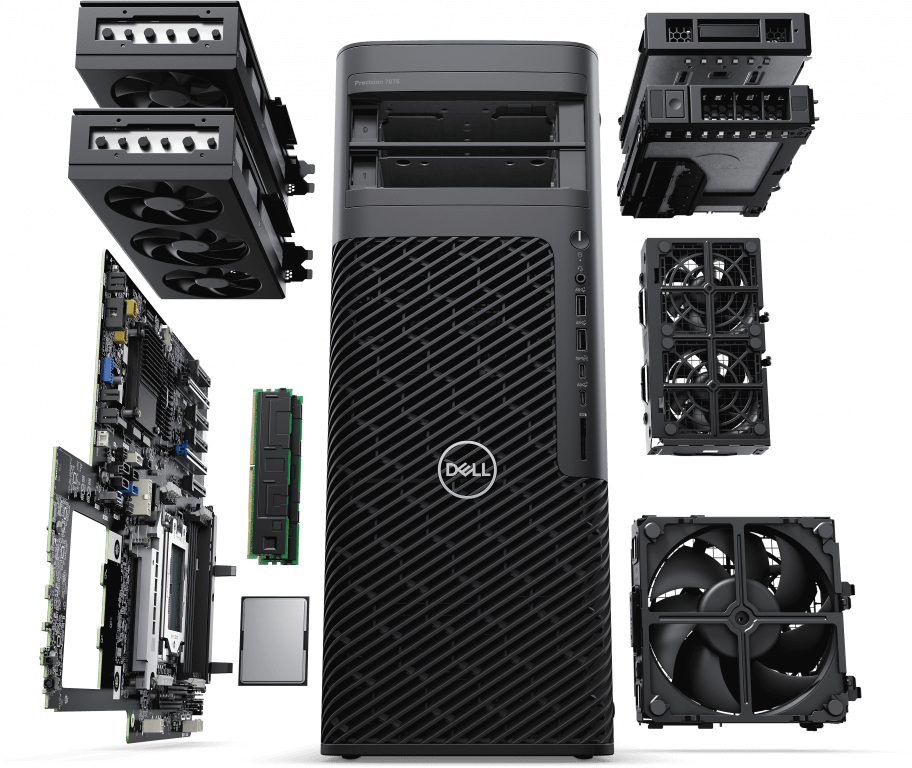
Precision 7875 Tower Exploded view

\n

As for the specifics of the towers chassis, Dell claims the Precision 7875 is taller and deeper than the previous generation to provide a larger air space to cool the chip as well as six PCIe slots for more expandability.

\n

As a first, Dell is integrating Wi-Fi into its own slot instead of it taking up a PCIe slot, and they’re offering up a variety of GPU, storage, memory and support configurations that include:

\n

    \n

  • Up to two 48GB AMD Radeon Pro W7900
  • \n

  • Up to two 48GB NVIDIA RTX 6000 Ada Generation
  • \n

  • Up to 56TB of storage
  • \n

  • Up to 2TB of DDR5 RAM
  • \n

  • Support for NVIDIA AI Enterprise
  • \n

  • Support for TPM 2.0
  • \n

\n

Dell says its Precision 7875 Tower will be available globally starting December 5, 2023, with prices announced closer to shipping.

\n

Dell Latitude 7030 Rugged Extreme Tablet

\n

On the opposite side of the scale is one of Dell’s more portable workstations in the new Latitude 7030 Rugged Extreme Tablet.

\n

For those who don’t want to be chained to a desk during their working hours, Dell unveiled its FHD (1920 x 1200) FHD+ 10.1-inch 7030 Rugged Extreme Tablet which the company claims is the most lightest ruggedized Windows tablet around.

\n

With a 16:10 aspect ratio and 1000 nits of peak brightness, the 7030 should be viewable in most situations, especially outdoors.

\n

Similar to Lenovo’s highly touted MIL-spec ThinkPad’s, the Latitude 7030 comes with its own MIL-STD and IP-65 ratings for use in extreme conditions that include temperature fluctuations between-20 F to 145 F, as well as passing drop test from up to four feet. In addition to being used at the top of snowy mountain or a swamp, the 7030 will come with an optional configuration that supports swappable batteries to help provide a full day of power versus the standard 36Whr internal battery.

\n
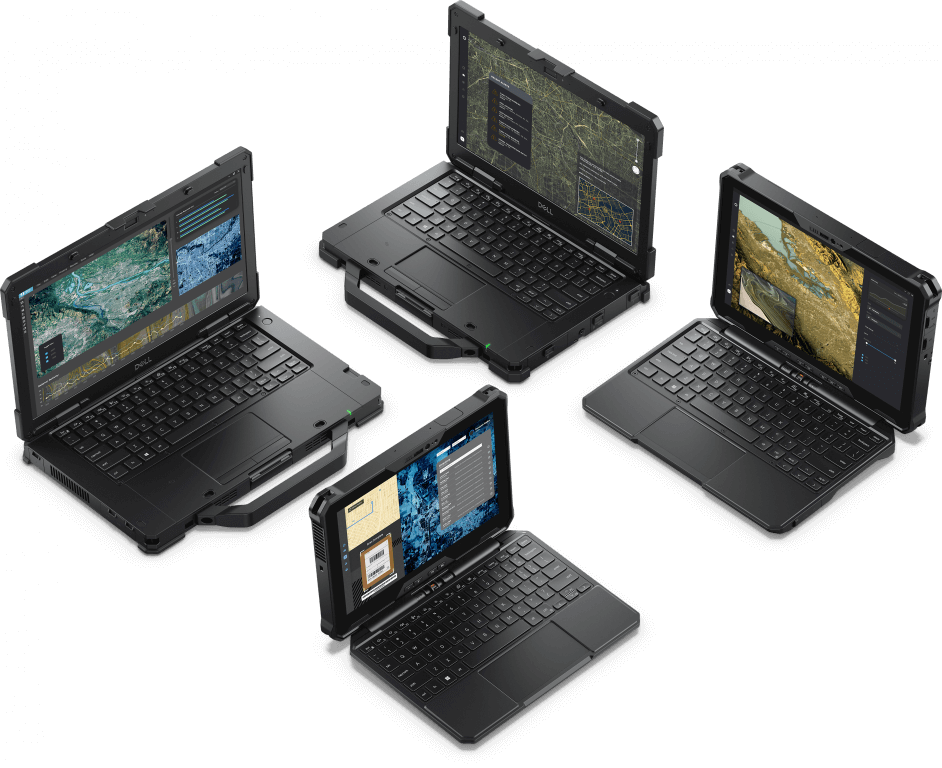
Latitude 7030 Rugged Extreme_1

\n

A 12th Gen Intel Core i7 processor paired with Iris Xe graphics and up to 32GBs of LPDDR5 RAM will power the 10-inch tablet as well as support for up to 2TB of NVMe of storage. As the 7030 is designed to be used on the go, Dell is making sure it’s always connected with GPS, 5G and 5G Private Network, and support for Wi-Fi 6E and dual broadband for the fastest uninterrupted connectivity.

\n

When out and about, users can also make use of a handful of Purpose-built accessories such as:

\n

    \n

  • Rigid handle and passive stylus. This pairing gives you a grip for carrying the 7030
    \nRugged Extreme and a passive stylus for greater precision when writing or drawing. The
    \nhandle, which conveniently stores the pen, has a rubber mold and rigid polymer
    \nstructure for a satisfying feel. The passive stylus can also be purchased separately.
  • \n

  • Detachable keyboard. Convert the 7030 Rugged Extreme into a 2-in-1 with the IP-65-
    \nrated detachable RGB backlit keyboard that easily locks into place. Once attached, the
    \ntablet can be propped upright for standard “laptop” mode or folded 180 degrees.
  • \n

  • Rotating hand strap. A 360-degree rotating hand strap allows you to comfortably secure
    \nthe tablet to your wrist as you use it in static or mobile environments. The strap
    \nattaches to a 50×50 VESA mount and includes a convenient place to store your stylus.
  • \n

  • Two programmable hardware buttons that provide quick access to customizations from the Rugged Control Center software on the device.
  • \n

\n

Dell claims The 7030 Rugged Extreme will be available globally later this year, with pricing announced closer to shipping.

\n

\n

Related

\n

Share this article:
Previous Article Windows 11 Insiders in the Beta Channel get a new build with 22635.2486 Next Article No more language barriers: Microsoft Edge might add a video translation feature to YouTube

Related Articles

PowerToys 0.75 released; Environment Variables editor is here

October 31, 2023

Former Halo developer Bungie announces layoffs in wake of game delays

October 31, 2023

Siemens and Microsoft partner to bring GenAI to industries worldwide

October 31, 2023

Leave a Comment Cancel reply

Your email address will not be published. Required fields are marked *

Recent Posts

  • PowerToys 0.75 released; Environment Variables editor is here
  • Former Halo developer Bungie announces layoffs in wake of game delays
  • Siemens and Microsoft partner to bring GenAI to industries worldwide
  • 43 Microsoft Edge keyboard shortcuts to remember for stylish and speedy web surfing
  • Here is what’s coming to (and leaving) Xbox Game Pass soon

Recent Comments

No comments to show.

Archives

  • October 2023
  • September 2023
  • August 2023
  • July 2023
  • June 2023
  • May 2023
  • April 2023
  • March 2023
  • February 2023
  • January 2023
  • December 2022
  • November 2022
  • October 2022
  • September 2022
  • August 2022
  • July 2022
  • June 2022
  • May 2022
  • April 2022
  • March 2022
  • February 2022
  • January 2022
  • December 2021
  • November 2021
  • October 2021
  • September 2021
  • August 2021
  • July 2021
  • June 2021
  • May 2021
  • April 2021
  • March 2021
  • February 2021
  • January 2021
  • December 2020
  • November 2020
  • October 2020
  • September 2020
  • August 2020
  • July 2020
  • June 2020
  • May 2020
  • April 2020
  • March 2020
  • February 2020
  • January 2020
  • December 2019
  • November 2019
  • October 2019
  • September 2019
  • August 2019
  • July 2019
  • June 2019
  • May 2019
  • April 2019
  • March 2019
  • February 2019
  • January 2019
  • December 2018
  • November 2018
  • October 2018
  • September 2018
  • August 2018
  • July 2018
  • June 2018
  • May 2018
  • April 2018
  • March 2018
  • February 2018
  • January 2018
  • December 2017
  • November 2017
  • October 2017
  • September 2017
  • August 2017
  • July 2017
  • June 2017
  • May 2017
  • April 2017
  • March 2017
  • February 2017
  • January 2017
  • December 2016
  • November 2016
  • October 2016
  • September 2016
  • August 2016
  • July 2016
  • June 2016
  • May 2016
  • April 2016
  • March 2016
  • February 2016
  • January 2016
  • December 2015
  • November 2015
  • October 2015
  • September 2015
  • August 2015
  • July 2015
  • June 2015
  • May 2015
  • April 2015
  • March 2015
  • February 2015
  • January 2015
  • December 2014
  • November 2014
  • October 2014
  • September 2014
  • August 2014
  • July 2014
  • June 2014
  • May 2014
  • April 2014
  • March 2014
  • February 2014
  • January 2014
  • December 2013
  • November 2013
  • October 2013
  • September 2013
  • August 2013
  • July 2013
  • June 2013
  • May 2013
  • April 2013
  • March 2013
  • February 2013
  • January 2013
  • December 2012
  • November 2012
  • October 2012
  • September 2012
  • August 2012
  • July 2012
  • June 2012
  • May 2012
  • April 2012
  • March 2012
  • February 2012
  • January 2012
  • December 2011
  • November 2011
  • October 2011
  • September 2011
  • August 2011
  • July 2011
  • June 2011
  • May 2011
  • April 2011
  • March 2011
  • February 2011
  • January 2011
  • December 2010
  • November 2010
  • October 2010
  • September 2010

Categories

  • Announcements
  • Deals
  • Developer
  • Editorial
  • Feature
  • Feature stories
  • Hero-post
  • Hotdeals
  • How-to
  • Latest news
  • Microsoft / office 365
  • News
  • Office 365
  • Onpodcast
  • Opinion
  • Our featured post
  • Polls
  • Review
  • Reviews
  • Videos
OnMSFT.com

OnMSFT.com covers Microsoft news, reviews, and how-to guides. Formerly known as WinBeta, we have been your source for Microsoft news since 1998.

Categories

  • Windows
  • Surface
  • Xbox
  • How-To
  • OnPodcast
  • Gaming
  • Edge
  • Teams

Recent Posts

  • PowerToys 0.75 released; Environment Variables editor is here
  • Former Halo developer Bungie announces layoffs in wake of game delays
  • Siemens and Microsoft partner to bring GenAI to industries worldwide
  • 43 Microsoft Edge keyboard shortcuts to remember for stylish and speedy web surfing
  • Here is what’s coming to (and leaving) Xbox Game Pass soon

Quick Links

  • About OnMSFT.com
  • Contact OnMSFT
  • Join Our Team
© 2010–2026 OnMSFT.com LLC. All rights reserved.
About OnMSFT.comContact OnMSFT