Skip to content
OnMSFT.com
  • Home
  • About
  • Contact
  • Windows
  • Surface
  • Xbox
  • How-To
  • OnPodcast
  • Edge
  • Teams
  • Gaming
Menu
  • Home
  • About
  • Contact
  • Windows
  • Surface
  • Xbox
  • How-To
  • OnPodcast
  • Edge
  • Teams
  • Gaming
  1. Home
  2. Microsoft ships Collaborative notes in Teams meetings to public preview

Microsoft ships Collaborative notes in Teams meetings to public preview

admin admin
June 15, 2023
2 min read

Microsoft is busy at work, constantly pushing new updates and features to its video conferencing platform, Microsoft Teams, with the aim of enhancing its meeting experience. Earlier this year, the company introduced video filters to the platform, designed to help users customize their video streams using special visual effects like frames.

And now, the company has announced shipping Collaborative notes in Teams meetings to public preview. The feature is designed to provide users with a more exclusive experience, where they can now collaborate on projects in real-time, just like Loop Components.
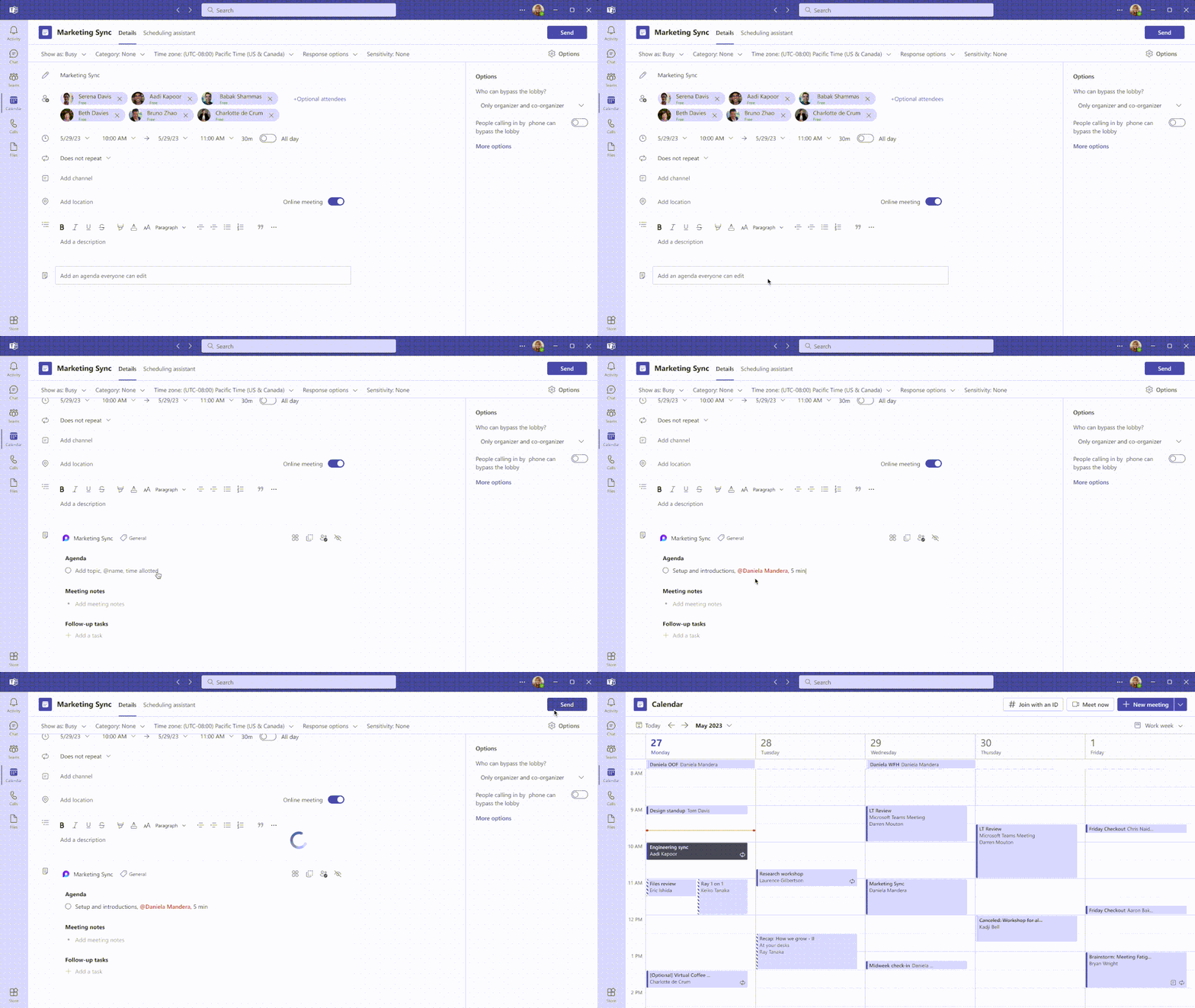
thumbnail image 1 of blog post titled Now in public preview: Collaborative notes in Microsoft Teams Meetings

According to Microsoft:

Collaborative notes eliminate the typical bottleneck of a single note-taker for capturing the agenda and notes and also makes them visible to everyone, improving accuracy and inclusion at every stage of your meeting.

The new feature will help users keep their content synced across Microsoft 365 apps. This means you’ll be able to access them in Outlook, Teams chat, the Loop app, Word for the web, and Whiteboard. This way, if you’d already shared Collaborative notes before initiating a meeting, participants will be able to pitch in and incorporate new ideas and suggestions for brainstorming and better planning purposes. It is worth noting that this can be done from any app the collaborative notes were shared to.

Once the meeting has started, users can continue adding new items to the collaborative notes and even draft or assign tasks to participants. What’s more, keeping track of everything going on is easier. You can also track changes made by clicking on the text to see the user. The notes can be shared even after the meeting to establish continuity.

Users will also be able to transfer the Collaborative notes from the meeting to the Loop app, that’s also currently in public preview. You can now access all your resources in one convenient location. Microsoft has also indicated that it will integrate Loop components with OneNote later in the fall. Ultimately, it will be easier for users to add collaborative meeting notes to their OneNote notebooks.

Related

Share this article:
Previous Article Play EA Sports PGA Tour and 3 more games with Xbox Free Play Days Next Article Forza Motorsport developer Turn 10 is working on a new car game for mobile

Related Articles

PowerToys 0.75 released; Environment Variables editor is here

October 31, 2023

Former Halo developer Bungie announces layoffs in wake of game delays

October 31, 2023

Siemens and Microsoft partner to bring GenAI to industries worldwide

October 31, 2023

Leave a Comment Cancel reply

Your email address will not be published. Required fields are marked *

Recent Posts

  • PowerToys 0.75 released; Environment Variables editor is here
  • Former Halo developer Bungie announces layoffs in wake of game delays
  • Siemens and Microsoft partner to bring GenAI to industries worldwide
  • 43 Microsoft Edge keyboard shortcuts to remember for stylish and speedy web surfing
  • Here is what’s coming to (and leaving) Xbox Game Pass soon

Recent Comments

No comments to show.

Archives

  • October 2023
  • September 2023
  • August 2023
  • July 2023
  • June 2023
  • May 2023
  • April 2023
  • March 2023
  • February 2023
  • January 2023
  • December 2022
  • November 2022
  • October 2022
  • September 2022
  • August 2022
  • July 2022
  • June 2022
  • May 2022
  • April 2022
  • March 2022
  • February 2022
  • January 2022
  • December 2021
  • November 2021
  • October 2021
  • September 2021
  • August 2021
  • July 2021
  • June 2021
  • May 2021
  • April 2021
  • March 2021
  • February 2021
  • January 2021
  • December 2020
  • November 2020
  • October 2020
  • September 2020
  • August 2020
  • July 2020
  • June 2020
  • May 2020
  • April 2020
  • March 2020
  • February 2020
  • January 2020
  • December 2019
  • November 2019
  • October 2019
  • September 2019
  • August 2019
  • July 2019
  • June 2019
  • May 2019
  • April 2019
  • March 2019
  • February 2019
  • January 2019
  • December 2018
  • November 2018
  • October 2018
  • September 2018
  • August 2018
  • July 2018
  • June 2018
  • May 2018
  • April 2018
  • March 2018
  • February 2018
  • January 2018
  • December 2017
  • November 2017
  • October 2017
  • September 2017
  • August 2017
  • July 2017
  • June 2017
  • May 2017
  • April 2017
  • March 2017
  • February 2017
  • January 2017
  • December 2016
  • November 2016
  • October 2016
  • September 2016
  • August 2016
  • July 2016
  • June 2016
  • May 2016
  • April 2016
  • March 2016
  • February 2016
  • January 2016
  • December 2015
  • November 2015
  • October 2015
  • September 2015
  • August 2015
  • July 2015
  • June 2015
  • May 2015
  • April 2015
  • March 2015
  • February 2015
  • January 2015
  • December 2014
  • November 2014
  • October 2014
  • September 2014
  • August 2014
  • July 2014
  • June 2014
  • May 2014
  • April 2014
  • March 2014
  • February 2014
  • January 2014
  • December 2013
  • November 2013
  • October 2013
  • September 2013
  • August 2013
  • July 2013
  • June 2013
  • May 2013
  • April 2013
  • March 2013
  • February 2013
  • January 2013
  • December 2012
  • November 2012
  • October 2012
  • September 2012
  • August 2012
  • July 2012
  • June 2012
  • May 2012
  • April 2012
  • March 2012
  • February 2012
  • January 2012
  • December 2011
  • November 2011
  • October 2011
  • September 2011
  • August 2011
  • July 2011
  • June 2011
  • May 2011
  • April 2011
  • March 2011
  • February 2011
  • January 2011
  • December 2010
  • November 2010
  • October 2010
  • September 2010

Categories

  • Announcements
  • Deals
  • Developer
  • Editorial
  • Feature
  • Feature stories
  • Hero-post
  • Hotdeals
  • How-to
  • Latest news
  • Microsoft / office 365
  • News
  • Office 365
  • Onpodcast
  • Opinion
  • Our featured post
  • Polls
  • Review
  • Reviews
  • Videos
OnMSFT.com

OnMSFT.com covers Microsoft news, reviews, and how-to guides. Formerly known as WinBeta, we have been your source for Microsoft news since 1998.

Categories

  • Windows
  • Surface
  • Xbox
  • How-To
  • OnPodcast
  • Gaming
  • Edge
  • Teams

Recent Posts

  • PowerToys 0.75 released; Environment Variables editor is here
  • Former Halo developer Bungie announces layoffs in wake of game delays
  • Siemens and Microsoft partner to bring GenAI to industries worldwide
  • 43 Microsoft Edge keyboard shortcuts to remember for stylish and speedy web surfing
  • Here is what’s coming to (and leaving) Xbox Game Pass soon

Quick Links

  • About OnMSFT.com
  • Contact OnMSFT
  • Join Our Team
© 2010–2026 OnMSFT.com LLC. All rights reserved.
About OnMSFT.comContact OnMSFT