Skip to content
OnMSFT.com
  • Home
  • About
  • Contact
  • Windows
  • Surface
  • Xbox
  • How-To
  • OnPodcast
  • Edge
  • Teams
  • Gaming
Menu
  • Home
  • About
  • Contact
  • Windows
  • Surface
  • Xbox
  • How-To
  • OnPodcast
  • Edge
  • Teams
  • Gaming
  1. Home
  2. Here’s what’s announced as coming to Microsoft 365 this week

Here’s what’s announced as coming to Microsoft 365 this week

Kevin Okemwa Kevin Okemwa
January 6, 2023
2 min read

In this article

  • Expanded view of the profile card in Teams
  • Microsoft Teams Teams Calendar Now Includes Scheduling Form Pop-Outs
  • Graph API for Teams Meetings Transcripts

It's the first Friday of the year, and as usual, we'll get to recap all the features that Microsoft announced as coming to Microsoft 365 throughout this week. Here's everything you need to know:

Expanded view of the profile card in Teams

Teams users will soon have access to a new feature tagged 109526 in the Microsoft 365 Roadmap that will let them use expanded views of the profile card in Teams. This will allow your profile visitors to gather more information from your profile card, that is, an overview of the profile, contact information, organizational chart, and LinkedIn tab.

The expanded view feature is already available in Outlook and is expected to reach general availability in April for Teams users.

Microsoft Teams: Teams Calendar Now Includes Scheduling Form Pop-Outs

As we had previously reported, Microsoft Teams is set to get a new feature that lets users pop out the scheduling form as a separate window. The feature tagged 99197 in the Microsoft 365 Roadmap was initially supposed to hit general availability by late November, however, this has since changed and is now expected to reach broad availability by mid-January.
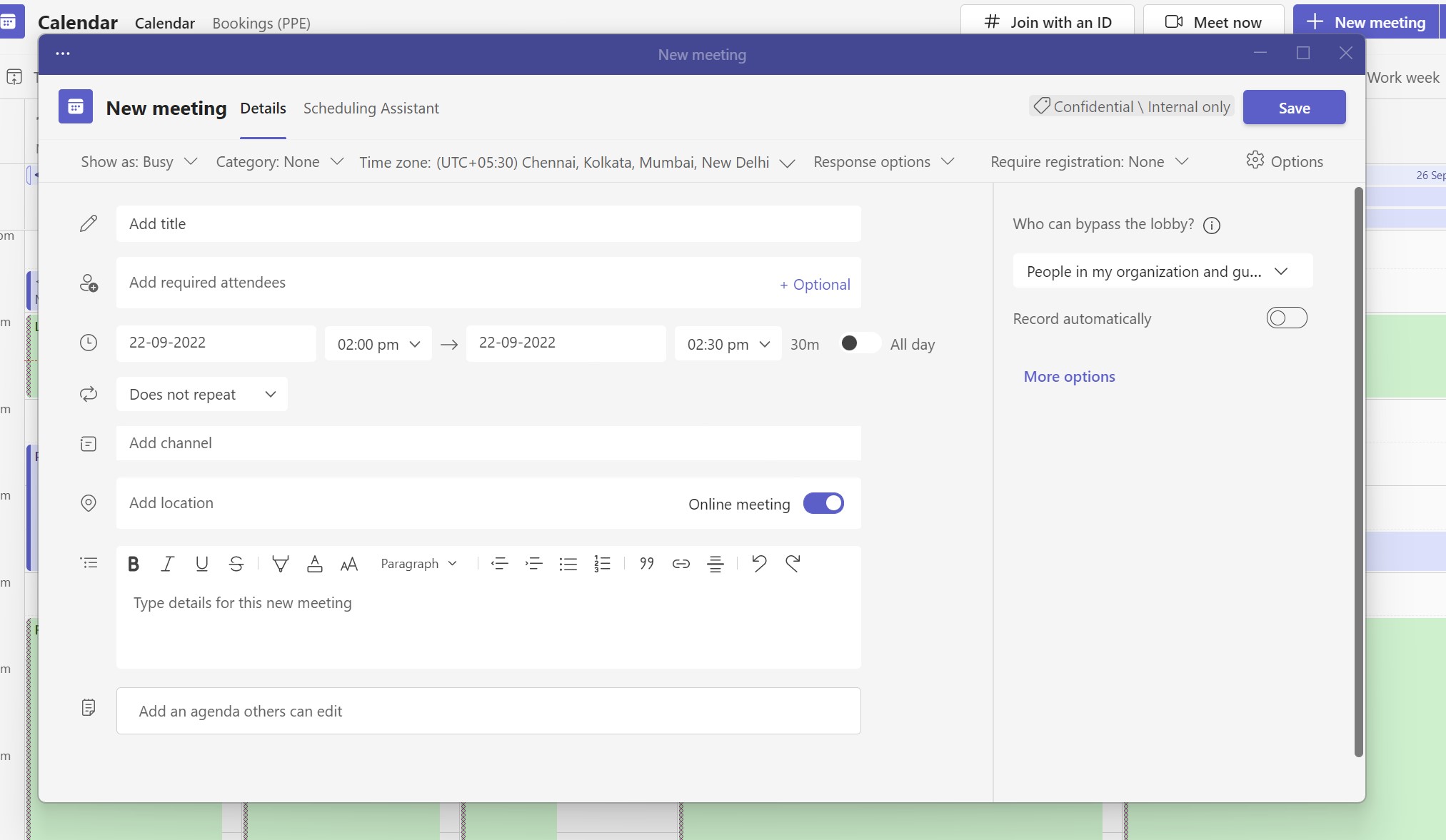
Here's what's announced as coming to Microsoft 365 this week - OnMSFT.com - January 6, 2023

In related news, Microsoft identified an issue with the Teams’ calendar. It appears not to auto refresh for some users. The company is currently working on a fix and plans to deploy it by the 1st week of February. In the meantime, you can try out this workaround:

Users will get the most updated view of their calendar by

  1. Going to a different app and coming back
  2. clicking on today/ next or previous week and coming back
  3. Refreshing the page if they’re on web browser.

Graph API for Teams Meetings Transcripts

Microsoft is introducing new org-wide application permissions and RSC application permissions with the aim of ensuring that apps will be able to access meeting transcripts for a specific meeting. According to Microsoft, "Resource specific consent (RSC) permissions, specifically enables admins to authorize users to provide consent to apps, so they get specific access to a Teams meeting’s transcripts to which it is installed, rather than providing them access across the entire tenant."

The feature tagged 95788 in the Microsoft 365 Roadmap was already published beta last year towards the end of July, though the timeline when it is expected to hit general availability has been moved forward from late February to early April.

That's it for this week folks! Let us know which feature you are looking forward to using most in the comment section below.

Share this article:
Kevin Okemwa
Written by

Kevin Okemwa

Hardworking, young, and full of life. His goal is to make your life easier by deciphering the latest in gadgets and trends. At OnMSFT.com, he covers How-to guides, breaking news, and featured stories.

Previous Article The Witcher 3 next-gen edition will get a physical release on January 26th Next Article NetEase Games acquires Minecraft and Halo Infinite co-developer Skybox Labs

Related Articles

PowerToys 0.75 released; Environment Variables editor is here

October 31, 2023

Former Halo developer Bungie announces layoffs in wake of game delays

October 31, 2023

Siemens and Microsoft partner to bring GenAI to industries worldwide

October 31, 2023

Leave a Comment Cancel reply

Your email address will not be published. Required fields are marked *

Recent Posts

  • PowerToys 0.75 released; Environment Variables editor is here
  • Former Halo developer Bungie announces layoffs in wake of game delays
  • Siemens and Microsoft partner to bring GenAI to industries worldwide
  • 43 Microsoft Edge keyboard shortcuts to remember for stylish and speedy web surfing
  • Here is what’s coming to (and leaving) Xbox Game Pass soon

Recent Comments

No comments to show.

Archives

  • October 2023
  • September 2023
  • August 2023
  • July 2023
  • June 2023
  • May 2023
  • April 2023
  • March 2023
  • February 2023
  • January 2023
  • December 2022
  • November 2022
  • October 2022
  • September 2022
  • August 2022
  • July 2022
  • June 2022
  • May 2022
  • April 2022
  • March 2022
  • February 2022
  • January 2022
  • December 2021
  • November 2021
  • October 2021
  • September 2021
  • August 2021
  • July 2021
  • June 2021
  • May 2021
  • April 2021
  • March 2021
  • February 2021
  • January 2021
  • December 2020
  • November 2020
  • October 2020
  • September 2020
  • August 2020
  • July 2020
  • June 2020
  • May 2020
  • April 2020
  • March 2020
  • February 2020
  • January 2020
  • December 2019
  • November 2019
  • October 2019
  • September 2019
  • August 2019
  • July 2019
  • June 2019
  • May 2019
  • April 2019
  • March 2019
  • February 2019
  • January 2019
  • December 2018
  • November 2018
  • October 2018
  • September 2018
  • August 2018
  • July 2018
  • June 2018
  • May 2018
  • April 2018
  • March 2018
  • February 2018
  • January 2018
  • December 2017
  • November 2017
  • October 2017
  • September 2017
  • August 2017
  • July 2017
  • June 2017
  • May 2017
  • April 2017
  • March 2017
  • February 2017
  • January 2017
  • December 2016
  • November 2016
  • October 2016
  • September 2016
  • August 2016
  • July 2016
  • June 2016
  • May 2016
  • April 2016
  • March 2016
  • February 2016
  • January 2016
  • December 2015
  • November 2015
  • October 2015
  • September 2015
  • August 2015
  • July 2015
  • June 2015
  • May 2015
  • April 2015
  • March 2015
  • February 2015
  • January 2015
  • December 2014
  • November 2014
  • October 2014
  • September 2014
  • August 2014
  • July 2014
  • June 2014
  • May 2014
  • April 2014
  • March 2014
  • February 2014
  • January 2014
  • December 2013
  • November 2013
  • October 2013
  • September 2013
  • August 2013
  • July 2013
  • June 2013
  • May 2013
  • April 2013
  • March 2013
  • February 2013
  • January 2013
  • December 2012
  • November 2012
  • October 2012
  • September 2012
  • August 2012
  • July 2012
  • June 2012
  • May 2012
  • April 2012
  • March 2012
  • February 2012
  • January 2012
  • December 2011
  • November 2011
  • October 2011
  • September 2011
  • August 2011
  • July 2011
  • June 2011
  • May 2011
  • April 2011
  • March 2011
  • February 2011
  • January 2011
  • December 2010
  • November 2010
  • October 2010
  • September 2010

Categories

  • Announcements
  • Deals
  • Developer
  • Editorial
  • Feature
  • Feature stories
  • Hero-post
  • Hotdeals
  • How-to
  • Latest news
  • Microsoft / office 365
  • News
  • Office 365
  • Onpodcast
  • Opinion
  • Our featured post
  • Polls
  • Review
  • Reviews
  • Videos
OnMSFT.com

OnMSFT.com covers Microsoft news, reviews, and how-to guides. Formerly known as WinBeta, we have been your source for Microsoft news since 1998.

Categories

  • Windows
  • Surface
  • Xbox
  • How-To
  • OnPodcast
  • Gaming
  • Edge
  • Teams

Recent Posts

  • PowerToys 0.75 released; Environment Variables editor is here
  • Former Halo developer Bungie announces layoffs in wake of game delays
  • Siemens and Microsoft partner to bring GenAI to industries worldwide
  • 43 Microsoft Edge keyboard shortcuts to remember for stylish and speedy web surfing
  • Here is what’s coming to (and leaving) Xbox Game Pass soon

Quick Links

  • About OnMSFT.com
  • Contact OnMSFT
  • Join Our Team
© 2010–2026 OnMSFT.com LLC. All rights reserved.
About OnMSFT.comContact OnMSFT