Skip to content
OnMSFT.com
  • Home
  • About
  • Contact
  • Windows
  • Surface
  • Xbox
  • How-To
  • OnPodcast
  • Edge
  • Teams
  • Gaming
Menu
  • Home
  • About
  • Contact
  • Windows
  • Surface
  • Xbox
  • How-To
  • OnPodcast
  • Edge
  • Teams
  • Gaming
  1. Home
  2. A look ahead of Microsoft’s Windows 11 Moment 2 update

A look ahead of Microsoft’s Windows 11 Moment 2 update

admin admin
February 22, 2023
4 min read

\n

\n

\n

In this article

\n

\n

  • Taskbar enhancements
  • Task Manager and Settings app changes
  • File Explorer tweaks

\n

Microsoft has been busy releasing updates to Windows 11, all geared toward enhancing its user experience. As is the case with the Windows 11 2022 Update which featured tons of improvements and features.

\n

Towards the end of last year, the company indicated that it had big plans in store for Windows 11 in 2023. It further added that it will be releasing updates to the OS more frequently, starting with Windows 11 version 22H2 instead of having users wait for the normal yearly update.

\n

\n

\n

\n

\n

\n

\n

\n

\n

\n

\n

\n

\n

\n

The first Moment update shipped in October featuring tabs in File Explorer, that are designed to help users stay organized with their files and folders. And as it happens. Microsoft is reportedly getting ready to make a second release.

\n

As it happens, Windows 11’s ‘Moment 2’ is reportedly set to ship in March through a Windows Update. It features a plethora of features and key improvements. The update has already been in the testing phase for a couple of months now, where Windows Insiders in the Beta Channel have been able to access some of these features.

\n

Here’s everything you should expect the Moment 2 update to unpack:

\n

Taskbar enhancements

\n

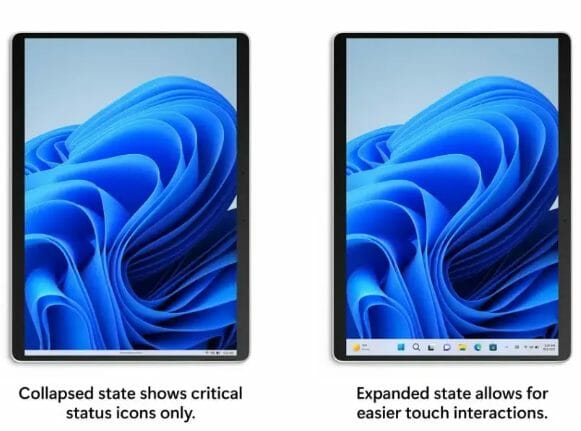
As earlier indicated, there were big changes expected to be made to the Windows 11 Taskbar, especially for those using the OS in tablet mode. Once this update ships, users will now have access to a new Taskbar that is optimized for the tablet.

\n

Windows Central’s Zac Bowden cites that when you’re interacting with other apps the Taskbar will no longer be in your way. You’ll now be able to enjoy your tablet’s screen real estate without it taking up all your space.

\n

\n

\n

\n

\n

\n

\n
\n

\n

\n

\n

\n

\n

\n

optimized taskbar in tablet mode

\n


\n

What’s more, you’ll now be able to swipe up the Taskbar to gain access to pinned and running app icons. Additionally, when you continue swiping up, you’ll be transitioned to the Start Menu automatically.

\n

The Taskbar’s system tray will also receive significant updates designed to give it a modern and sleek look. The icons in the tray will also feature rounded corners to give it a more Fluent design, similar to Microsoft’s products and services.

\n

Users will also have the capability of pinning and unpinning background apps to it through the Settings app. For those users that don’t find the System Tray overflow menu, they’ll now have the option of disabling it. The Windows 11’s overflow flyout has also been revamped and can now accommodate up to 5 icons.

\n

Windows 11 build 22000.100 outs with new features - Pureinfotech

\n

\n

\n

\n

\n

\n

\n

\n

\n

\n

\n

\n

\n

\n

Another notable addition is that the Taskbar is also getting 4 new search bar options, that is, no icon, search icon, search icon with label, and search box. This will come in handy for users who wish to customize it to meet their preferences.

\n

Task Manager and Settings app changes

\n

Moving on to the Task Manager, which will feature a new Search bar at the top which will allow users to conduct their searches easily and efficiently thus, saving time. It also comes with sleek popup dialogs that are in line with Windows 11’s Fluent design as well as better accent color support.

\n
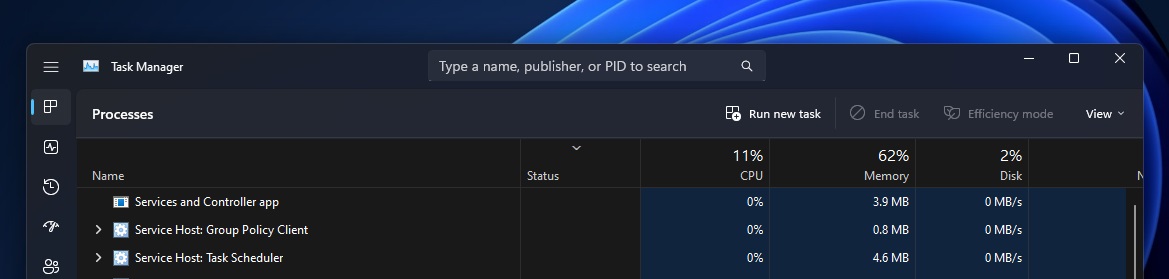
Search bar in Task Manager

\n

The Settings app has also received a host of new capabilities that are designed to help enhance the user’s experience and how they interact with the OS. Notably, the improvements ship with a key feature, a new Energy Recommendations feature that’s part of the Power & Sleep section.

\n
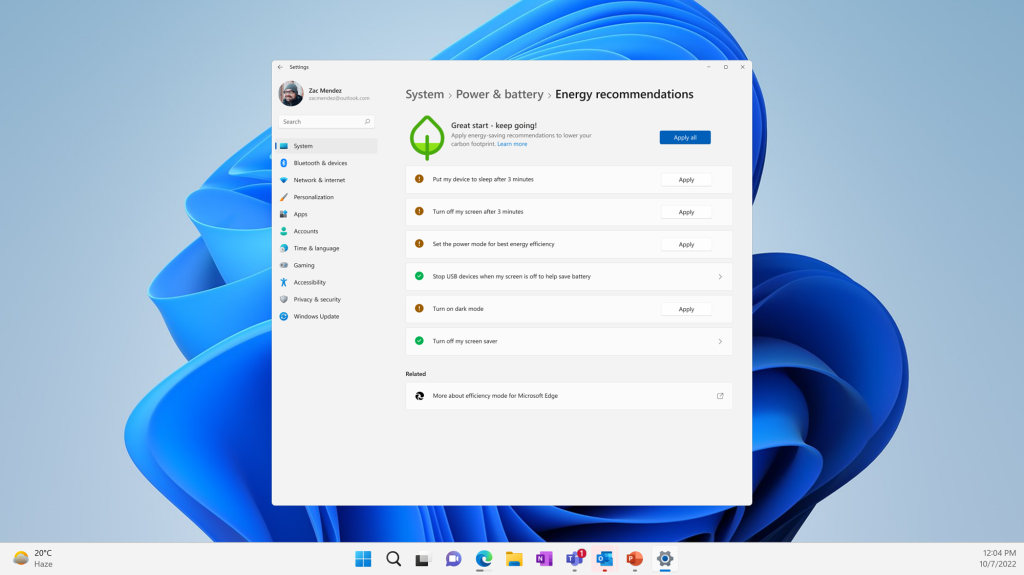
New Energy Recommendations in Settings.

\n

With the feature, users can switch to energy efficient settings easily where they can adjust the time it takes for the device to go to sleep when it can’t detect any input.

\n

File Explorer tweaks

\n

The File Explorer has also been enhanced. When you type something in the search box, the results will be displayed instantly. The search box also appears to have reduced in size.

\n

Other key changes include expanded voice commands supported by the Voice Access feature, the Snipping tool now comes with two buttons, Snip and Record. This means you can now screen record your display, and even pause and play it. Share your thoughts with us below.

\n

via: Windows Central

\n\n

Share this article:
Previous Article Ukraine government to petition ban of Atomic Heart sales both there and abroad Next Article What is Microsoft Safety Scanner, and how can you use it?

Related Articles

PowerToys 0.75 released; Environment Variables editor is here

October 31, 2023

Former Halo developer Bungie announces layoffs in wake of game delays

October 31, 2023

Siemens and Microsoft partner to bring GenAI to industries worldwide

October 31, 2023

Leave a Comment Cancel reply

Your email address will not be published. Required fields are marked *

Recent Posts

  • PowerToys 0.75 released; Environment Variables editor is here
  • Former Halo developer Bungie announces layoffs in wake of game delays
  • Siemens and Microsoft partner to bring GenAI to industries worldwide
  • 43 Microsoft Edge keyboard shortcuts to remember for stylish and speedy web surfing
  • Here is what’s coming to (and leaving) Xbox Game Pass soon

Recent Comments

No comments to show.

Archives

  • October 2023
  • September 2023
  • August 2023
  • July 2023
  • June 2023
  • May 2023
  • April 2023
  • March 2023
  • February 2023
  • January 2023
  • December 2022
  • November 2022
  • October 2022
  • September 2022
  • August 2022
  • July 2022
  • June 2022
  • May 2022
  • April 2022
  • March 2022
  • February 2022
  • January 2022
  • December 2021
  • November 2021
  • October 2021
  • September 2021
  • August 2021
  • July 2021
  • June 2021
  • May 2021
  • April 2021
  • March 2021
  • February 2021
  • January 2021
  • December 2020
  • November 2020
  • October 2020
  • September 2020
  • August 2020
  • July 2020
  • June 2020
  • May 2020
  • April 2020
  • March 2020
  • February 2020
  • January 2020
  • December 2019
  • November 2019
  • October 2019
  • September 2019
  • August 2019
  • July 2019
  • June 2019
  • May 2019
  • April 2019
  • March 2019
  • February 2019
  • January 2019
  • December 2018
  • November 2018
  • October 2018
  • September 2018
  • August 2018
  • July 2018
  • June 2018
  • May 2018
  • April 2018
  • March 2018
  • February 2018
  • January 2018
  • December 2017
  • November 2017
  • October 2017
  • September 2017
  • August 2017
  • July 2017
  • June 2017
  • May 2017
  • April 2017
  • March 2017
  • February 2017
  • January 2017
  • December 2016
  • November 2016
  • October 2016
  • September 2016
  • August 2016
  • July 2016
  • June 2016
  • May 2016
  • April 2016
  • March 2016
  • February 2016
  • January 2016
  • December 2015
  • November 2015
  • October 2015
  • September 2015
  • August 2015
  • July 2015
  • June 2015
  • May 2015
  • April 2015
  • March 2015
  • February 2015
  • January 2015
  • December 2014
  • November 2014
  • October 2014
  • September 2014
  • August 2014
  • July 2014
  • June 2014
  • May 2014
  • April 2014
  • March 2014
  • February 2014
  • January 2014
  • December 2013
  • November 2013
  • October 2013
  • September 2013
  • August 2013
  • July 2013
  • June 2013
  • May 2013
  • April 2013
  • March 2013
  • February 2013
  • January 2013
  • December 2012
  • November 2012
  • October 2012
  • September 2012
  • August 2012
  • July 2012
  • June 2012
  • May 2012
  • April 2012
  • March 2012
  • February 2012
  • January 2012
  • December 2011
  • November 2011
  • October 2011
  • September 2011
  • August 2011
  • July 2011
  • June 2011
  • May 2011
  • April 2011
  • March 2011
  • February 2011
  • January 2011
  • December 2010
  • November 2010
  • October 2010
  • September 2010

Categories

  • Announcements
  • Deals
  • Developer
  • Editorial
  • Feature
  • Feature stories
  • Hero-post
  • Hotdeals
  • How-to
  • Latest news
  • Microsoft / office 365
  • News
  • Office 365
  • Onpodcast
  • Opinion
  • Our featured post
  • Polls
  • Review
  • Reviews
  • Videos
OnMSFT.com

OnMSFT.com covers Microsoft news, reviews, and how-to guides. Formerly known as WinBeta, we have been your source for Microsoft news since 1998.

Categories

  • Windows
  • Surface
  • Xbox
  • How-To
  • OnPodcast
  • Gaming
  • Edge
  • Teams

Recent Posts

  • PowerToys 0.75 released; Environment Variables editor is here
  • Former Halo developer Bungie announces layoffs in wake of game delays
  • Siemens and Microsoft partner to bring GenAI to industries worldwide
  • 43 Microsoft Edge keyboard shortcuts to remember for stylish and speedy web surfing
  • Here is what’s coming to (and leaving) Xbox Game Pass soon

Quick Links

  • About OnMSFT.com
  • Contact OnMSFT
  • Join Our Team
© 2010–2026 OnMSFT.com LLC. All rights reserved.
About OnMSFT.comContact OnMSFT