Skip to content
OnMSFT.com
  • Home
  • About
  • Contact
  • News
  • How-to
  • Feature stories
  • Deals
  • Microsoft / office 365
  • Reviews
Menu
  • Home
  • About
  • Contact
  • News
  • How-to
  • Feature stories
  • Deals
  • Microsoft / office 365
  • Reviews
  1. Home
  2. News
  3. Windows Terminal 1.1 Brings Pane Updates & More

Windows Terminal 1.1 Brings Pane Updates & More

Arif Bacchus Arif Bacchus
August 31, 2021
2 min read

Microsoft is now rolling out Windows Terminal Preview version 1.11 for Windows Insiders and Windows Terminal 1.10. Windows Terminal 1.11 brings some new features like an acrylic title bar, improvements to the pane, and a lot more. We have you covered with a look at all the changes.

We’ll get into the Pane improvements first. Microsoft is introducing a move pane to tab feature to let you move an open pane to a new or existing tab. Also new is the ability to swap panes within a tab and split the tab in context view. These features should make multitasking in Windows Terminal easier. Microsoft thanks Schuyler Rosefield for most of these contributions.
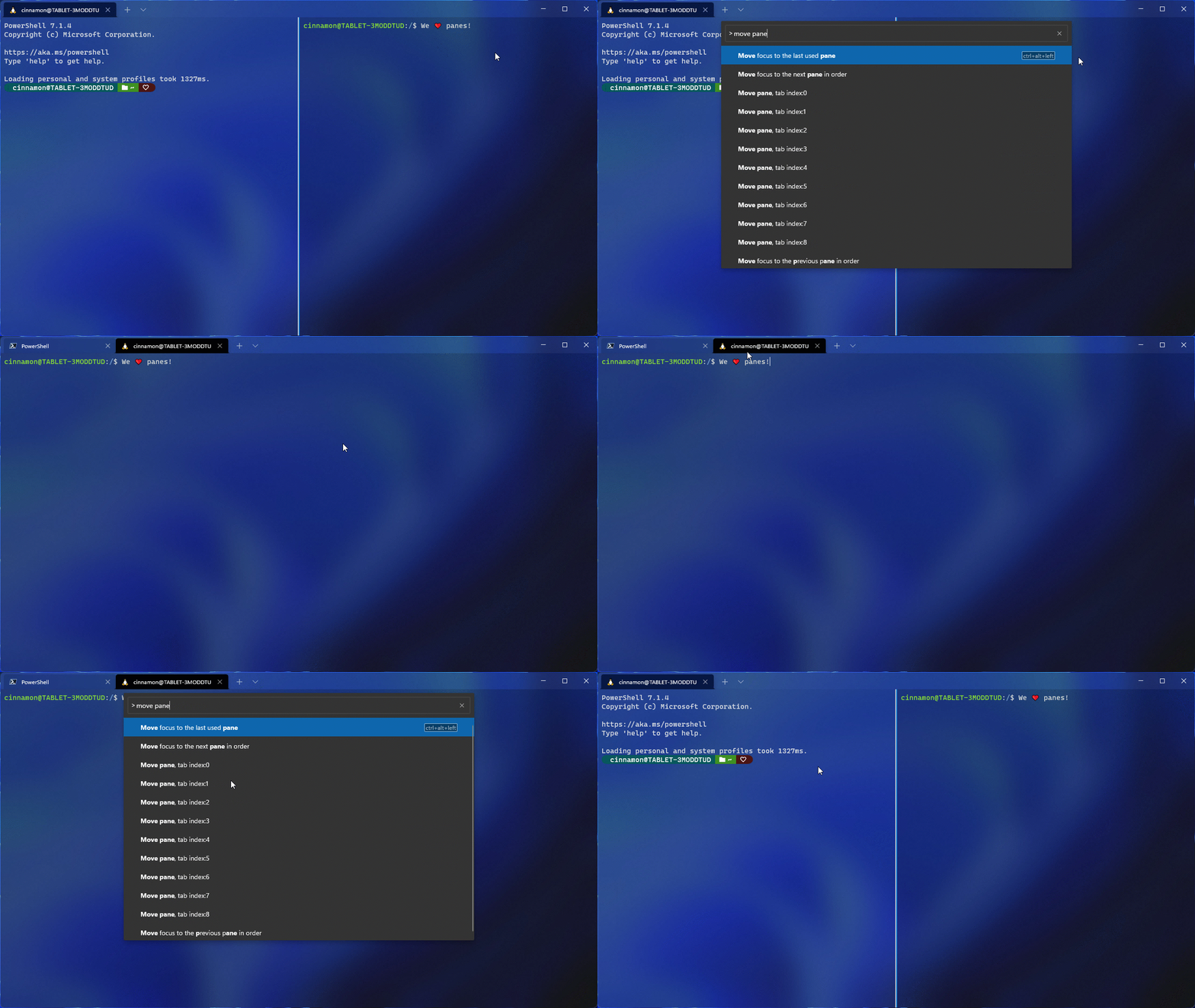
Windows terminal

Other than that there’s also a new setting toggle to make your title bar acrylic. This is in the appearance page of the settings UI, and it can be set in your global settings, though you’ll need to restart your terminal to see the difference. We noted the other changes for you below.

  • When adding keys to your actions, you now only have to type the key chord, rather than spelling out all of the keys (i.e. c-t-r-l).
  • The appearance settings that apply to your profile when unfocused are now in the settings UI.
  • The font object now accepts OpenType features and axes in the settings.json file.
  • You can now optionally minimize your terminal to the system tray. Two new global boolean settings were added for this functionality
  • You can now drag and drop directories and files onto the ‘+’ button, which will then open a new tab, pane, or window using the given starting path
  • When launching the terminal via the default terminal setting, the terminal will now use no profile rather than your default profile.
  • You can now choose how you want intense text to appear in your terminal by using the intenseTextStyle profile setting. You can either set your style to be bold, bright, both bold and bright, or have no additional styling added to it

The standard Windows Terminal release will be rolling out via the Windows Insider Program, and will go to retail once testing is finished. This is to ensure that any bugs are squashed. Note that all the features from Windows Terminal 1.10 are also in 1.11, except for the default terminal setting, the editable actions page, and the Defaults page of the settings UI. You can get these bulds today via the Microsoft Store, or from GitHub.


Share This Post:

Share this article:
Tags:
Windows 10 Windows 11 Windows Terminal
Previous Article Microsoft Releases First Edge Dev Version 95 Build Next Article New Windows 10 21H1 and 21H2 Insider builds bring a single fix

Related Articles

Samsung Display crosses 5 million QD-OLED monitor shipments as demand grows fast, with new panels and strong premium market expansion worldwide.

Samsung Display Ships 5 Million QD-OLED Monitor Panels in Four Years

April 9, 2026
Intel Arc Pro B70 teardown reveals blower cooler design, PCB layout, firmware details, and early insights into Battlemage workstation GPU hardware.

Intel Arc Pro B70 Teardown Reveals Blower Cooler and Early Board Design Details

April 9, 2026
Users Modify RTX 5090 Lightning Z Hardware to Unlock MSI’s Restricted 2500W BIOS

Users Modify RTX 5090 Lightning Z Hardware to Unlock MSI’s Restricted 2500W BIOS

April 9, 2026

Leave a Comment Cancel reply

Your email address will not be published. Required fields are marked *

Recent Posts

  • Samsung Display Ships 5 Million QD-OLED Monitor Panels in Four Years
  • Intel Arc Pro B70 Teardown Reveals Blower Cooler and Early Board Design Details
  • Users Modify RTX 5090 Lightning Z Hardware to Unlock MSI’s Restricted 2500W BIOS
  • Intel Arc GPUs Finally Run Crimson Desert After Driver Update, But Issues Remain
  • NVIDIA N1 SoC Leak Shows First AI Laptop Motherboard With 128GB RAM

Recent Comments

  1. XxRIVTYxX on Intel Says It Tried to Help Before Crimson Desert Dropped Arc Support
  2. Gaurav Kumar on Chrome Prepares Nudge to ‘Move Tabs to the Side’ as Vertical Tabs Near Release
OnMSFT.com

The Tech News Site

Categories

  • Windows
  • Surface
  • Xbox
  • How-To
  • OnPodcast
  • Gaming
  • Edge
  • Teams

Recent Posts

  • Samsung Display Ships 5 Million QD-OLED Monitor Panels in Four Years
  • Intel Arc Pro B70 Teardown Reveals Blower Cooler and Early Board Design Details
  • Users Modify RTX 5090 Lightning Z Hardware to Unlock MSI’s Restricted 2500W BIOS
  • Intel Arc GPUs Finally Run Crimson Desert After Driver Update, But Issues Remain
  • NVIDIA N1 SoC Leak Shows First AI Laptop Motherboard With 128GB RAM

Quick Links

  • About OnMSFT.com
  • Contact OnMSFT
  • Join Our Team
  • Privacy Policy
© 2010–2026 OnMSFT.com LLC. All rights reserved.
About OnMSFT.comContact OnMSFTPrivacy Policy
