Skip to content
OnMSFT.com
  • Home
  • About
  • Contact
  • Windows
  • Surface
  • Xbox
  • How-To
  • OnPodcast
  • Edge
  • Teams
  • Gaming
Menu
  • Home
  • About
  • Contact
  • Windows
  • Surface
  • Xbox
  • How-To
  • OnPodcast
  • Edge
  • Teams
  • Gaming
  1. Home
  2. News
  3. Microsoft Word on the web’s dark mode reaches broad availability

Microsoft Word on the web’s dark mode reaches broad availability

Kevin Okemwa Kevin Okemwa
January 11, 2023
2 min read

As we had previously reported, Microsoft had plans underway to get dark mode in Word for the web. An important feature for everyone who uses the application as it reduces eye strain and accommodates light sensitivity, ultimately enhancing the user’s productivity.

And yesterday, Microsoft Word’s team announced that dark mode in Word for the web has finally hit general availability. The feature enhances Word’s user experience and allows people to work more on their documents as they no longer have to strain when the lights are on which would also lead to fatigue.
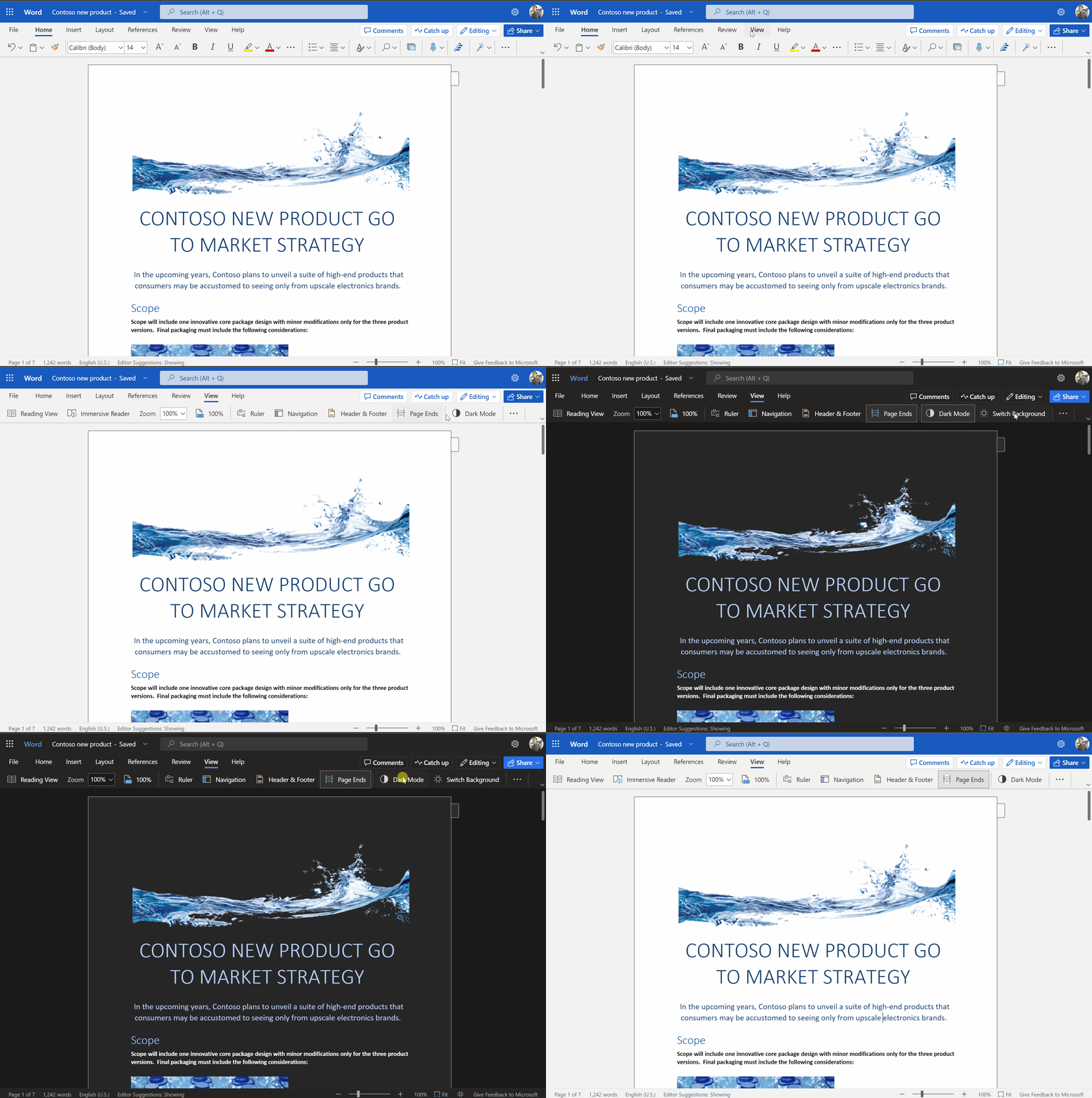
How to turn on Dark Mode

To access this feature, you can enable it by selecting View and then hit the Dark Mode button as illustrated above. The Switch Background button will also allow users to work on a white canvas and a dark ribbon, as you can navigate between the dark and light modes for the canvas. What’s more, Word on the web will recall the state of your switch background toggle for future sessions.

“Colors within your document will also be shifted to accommodate the new color contrast. Indeed, reds, blues, yellows, and other colors will be shifted slightly to mute the overall effect of the color palette and look more visually pleasing with the new dark background,” says Microsoft.

However, the feature comes with three known issues. First up, the dark mode setting does sync across all platforms, you will therefore need to enable it each time. Next up is that you may need to enable cookies on your browser for Word to recall your Dark Mode preferences. And finally, when copy-pasting something from another application that is also in Dark Mode, the text may appear as black text with a white background. This can, however, be fixed by pressing CTRL+SHIFT+V, or pasting CTRL+V and then selecting Paste Text Only in the Paste Options shortcut menu.


Related

Share this article:
Previous Article Microsoft 365 Basic set to launch featuring 100 GB of storage and more at $1.99 per month Next Article Microsoft Teams is officially optimized for Apple Silicon

Related Articles

Chrome’s Organizer feature may sync Gemini and AI conversations across devices

March 14, 2026

After Chrome, Edge tests launching the browser automatically when you sign into Windows

March 13, 2026
Latest iPhone Fold rumors reveal display crease details, hole-punch cameras, iOS multitasking layout, 12GB RAM, and storage options for Apple’s first foldable iPhone.

iPhone Fold Latest Rumors: Display, Cameras, RAM and Price Details Revealed

March 13, 2026

Leave a Comment Cancel reply

Your email address will not be published. Required fields are marked *

Recent Posts

  • Chrome’s Organizer feature may sync Gemini and AI conversations across devices
  • After Chrome, Edge tests launching the browser automatically when you sign into Windows
  • iPhone Fold Latest Rumors: Display, Cameras, RAM and Price Details Revealed
  • Samsung fears first mobile operating loss due to memory price surge
  • Elon Musk’s X to Change Verification in Europe Following EU Fine

Recent Comments

No comments to show.
OnMSFT.com

OnMSFT.com covers Microsoft news, reviews, and how-to guides. Formerly known as WinBeta, we have been your source for Microsoft news since 1998.

Categories

  • Windows
  • Surface
  • Xbox
  • How-To
  • OnPodcast
  • Gaming
  • Edge
  • Teams

Recent Posts

  • Chrome’s Organizer feature may sync Gemini and AI conversations across devices
  • After Chrome, Edge tests launching the browser automatically when you sign into Windows
  • iPhone Fold Latest Rumors: Display, Cameras, RAM and Price Details Revealed
  • Samsung fears first mobile operating loss due to memory price surge
  • Elon Musk’s X to Change Verification in Europe Following EU Fine

Quick Links

  • About OnMSFT.com
  • Contact OnMSFT
  • Join Our Team
  • Privacy Policy
© 2010–2026 OnMSFT.com LLC. All rights reserved.
About OnMSFT.comContact OnMSFTPrivacy Policy
