Skip to content
OnMSFT.com
  • Home
  • About
  • Contact
  • Windows
  • Surface
  • Xbox
  • How-To
  • OnPodcast
  • Edge
  • Teams
  • Gaming
Menu
  • Home
  • About
  • Contact
  • Windows
  • Surface
  • Xbox
  • How-To
  • OnPodcast
  • Edge
  • Teams
  • Gaming
  1. Home
  2. News
  3. Windows Terminal Preview 1.4 is now available with Jumplist support and hyperlinks improvements

Windows Terminal Preview 1.4 is now available with Jumplist support and hyperlinks improvements

Laurent Giret Laurent Giret
September 22, 2020
1 min read

Microsoft has released today a new preview version of Windows Terminal, the company’s new command line tool for Windows 10. The preview version 1.4 introduces Jump list support, making it easy to launch the app with a specific profile right from the Start Menu or Task Bar.

This new release also adds hyperlink support for embedded hyperlinks in apps. The team is still working on hyperlink detection, and said that this feature would come “very soon.” There are also a couple of bug fixes in this new preview build, and more details can be found on the project’s GitHub page.
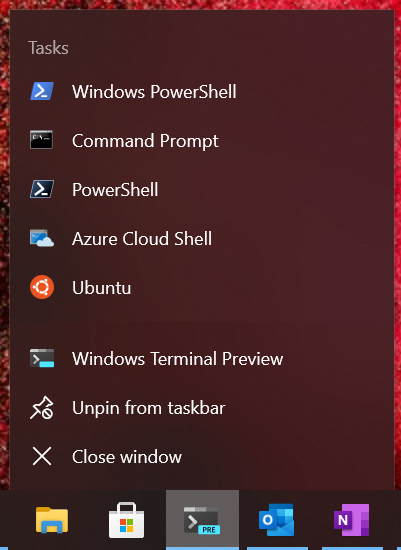
Image terminal jump list blog

In addition to this new preview release, the team also announced that Windows Terminal version 1.3 is now generally available. This version has been in preview since late August, and it brings an advanced tab switcher, tab colours, and more.

Windows Terminal Preview 1.4 and Windows Terminal 1.3 can both be downloaded from the Microsoft Store and the project’s GitHub page. The team is still welcoming contributions from users, so make sure to visit the GitHub page if you want to help out.


Windows Terminal
Windows Terminal
Download
QR-Code
Windows Terminal
Developer:
‪Microsoft Corporation‬
Price:
Free

Windows Terminal Preview
Download
QR-Code
Windows Terminal Preview
Developer:
‪Microsoft Corporation‬
Price:
Free


Share This Post:

Tags: Windows 10 | Windows Terminal
Share this article:
Tags:
Windows 10 Windows Terminal
Previous Article How to use Microsoft Access to create a customer service database for your small business Next Article Google Cr-48 Chrome laptop preview

Related Articles

Chrome and Gemini icons representing Gemini Live voice assistant integration in Chrome

Chrome tests Gemini Live voice assistant in a floating overlay panel

March 14, 2026

Chrome’s Organizer feature may sync Gemini and AI conversations across devices

March 14, 2026

After Chrome, Edge tests launching the browser automatically when you sign into Windows

March 13, 2026

Leave a Comment Cancel reply

Your email address will not be published. Required fields are marked *

Recent Posts

  • Chrome tests Gemini Live voice assistant in a floating overlay panel
  • Chrome’s Organizer feature may sync Gemini and AI conversations across devices
  • After Chrome, Edge tests launching the browser automatically when you sign into Windows
  • iPhone Fold Latest Rumors: Display, Cameras, RAM and Price Details Revealed
  • Samsung fears first mobile operating loss due to memory price surge

Recent Comments

No comments to show.
OnMSFT.com

OnMSFT.com covers Microsoft news, reviews, and how-to guides. Formerly known as WinBeta, we have been your source for Microsoft news since 1998.

Categories

  • Windows
  • Surface
  • Xbox
  • How-To
  • OnPodcast
  • Gaming
  • Edge
  • Teams

Recent Posts

  • Chrome tests Gemini Live voice assistant in a floating overlay panel
  • Chrome’s Organizer feature may sync Gemini and AI conversations across devices
  • After Chrome, Edge tests launching the browser automatically when you sign into Windows
  • iPhone Fold Latest Rumors: Display, Cameras, RAM and Price Details Revealed
  • Samsung fears first mobile operating loss due to memory price surge

Quick Links

  • About OnMSFT.com
  • Contact OnMSFT
  • Join Our Team
  • Privacy Policy
© 2010–2026 OnMSFT.com LLC. All rights reserved.
About OnMSFT.comContact OnMSFTPrivacy Policy


