Skip to content
OnMSFT.com
  • Home
  • About
  • Contact
  • Windows
  • Surface
  • Xbox
  • How-To
  • OnPodcast
  • Edge
  • Teams
  • Gaming
Menu
  • Home
  • About
  • Contact
  • Windows
  • Surface
  • Xbox
  • How-To
  • OnPodcast
  • Edge
  • Teams
  • Gaming
  1. Home
  2. News
  3. Turn off these security features to boost gaming performance in Windows 11, says Microsoft – onmsft.com

Turn off these security features to boost gaming performance in Windows 11, says Microsoft – onmsft.com

Robert Collins Robert Collins
October 7, 2022
1 min read

For those who want to get the most out of their Windows 11 machine in terms of gaming, there are a few options you can try to configure your PC for optimized gaming performance. Specifically, there are a couple security features that can be turned off to boost performance.

These are Memory Integrity and Virtual Machine Platform (VMP).

Memory Integrity “helps prevent attackers from injecting their own malicious code and helps ensure that all drivers loaded onto the OS are signed and trustworthy.” While VMP “provides core virtual machine services for Windows.” These security features are typically enabled by default in Windows 11. However, the OS allows for user choice when it comes to these features. By turning off Memory Integrity and VMP, users can prioritize gaming performance. Here’s how.

Turn off Memory Integrity

  1. Enter Start key (or Windows key). Enter ‘Core Isolation’ in the taskbar. Select Core Isolation from the results list. This opens The Windows security app.
  2. On the Core Isolation page, toggle off Memory Integrity. Restart your device if needed.
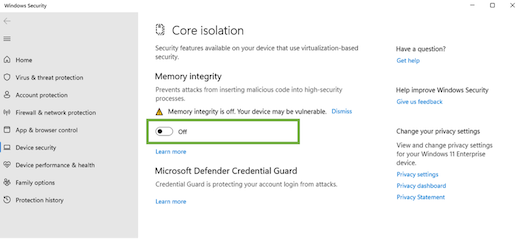
Core isolation settings page with memory integrity toggle

Turn off VMP

  1. Press Start key. In the search box Enter ‘Windows features.’ Select Turn Windows features on or off in the results list.
  2. This opens the Windows features window. Find Virtual Machine Platform. Unselect to turn it off.
  3. Select OK. Restart your device if needed.

Windows Features window with Virtual Machine Platform folder shown

You should now be able to see a noticeable improvement in gaming performance. You can always turn these security features back on if you choose through the same methods.


Share This Post:

Share this article:
Tags:
Windows Windows 11
Previous Article Google’s ‘Made by Google’ 2022 Pixel Event recap – onmsft.com Next Article The new Acer Swift Edge features Microsoft’s new Pluton security processor – onmsft.com

Related Articles

Chrome and Gemini icons representing Gemini Live voice assistant integration in Chrome

Chrome tests Gemini Live voice assistant in a floating overlay panel

March 14, 2026

Chrome’s Organizer feature may sync Gemini and AI conversations across devices

March 14, 2026

After Chrome, Edge tests launching the browser automatically when you sign into Windows

March 13, 2026

Leave a Comment Cancel reply

Your email address will not be published. Required fields are marked *

Recent Posts

  • Chrome tests Gemini Live voice assistant in a floating overlay panel
  • Chrome’s Organizer feature may sync Gemini and AI conversations across devices
  • After Chrome, Edge tests launching the browser automatically when you sign into Windows
  • iPhone Fold Latest Rumors: Display, Cameras, RAM and Price Details Revealed
  • Samsung fears first mobile operating loss due to memory price surge

Recent Comments

No comments to show.
OnMSFT.com

OnMSFT.com covers Microsoft news, reviews, and how-to guides. Formerly known as WinBeta, we have been your source for Microsoft news since 1998.

Categories

  • Windows
  • Surface
  • Xbox
  • How-To
  • OnPodcast
  • Gaming
  • Edge
  • Teams

Recent Posts

  • Chrome tests Gemini Live voice assistant in a floating overlay panel
  • Chrome’s Organizer feature may sync Gemini and AI conversations across devices
  • After Chrome, Edge tests launching the browser automatically when you sign into Windows
  • iPhone Fold Latest Rumors: Display, Cameras, RAM and Price Details Revealed
  • Samsung fears first mobile operating loss due to memory price surge

Quick Links

  • About OnMSFT.com
  • Contact OnMSFT
  • Join Our Team
  • Privacy Policy
© 2010–2026 OnMSFT.com LLC. All rights reserved.
About OnMSFT.comContact OnMSFTPrivacy Policy
