

Surface Pro Artist’s Rick Rodriguez shares his hands-on experience with the VAIO Z Canvas. The VAIO Z Canvas, as we reported earlier, is a premium and very expensive hybrid aimed squarely at art professionals. It, alongside the recently announced and highly anticipated Surface Pro 4 and Wacom’s Cintiq Companion 2, are among the top premium hybrids with serious artistic credentials.
There are several key differences between the Surface Pro 4 and the VAIO Z Canvas. Unlike the Surface Pro 4’s Type Cover, which is attached at the base of the tablet, the Canvas is a wireless Bluetooth keyboard. This gives it the advantage of being able to reposition the keyboard to the side of the device while drawing, enabling a much more comfortable drawing posture.
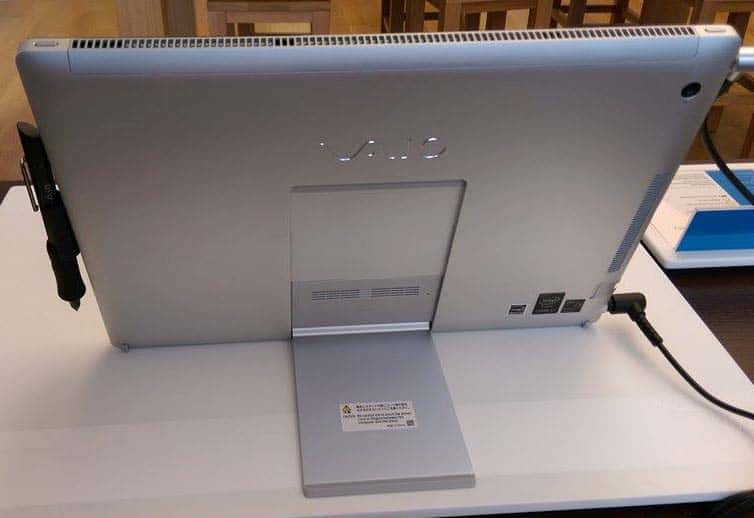
The Canvas sports would could be described as an inverted Surface kickstand, which exposes outward from the bottom. Rodriguez argues that it’s not quite as versatile as the Surface’s kickstand.
A very significant addition to the Canvas’ bag of tricks is one specifically aimed at artists: hardware buttons that disable touch and summon on-screen keyboard shortcuts which can be tailored to any specific application. It’s worth noting that the Surface Pro can achieve the same thing through the myriad of third party art dock software available.
Perhaps the greatest advantage the Canvas has is its quad core Intel Core i7-4770HQ processor, which is a higher power version of the ultra-low voltage dual core CPUs found in the Surface Pro 4. Despite the Canvas using woefully outdated Haswell-generation CPUs, it should be on-par, if not severely outperform, the Surface Pro 4 in raw number crunching.
As it should, seeing as how it starts at $2199 USD, and scales neatly to $3099 USD.
While intrigued, Rodriguez’s limited experience with the Canvas didn’t leave a terribly good impression:
So is the Z Canvas still worth considering, especially given its premium price-tag that balloons up to $3099 for the 16GB/1TB model? I decided to check it out for myself and I’m sorry to report I have decidedly mixed feelings.
It’s so unfair to base an opinion on a few minutes of scribbling with inappropriate software, but having no other option, I’d say my reaction to the pen performance is lukewarm. It wasn’t bad by any means; it just didn’t feel special. In fact, it felt familiar, bearing many of the niggling problems of other current generation N-Trig devices.
Of particular note is his photograph which details flaws in the stroke composition generated by the Canvas’ N-trig DuoSense2 pen.
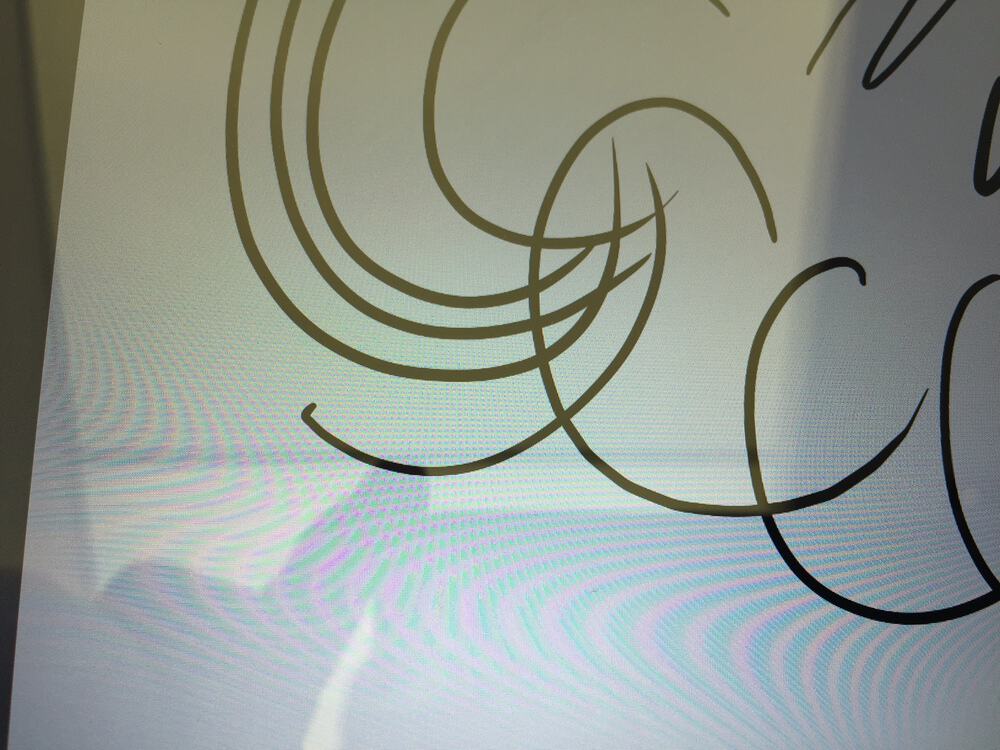
My encounter with the Surface Pro 4 featured no such flaws in its inking. Heck, no generation of the Surface Pro lineup has had this kind of issue to my knowledge, and I’ve owned every single one. Also present is the slow diagonal jitter, which is present on the Surface Pro 3, and has persisted in reduced form in the Surface Pro 4.
It remains to be seen whether the VAIO Z Canvas’ relatively lackluster drawing competency persists in when in the comforts of one’s home. Maybe it’s just shy in the public.
While VAIO’s laudable effort in catering the Canvas to artists is plain as day, Rodriguez’s impressions, as well as others I’ve read of, has left me unimpressed thus far. The device was already a tough sell at it’s current price, and I worry that poor sales performance might put the storied PC maker out for good this time.
The VAIO Z Canvas is now on-sale. Read Rick Rodriguez’s review for further information on the drawing experience.
Further reading: canvas, N-trig, Surface Pro 4, vaio, vaio z


