Skip to content
OnMSFT.com
  • Home
  • About
  • Contact
  • Windows
  • Surface
  • Xbox
  • How-To
  • OnPodcast
  • Edge
  • Teams
  • Gaming
Menu
  • Home
  • About
  • Contact
  • Windows
  • Surface
  • Xbox
  • How-To
  • OnPodcast
  • Edge
  • Teams
  • Gaming
  1. Home
  2. News
  3. Real-time co-authoring and drag and drop support are coming to Microsoft’s Office iOS apps

Real-time co-authoring and drag and drop support are coming to Microsoft’s Office iOS apps

Laurent Giret Laurent Giret
January 31, 2018
2 min read

Microsoft Office iOS apps\n

Following the release of OneDrive 10.1 for iOS yesterday, Microsoft announced a major update for its Office iOS apps. Real-time co-authoring is coming to Word, Excel and Powerpoint on iOS, just a couple of weeks after the feature rolled out to Office 2016 for Mac.

\n

\n

Introducing new features in @Office and @OneDrive for iOS, including real-time co-authoring, drag and drop, and universal link support for shared files. Learn more: https://t.co/S5pxqb1OHv pic.twitter.com/yNHMQpbbeQ

\n

— Microsoft Office News (@OfficeNews) January 30, 2018

\n

\n

“Using real-time co-authoring, colleagues, friends, and family can contribute to and edit documents simultaneously in the Word, Excel and PowerPoint iOS apps, the Office team explained. “This allows you to know who else is working with you in a document, see where they’re working, and view changes automatically within seconds.” As on other platforms, real-time co-authoring will require an Office 365 subscription.

\n

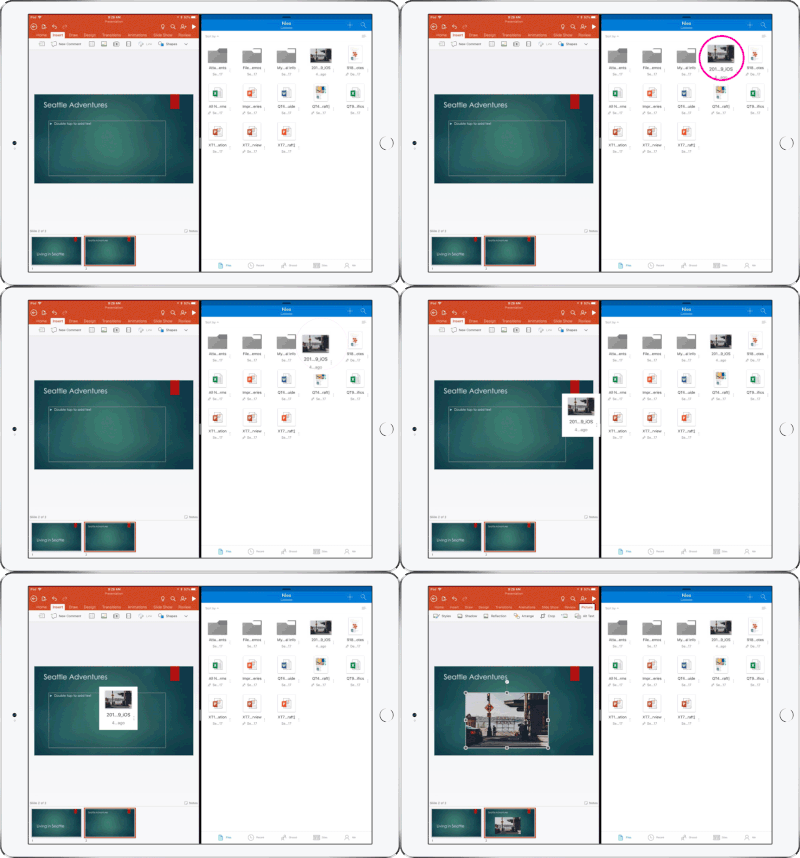
For iPad users, the upcoming updates for Word, Excel and Powerpoint will also let you drag and drop content between the three Office apps as well as OneDrive. To do that, you’ll just have to open two apps side by side and drag and drop content from one app to another.
\n

Drag and Drop OD to PPT.gif

\n

Lastly, Word, Excel and Powerpoint will get new accessibility features on iOS 11, including the new VoiceOver rotor to change how VoiceOver speaks, reads, and sounds. Microsoft says that these new capabilities will roll out to iOS users in the coming days, so make sure to check for updates in the App Store on your iPhone or iPad.

\n\nFurther reading: Excel for iOS, iOS, Office, Office 365, Office for iOS, Powerpoint for iOS, Word for iOS


Share this article:
Tags:
Excel for iOS iOS Office Office 365 Office for iOS Powerpoint for iOS Word for iOS
Previous Article Overwatch video game now plays in 4K on Microsoft’s Xbox One X console Next Article Video shows off Microsoft’s long cancelled Xbox Watch prototype

Related Articles

GPT 5.3

OpenAI GPT-5.3 Instant released, when will you get it, and benchmarks

March 3, 2026
Gemini 3.1

Claude is down, but Gemini 3.1 Flash-Lite is rolling out right now

March 3, 2026
MacBook Pro M5 Pro

Apple March Event Live: M5 Pro, M5 Mac, MacBook Air, MacBook Pro, and new Studio Displays

March 3, 2026

Leave a Comment Cancel reply

Your email address will not be published. Required fields are marked *

Recent Posts

  • OpenAI GPT-5.3 Instant released, when will you get it, and benchmarks
  • MSFT stock price today: Microsoft shares rise, investors watch AI execution
  • Claude is down, but Gemini 3.1 Flash-Lite is rolling out right now
  • Apple March Event Live: M5 Pro, M5 Mac, MacBook Air, MacBook Pro, and new Studio Displays
  • Is the Mac mini M5 launching today? Here’s everything you need to know

Recent Comments

No comments to show.
OnMSFT.com

OnMSFT.com covers Microsoft news, reviews, and how-to guides. Formerly known as WinBeta, we have been your source for Microsoft news since 1998.

Categories

  • Windows
  • Surface
  • Xbox
  • How-To
  • OnPodcast
  • Gaming
  • Edge
  • Teams

Recent Posts

  • OpenAI GPT-5.3 Instant released, when will you get it, and benchmarks
  • MSFT stock price today: Microsoft shares rise, investors watch AI execution
  • Claude is down, but Gemini 3.1 Flash-Lite is rolling out right now
  • Apple March Event Live: M5 Pro, M5 Mac, MacBook Air, MacBook Pro, and new Studio Displays
  • Is the Mac mini M5 launching today? Here's everything you need to know

Quick Links

  • About OnMSFT.com
  • Contact OnMSFT
  • Join Our Team
  • Privacy Policy
© 2010–2026 OnMSFT.com LLC. All rights reserved.
About OnMSFT.comContact OnMSFTPrivacy Policy
