Skip to content
OnMSFT.com
  • Home
  • About
  • Contact
  • Windows
  • Surface
  • Xbox
  • How-To
  • OnPodcast
  • Edge
  • Teams
  • Gaming
Menu
  • Home
  • About
  • Contact
  • Windows
  • Surface
  • Xbox
  • How-To
  • OnPodcast
  • Edge
  • Teams
  • Gaming
  1. Home
  2. News
  3. Teams adds profanity filtering control for live captions

Teams adds profanity filtering control for live captions

OnMSFT Staff OnMSFT Staff
April 12, 2023
1 min read

Live captions plays an important role in Microsoft Teams meetings by ensuring that the flow of communication isn’t broken and that all meeting attendees are able to follow through with everything despite the quality of the audio.

Essentially, the feature automatically creates real-time subtitles of everything that’s said during a meeting. However, it may be difficult to control what’s said during a meeting especially when it comes to profanity.

Luckily, with the newly introduced profanity filtering in live captions in Teams meetings users can control the type of text or words that feature in the live captions of their Teams meetings.

According to Microsoft:

With the newly introduced toggle for turning on or off profanity filtering in live captions in Teams meetings, you are now able to control whether you want to continue to leverage the profanity filtering capability provided out of the box, or if you prefer to see every word as they were spoken.

To access the feature, select Settings and more > Settings > Captions and transcripts, and then slide the Filter profane words in meeting captions toggle on.
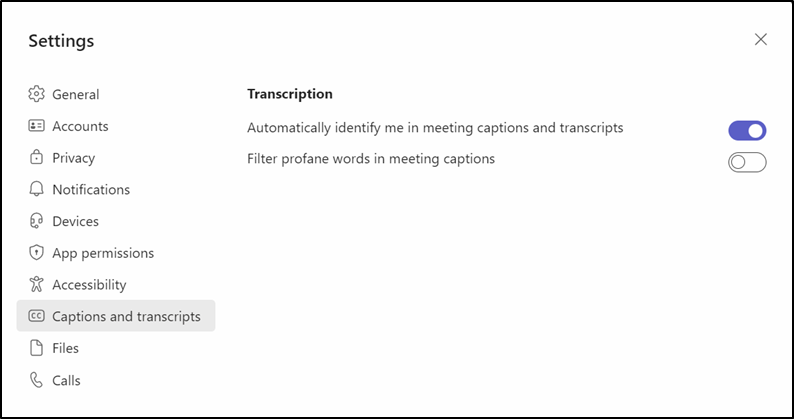
live captions

We also invite you to check out our dedicated post on how to use live captions in Windows 11. The feature is rolling out the Teams Public Preview channel for both the Windows and macOS Teams client.


Check out more from OnMSFT.com!

Share this article:
Previous Article Windows 11 Insiders get a Windows Subsystem for Android update Next Article So long Microsoft Teams Free (classic)

Related Articles

OpenAI says ChatGPT ‘Adult Mode’ Needs More Time

March 9, 2026

Claude Opus 4.6 Discovers 22 Firefox Vulnerabilities in Just Two Weeks

March 9, 2026
OpenClaw can now connect with Gmail, Drive, and Docs using Google’s new CLI

OpenClaw can now connect with Gmail, Drive, and Docs using Google’s new CLI

March 9, 2026

Leave a Comment Cancel reply

Your email address will not be published. Required fields are marked *

Recent Posts

  • OpenAI says ChatGPT ‘Adult Mode’ Needs More Time
  • Claude Opus 4.6 Discovers 22 Firefox Vulnerabilities in Just Two Weeks
  • OpenClaw can now connect with Gmail, Drive, and Docs using Google’s new CLI
  • Chrome Prepares Nudge to ‘Move Tabs to the Side’ as Vertical Tabs Near Release
  • How Apple Made the $599 MacBook Neo Without Using Plastic

Recent Comments

No comments to show.
OnMSFT.com

OnMSFT.com covers Microsoft news, reviews, and how-to guides. Formerly known as WinBeta, we have been your source for Microsoft news since 1998.

Categories

  • Windows
  • Surface
  • Xbox
  • How-To
  • OnPodcast
  • Gaming
  • Edge
  • Teams

Recent Posts

  • OpenAI says ChatGPT 'Adult Mode' Needs More Time
  • Claude Opus 4.6 Discovers 22 Firefox Vulnerabilities in Just Two Weeks
  • OpenClaw can now connect with Gmail, Drive, and Docs using Google’s new CLI
  • Chrome Prepares Nudge to 'Move Tabs to the Side' as Vertical Tabs Near Release
  • How Apple Made the $599 MacBook Neo Without Using Plastic

Quick Links

  • About OnMSFT.com
  • Contact OnMSFT
  • Join Our Team
  • Privacy Policy
© 2010–2026 OnMSFT.com LLC. All rights reserved.
About OnMSFT.comContact OnMSFTPrivacy Policy
