Skip to content
OnMSFT.com
  • Home
  • About
  • Contact
  • Windows
  • Surface
  • Xbox
  • How-To
  • OnPodcast
  • Edge
  • Teams
  • Gaming
Menu
  • Home
  • About
  • Contact
  • Windows
  • Surface
  • Xbox
  • How-To
  • OnPodcast
  • Edge
  • Teams
  • Gaming
  1. Home
  2. News
  3. Parallels Desktop 15 for Mac launches today with support for DirectX 11 on Apple Metal

Parallels Desktop 15 for Mac launches today with support for DirectX 11 on Apple Metal

Laurent Giret Laurent Giret
August 13, 2019
3 min read

Parallels Desktop 15 for Mac launches today with support for DirectX 11 on Apple Metal\n

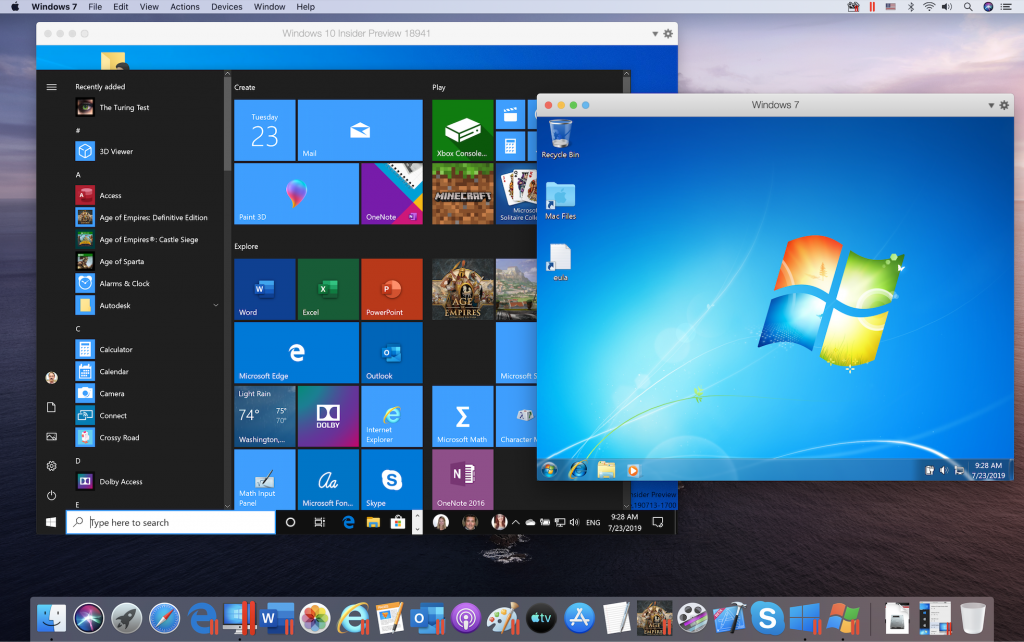
Parallels Desktop 15, the latest version of the virtualization software is launching today on macOS. This is the first major release since the acquisition of Parallels by the Canadian software company Corel, which was announced back in December. Parallels Desktop remains a great hassle-free solution to run Windows in a virtual machine on a Mac, and the latest version is ready for macOS Catalina and brings significant performance increases thanks to DirectX 11 support via Apple’s Metal API.

\n

“Parallels made significant investments to support Apple Metal API, so today our customers can enjoy the fastest and most efficient version of Parallels Desktop to date,” said Nick Dobrovolskiy, Senior Vice President, Engineering and Support at Parallels in a press release. “Now Parallels Desktop 15 users can experience demanding computer-aided design (CAD) and computer-aided manufacturing (CAM) applications and Windows PC games that were previously unavailable. In addition, there are planned integration features with macOS Catalina—including support for Sidecar and Apple Pencil— offering customers our most comprehensive merging of Mac and Windows ever.”

\n

\n

As you may know, Apple announced the deprecation of OpenGL in macOS Mojave last year, pushing developers to embrace its Metal API instead. Parallels Desktop 15 now supports DirectX 9 and 10 via Metal instead of OpenGL, and it also introduces support for DirectX 11 via Metal as well. Parallels says that DirectX 11 performance will be best on the upcoming macOS Catalina shipping later this fall, and compared to Parallels Desktop 14 the company promises up to 80% faster Microsoft Office application startup, up to 15% faster 3D graphics improvements, as well as a faster and more responsive UI.

\n

Parallels Desktop 15 for Mac launches today with support for DirectX 11 on Apple Metal

\n

The move to Metal also brings support for apps and games that were previously unavailable with Parallels Desktop, including several CAD/CAM apps that use DirectX11 such as Lumion 6.5, Autodesk 3ds Max 2020, and ArcGIS Pro 2.3. On the gaming front, it will be possible to play recent AAA games such as FIFA 19 and Madden NFL on macOS Catalina, and Bluetooth Low Energy support in Parallels Desktop 15 will make the Xbox One Wireless Controller work right out of the box in a Windows virtual machine on a Mac.

\n

Parallels really deserve credit for leveraging new macOS features ahead their public release, and Parallels Desktop 15 will support the new “Sidecar” feature allowing Mac users to use their iPads as a second screen. With Sidecar, Mac users will be able to use Apple Pencil tilt and double-tap on apps such as CorelDRAW, Corel Painter, and Microsoft SketchPad.

\n

Parallels Desktop 15 for Mac launches today with support for DirectX 11 on Apple Metal

\n

Parallels Desktop 15 will also continue to blur the lines between Mac and Windows apps, and the Coherence mode allowing users to run Mac and Windows apps side by side has been improved in this release. It’s now possible to drag and drop screenshots previews, images from Safari and the Photos to Windows apps, or email files via the Windows 10 Mail app right from the macOS Finder. You can also still use the MacBook Pro Touch Bar with Windows apps, or use your printer or any other USB accessories without having to configure anything.

\n

\n

Parallels Desktop 15 is available today as a free upgrade for customers using Parallels Desktop 14 with an annual subscription. New subscriptions are currently $79.99 a year for Parallels Desktop 15, and $99.99 a year for the Pro and Business Editions. Customers with a perpetual licence can also upgrade from any previous edition to Parallels Desktop 15 for just $49.99.

\n

In addition to free updates, Parallels Desktop subscriptions also include a concurrent subscription to Parallels Toolbox for Windows and Mac. This year, the collection of 30+ one-click tools adds a Clipboard history and an energy saver on Mac as well as Break Time and Download audio tools for Windows.

\n

If you have yet to try Parallels Desktop, you can download a 14-day trial from Parallels’ website. The virtualisation software is a must have for Mac users looking for a seamless Mac and Windows integration on the same machine, and the performance improvements coming with DirectX 11 support should make Parallels Desktop 15 a very solid update.

\n\nFurther reading: macOS, Parallels, Parallels Desktop, Windows 10

Share this article:
Tags:
macOS Parallels Parallels Desktop Windows 10
Laurent Giret
Written by

Laurent Giret

Laurent was a Senior News Editor at OnMSFT from 2016 - 2022. His favorite topics to cover include operating systems, desktop and mobile apps, hardware, and gaming.

Previous Article GLAS smart thermostat dumps support for Microsoft’s Cortana digital assistant Next Article Microsoft starts rolling out Share dialog on Edge Canary and Dev channels

Related Articles

PowerToys 0.75 released; Environment Variables editor is here

October 31, 2023

Former Halo developer Bungie announces layoffs in wake of game delays

October 31, 2023

Siemens and Microsoft partner to bring GenAI to industries worldwide

October 31, 2023

Leave a Comment Cancel reply

Your email address will not be published. Required fields are marked *

Recent Posts

  • PowerToys 0.75 released; Environment Variables editor is here
  • Former Halo developer Bungie announces layoffs in wake of game delays
  • Siemens and Microsoft partner to bring GenAI to industries worldwide
  • 43 Microsoft Edge keyboard shortcuts to remember for stylish and speedy web surfing
  • Here is what’s coming to (and leaving) Xbox Game Pass soon

Recent Comments

No comments to show.

Archives

  • October 2023
  • September 2023
  • August 2023
  • July 2023
  • June 2023
  • May 2023
  • April 2023
  • March 2023
  • February 2023
  • January 2023
  • December 2022
  • November 2022
  • October 2022
  • September 2022
  • August 2022
  • July 2022
  • June 2022
  • May 2022
  • April 2022
  • March 2022
  • February 2022
  • January 2022
  • December 2021
  • November 2021
  • October 2021
  • September 2021
  • August 2021
  • July 2021
  • June 2021
  • May 2021
  • April 2021
  • March 2021
  • February 2021
  • January 2021
  • December 2020
  • November 2020
  • October 2020
  • September 2020
  • August 2020
  • July 2020
  • June 2020
  • May 2020
  • April 2020
  • March 2020
  • February 2020
  • January 2020
  • December 2019
  • November 2019
  • October 2019
  • September 2019
  • August 2019
  • July 2019
  • June 2019
  • May 2019
  • April 2019
  • March 2019
  • February 2019
  • January 2019
  • December 2018
  • November 2018
  • October 2018
  • September 2018
  • August 2018
  • July 2018
  • June 2018
  • May 2018
  • April 2018
  • March 2018
  • February 2018
  • January 2018
  • December 2017
  • November 2017
  • October 2017
  • September 2017
  • August 2017
  • July 2017
  • June 2017
  • May 2017
  • April 2017
  • March 2017
  • February 2017
  • January 2017
  • December 2016
  • November 2016
  • October 2016
  • September 2016
  • August 2016
  • July 2016
  • June 2016
  • May 2016
  • April 2016
  • March 2016
  • February 2016
  • January 2016
  • December 2015
  • November 2015
  • October 2015
  • September 2015
  • August 2015
  • July 2015
  • June 2015
  • May 2015
  • April 2015
  • March 2015
  • February 2015
  • January 2015
  • December 2014
  • November 2014
  • October 2014
  • September 2014
  • August 2014
  • July 2014
  • June 2014
  • May 2014
  • April 2014
  • March 2014
  • February 2014
  • January 2014
  • December 2013
  • November 2013
  • October 2013
  • September 2013
  • August 2013
  • July 2013
  • June 2013
  • May 2013
  • April 2013
  • March 2013
  • February 2013
  • January 2013
  • December 2012
  • November 2012
  • October 2012
  • September 2012
  • August 2012
  • July 2012
  • June 2012
  • May 2012
  • April 2012
  • March 2012
  • February 2012
  • January 2012
  • December 2011
  • November 2011
  • October 2011
  • September 2011
  • August 2011
  • July 2011
  • June 2011
  • May 2011
  • April 2011
  • March 2011
  • February 2011
  • January 2011
  • December 2010
  • November 2010
  • October 2010
  • September 2010

Categories

  • Announcements
  • Deals
  • Developer
  • Editorial
  • Feature
  • Feature stories
  • Hero-post
  • Hotdeals
  • How-to
  • Latest news
  • Microsoft / office 365
  • News
  • Office 365
  • Onpodcast
  • Opinion
  • Our featured post
  • Polls
  • Review
  • Reviews
  • Videos
OnMSFT.com

OnMSFT.com covers Microsoft news, reviews, and how-to guides. Formerly known as WinBeta, we have been your source for Microsoft news since 1998.

Categories

  • Windows
  • Surface
  • Xbox
  • How-To
  • OnPodcast
  • Gaming
  • Edge
  • Teams

Recent Posts

  • PowerToys 0.75 released; Environment Variables editor is here
  • Former Halo developer Bungie announces layoffs in wake of game delays
  • Siemens and Microsoft partner to bring GenAI to industries worldwide
  • 43 Microsoft Edge keyboard shortcuts to remember for stylish and speedy web surfing
  • Here is what’s coming to (and leaving) Xbox Game Pass soon

Quick Links

  • About OnMSFT.com
  • Contact OnMSFT
  • Join Our Team
© 2010–2026 OnMSFT.com LLC. All rights reserved.
About OnMSFT.comContact OnMSFT