Skip to content
OnMSFT.com
  • Home
  • About
  • Contact
  • Windows
  • Surface
  • Xbox
  • How-To
  • OnPodcast
  • Edge
  • Teams
  • Gaming
Menu
  • Home
  • About
  • Contact
  • Windows
  • Surface
  • Xbox
  • How-To
  • OnPodcast
  • Edge
  • Teams
  • Gaming
  1. Home
  2. News
  3. Outlook on the web brings calendar and tasks right next to your inbox – onmsft.com

Outlook on the web brings calendar and tasks right next to your inbox – onmsft.com

Rabia Noureen Rabia Noureen
July 29, 2021
2 min read

Microsoft has announced that Outlook on the web is getting a new To Do integration that should help users efficiently organize their work. The latest update has introduced a My Day side-pane which brings a side-by-side view of emails, tasks, and calendar.

“Context switching comes with a loss of efficiency. Every time you move between your emails, calendar, and tasks, you lose productive time returning back to where you were. In order to help you be more productive and save your time, we’re bringing you a side-by-side view of your mail, calendar, and tasks in Outlook Web as you navigate through your work,” the company explained in the blog post.
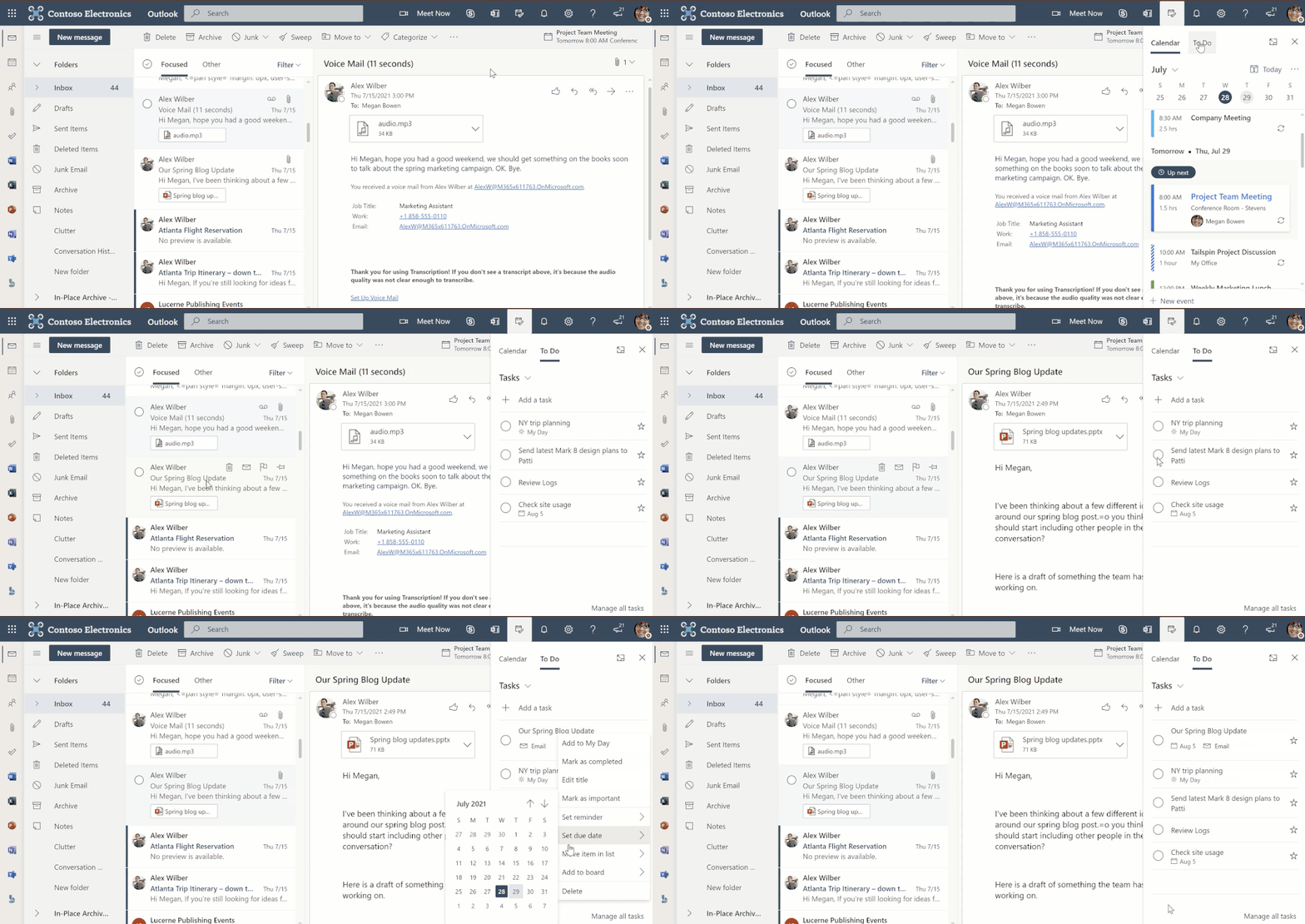
Thumbnail image 1 captioned my day side-pane in outlook web

Microsoft says that the feature lets Outlook users quickly create tasks or events by simply dragging and dropping emails from their inbox to the My Day side-pane. Users will be able to find these tasks in the default Tasks list, and each of them will contain a link to the relevant emails. This feature should make it easier for users to keep track of their tasks without switching between both apps.

In addition, Outlook users can create a task by selecting a part of the text in an email and editing it in the sidebar. The To Do tab available in the My Day side-pane also supports dragging and dropping a task into the calendar.

To try out this feature, users will first need to go to Outlook.com, navigate to the header and click the My Day option available besides the notifications icon. They can then switch between the To Do and calendar tabs to manage their tasks and events.

Some other features available in the My Day side-pane include the ability to view due tasks from the Calendar tab and right-click any specific task to add a due date or a reminder. The side pane also provides an option to open the Microsoft To Do web app in a separate tab. Let us know in the comments below if you think that this feature will help you to manage your day-to-day work.


Share This Post:

Share this article:
Tags:
Microsoft 365 Microsoft Outlook Microsoft To Do
Previous Article Microsoft Edge Canary now offers insights on Sleeping Tabs energy savings – onmsft.com Next Article Microsoft acquires Spend Intelligence company Suplari

Related Articles

Nvidia CEO Jensen Huang says demand for Blackwell and Rubin AI chips could reach $1 trillion as AI infrastructure spending grows rapidly.

Nvidia CEO Jensen Huang sees $1 trillion demand for Blackwell and Rubin AI chips

March 16, 2026
Nvidia introduces DLSS 5 to improve game realism with generative AI

Nvidia introduces DLSS 5 to improve game realism with generative AI

March 16, 2026
Dictionary Publisher Files Copyright Lawsuit Against OpenAI

Dictionary Publisher Files Copyright Lawsuit Against OpenAI

March 16, 2026

Leave a Comment Cancel reply

Your email address will not be published. Required fields are marked *

Recent Posts

  • Nvidia CEO Jensen Huang sees $1 trillion demand for Blackwell and Rubin AI chips
  • Nvidia introduces DLSS 5 to improve game realism with generative AI
  • Dictionary Publisher Files Copyright Lawsuit Against OpenAI
  • Shopify exec says AI shopping agents are the future of e-commerce
  • WhatsApp beta introduces guest chats for messaging without an account

Recent Comments

No comments to show.
OnMSFT.com

The Tech News Site

Categories

  • Windows
  • Surface
  • Xbox
  • How-To
  • OnPodcast
  • Gaming
  • Edge
  • Teams

Recent Posts

  • Nvidia CEO Jensen Huang sees $1 trillion demand for Blackwell and Rubin AI chips
  • Nvidia introduces DLSS 5 to improve game realism with generative AI
  • Dictionary Publisher Files Copyright Lawsuit Against OpenAI
  • Shopify exec says AI shopping agents are the future of e-commerce
  • WhatsApp beta introduces guest chats for messaging without an account

Quick Links

  • About OnMSFT.com
  • Contact OnMSFT
  • Join Our Team
  • Privacy Policy
© 2010–2026 OnMSFT.com LLC. All rights reserved.
About OnMSFT.comContact OnMSFTPrivacy Policy
