Skip to content
OnMSFT.com
  • Home
  • About
  • Contact
  • Windows
  • Surface
  • Xbox
  • How-To
  • OnPodcast
  • Edge
  • Teams
  • Gaming
Menu
  • Home
  • About
  • Contact
  • Windows
  • Surface
  • Xbox
  • How-To
  • OnPodcast
  • Edge
  • Teams
  • Gaming
  1. Home
  2. News
  3. OneNote and Word for Web now lets users embed Pinterest pins

OneNote and Word for Web now lets users embed Pinterest pins

Rabia Noureen Rabia Noureen
February 24, 2021
2 min read

Microsoft has announced a new Pinterest integration for OneNote and Word on the web that lets users embed Pinterest pins directly into their documents. The new feature should be particularly beneficial for educators, and it makes it easier to add interactive Pinterest content into their lesson plans and shared class notebooks.

“Over the past few years, we have heard many requests for a Pinterest integration with OneNote. The OneNote binder metaphor, and the ability to easily embed Pinterest Pins interactively in OneNote, organize them, or distribute to others in OneNote Class Notebook, seemed like a great match. In addition, with our recent announcement of Microsoft Word for web support for interactive content, we’ve also added Pinterest support here as well,” Mike Tholfsen, PM on Microsoft’s EDU team, explained in a blog post.
thumbnail image 1 of blog post titled Pinterest Pins can now be interactively embedded into OneNote and Word

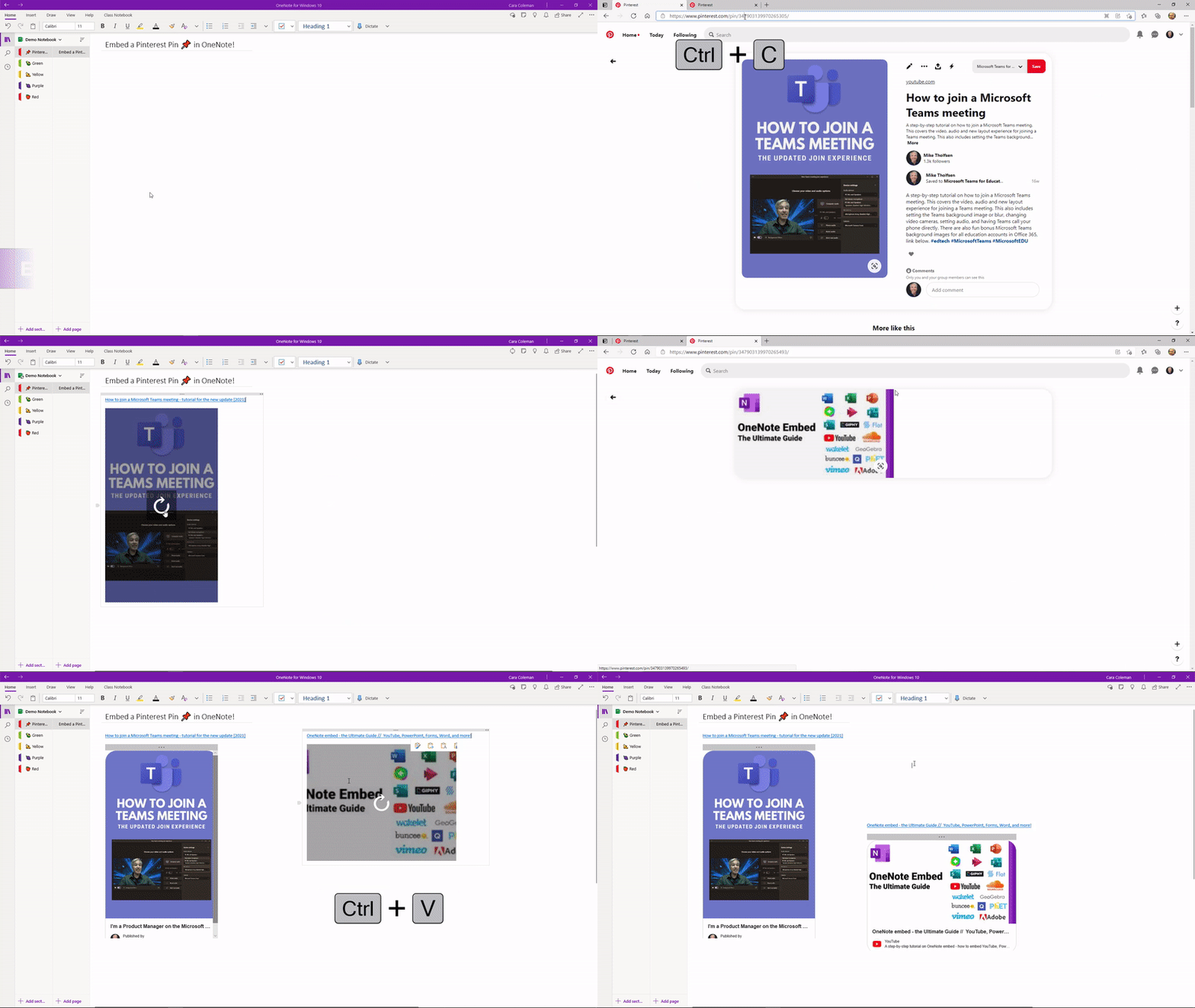
With this update, OneNote users will now be able to create pages, individual sections, as well as complete notebooks with interactive Pinterest content. This new capability is supported on all major versions of OneNote on desktop, OneNote 2016, iPad, Android, and the Web app.

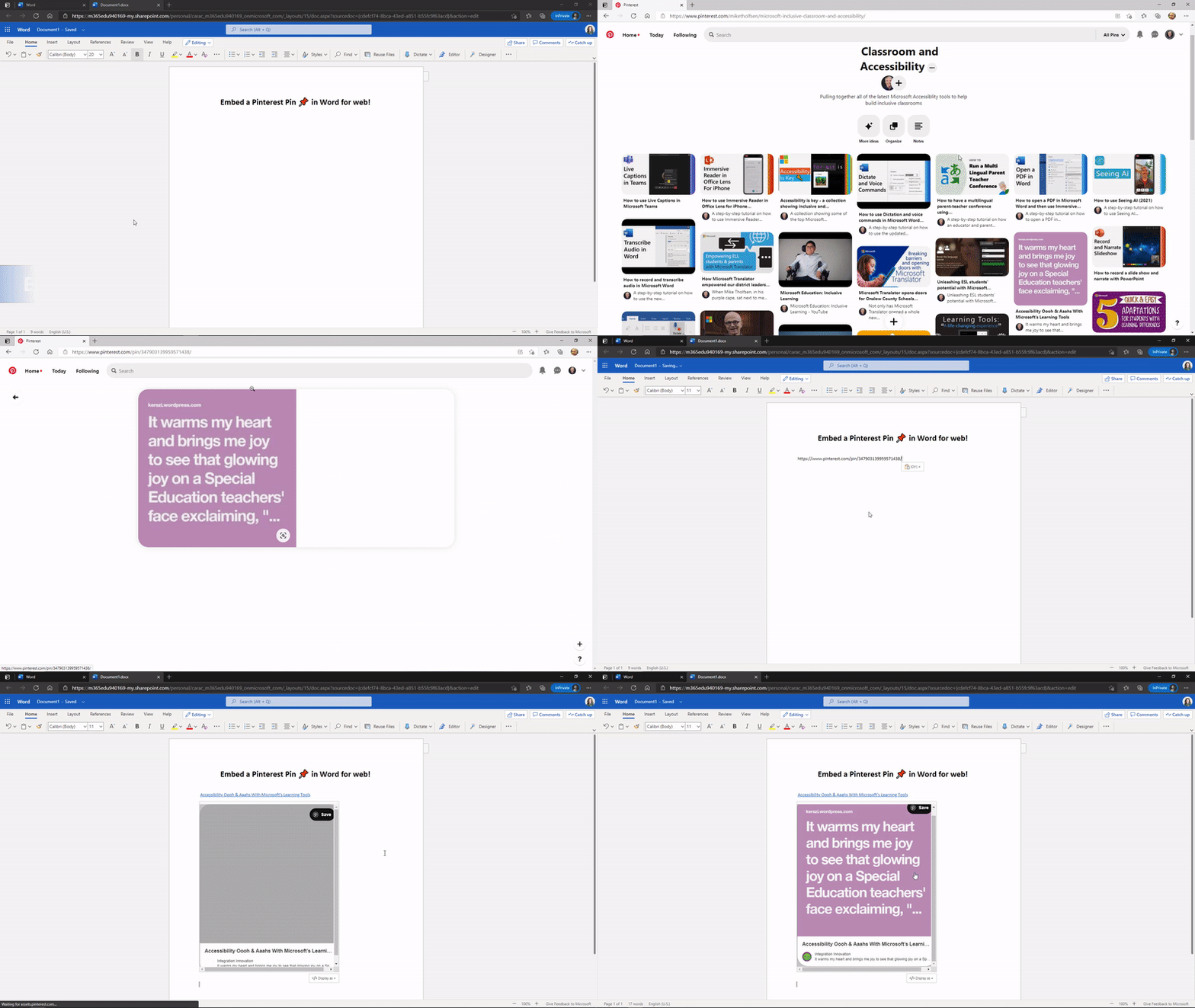
For Microsoft Word, the embedded pins only work in the web version of the app at this time. However, Educators will be able to use the Web app to add Pinterest content into their Word documents, and it should show up for students who open the document on their mobile devices or Word for Web.
thumbnail image 2 of blog post titled Pinterest Pins can now be interactively embedded into OneNote and Word

To get started, Pinterest users will simply need to copy the URL of the specific pin they want to embed and then paste it into a Microsoft Word document or OneNote page. The app will automatically pick up the relevant information from the content to create an interactive card for the pin.

This new integration appears to be rolling out gradually to all OneNote and Word users, so it’s possible that you may not be able to use it just yet. We hope that this functionality will be generally available for everyone within the next few days.


Share This Post:

Tags: Microsoft Word | OneNote | Pinterest
Share this article:
Tags:
Microsoft Word OneNote Pinterest
Previous Article Microsoft launches three new cloud offerings for Financial Services, Manufacturing, and Nonprofits Next Article Cyberpunk 2077’s next patch has been delayed to next month

Related Articles

‘Raise a lobster’: OpenClaw craze spreads across China’s AI sector

March 15, 2026
OpenClaw can now connect with Gmail, Drive, and Docs using Google’s new CLI

AWS adds OpenClaw AI agent deployment to Amazon Lightsail

March 15, 2026

Startup Builds Mac Mini GPU Hack for Running Local AI Models

March 15, 2026

Leave a Comment Cancel reply

Your email address will not be published. Required fields are marked *

Recent Posts

  • ‘Raise a lobster’: OpenClaw craze spreads across China’s AI sector
  • AWS adds OpenClaw AI agent deployment to Amazon Lightsail
  • MacBook Neo Has a Hidden Display P3 Setting That Improves Screen Colors
  • Startup Builds Mac Mini GPU Hack for Running Local AI Models
  • Apple Unlikely to Add Touchscreens to MacBook Neo for Years

Recent Comments

No comments to show.
OnMSFT.com

The Tech News Site

Categories

  • Windows
  • Surface
  • Xbox
  • How-To
  • OnPodcast
  • Gaming
  • Edge
  • Teams

Recent Posts

  • ‘Raise a lobster’: OpenClaw craze spreads across China’s AI sector
  • AWS adds OpenClaw AI agent deployment to Amazon Lightsail
  • MacBook Neo Has a Hidden Display P3 Setting That Improves Screen Colors
  • Startup Builds Mac Mini GPU Hack for Running Local AI Models
  • Apple Unlikely to Add Touchscreens to MacBook Neo for Years

Quick Links

  • About OnMSFT.com
  • Contact OnMSFT
  • Join Our Team
  • Privacy Policy
© 2010–2026 OnMSFT.com LLC. All rights reserved.
About OnMSFT.comContact OnMSFTPrivacy Policy
