Skip to content
OnMSFT.com
  • Home
  • About
  • Contact
  • Windows
  • Surface
  • Xbox
  • How-To
  • OnPodcast
  • Edge
  • Teams
  • Gaming
Menu
  • Home
  • About
  • Contact
  • Windows
  • Surface
  • Xbox
  • How-To
  • OnPodcast
  • Edge
  • Teams
  • Gaming
  1. Home
  2. News
  3. This is the new Xbox One dashboard experience with Cortana; built for speed

This is the new Xbox One dashboard experience with Cortana; built for speed

Zac Bowden Zac Bowden
August 22, 2019
1 min read

Xbox One

Wow! Microsoft just took the wraps off its brand new Xbox One Dashboard Experience at E3 today, and it looks fantastic. Improved from the ground up for speed, the new dashboard UI makes it even easier to access the things you love most. Better yet, Cortana is coming to Xbox One too.

The new dashboard experience introduces a new guide which swings out from the left, just like the original Xbox 360 dashboard. Here you can access friends, messages, notifications, Cortana and more. On the main dashboard, you get access to your recent games played, and if you scroll down even further you can gain access to your pinned apps.

Xbox One

The community tab has too received a major overhaul, positioning your friends and the games their playing at the forefront of Xbox. You can jump into the games your friends are playing quickly and easily, as well as check out what’s trending on the Xbox LIVE network.

Xbox One

And finally, Cortana. Cortana on Xbox One utilizes ‘Hey Cortana’, meaning you can simply say things like “Hey Cortana, is Amanda online?” and Cortana will be able to notify you if Amanda is ready to play. You can also use Cortana to send messages, share game clips and more.

Xbox One

No word on when this new dashboard UI will roll out to the public or indeed Xbox One Preview Members, we’ll keep you updated when we know.


Further reading: Microsoft, Xbox One

Share this article:
Tags:
Microsoft Xbox One
Previous Article Microsoft: Increasing our focus on developers Next Article Microsoft creates a new mascot to promote Windows 10 in Japan

Related Articles

Snapdragon X2 Elite Gaming Shows Real Progress but Still Falls Short for Serious Players

April 8, 2026

ASUS Says No New Motherboards Needed for Intel Core Ultra 200S Plus

April 8, 2026
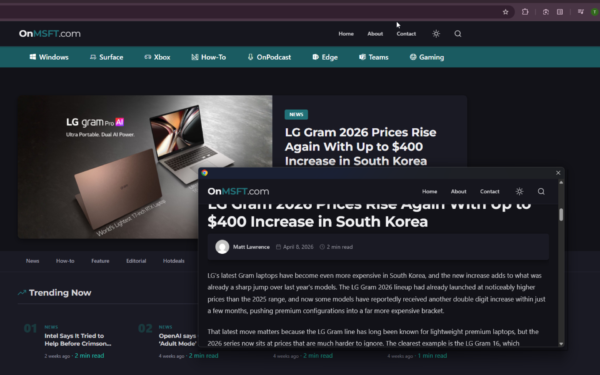
Chrome Link Preview feature showing a webpage in a floating window on desktop

Google is Killing Chrome’s Link Preview Feature from Desktop

April 8, 2026

Leave a Comment Cancel reply

Your email address will not be published. Required fields are marked *

Recent Posts

  • Snapdragon X2 Elite Gaming Shows Real Progress but Still Falls Short for Serious Players
  • ASUS Says No New Motherboards Needed for Intel Core Ultra 200S Plus
  • Google is Killing Chrome’s Link Preview Feature from Desktop
  • ASUS Snapdragon X2 Laptops Get Sudden Price Increase After Reviews
  • Intel Adds Arc Pro B70 and B65 Support to Gaming Driver in Latest Update

Recent Comments

  1. XxRIVTYxX on Intel Says It Tried to Help Before Crimson Desert Dropped Arc Support
  2. Gaurav Kumar on Chrome Prepares Nudge to ‘Move Tabs to the Side’ as Vertical Tabs Near Release
OnMSFT.com

The Tech News Site

Categories

  • Windows
  • Surface
  • Xbox
  • How-To
  • OnPodcast
  • Gaming
  • Edge
  • Teams

Recent Posts

  • Snapdragon X2 Elite Gaming Shows Real Progress but Still Falls Short for Serious Players
  • ASUS Says No New Motherboards Needed for Intel Core Ultra 200S Plus
  • Google is Killing Chrome's Link Preview Feature from Desktop
  • ASUS Snapdragon X2 Laptops Get Sudden Price Increase After Reviews
  • Intel Adds Arc Pro B70 and B65 Support to Gaming Driver in Latest Update

Quick Links

  • About OnMSFT.com
  • Contact OnMSFT
  • Join Our Team
  • Privacy Policy
© 2010–2026 OnMSFT.com LLC. All rights reserved.
About OnMSFT.comContact OnMSFTPrivacy Policy