Skip to content
OnMSFT.com
  • Home
  • About
  • Contact
  • Windows
  • Surface
  • Xbox
  • How-To
  • OnPodcast
  • Edge
  • Teams
  • Gaming
Menu
  • Home
  • About
  • Contact
  • Windows
  • Surface
  • Xbox
  • How-To
  • OnPodcast
  • Edge
  • Teams
  • Gaming
  1. Home
  2. News
  3. Monitor your PC on the go from Android devices or iOS devices with PC Monitor – onmsft.com

Monitor your PC on the go from Android devices or iOS devices with PC Monitor – onmsft.com

Ron Ron
December 14, 2010
2 min read

Ever seen those OnStar commercials that show people being able to control their cars from their phones? Well PC Monitor is a program/app that is similar… except it is for your PC. PC Monitor allows users to monitor and control their PCs from Android devices, iPhone, iPad and iPod Touch.

Key Features:

Monitor:
View the status and uptime of all computers
View the current CPU usage
View the current available memory
View the local hard disks status
View the services status
View the network interfaces status (available on Android, coming on the next update for iPhone, iPad and iPod Touch)
View running processes
View the scheduled tasks status
View all logged in users (local and remote)

Send Commands:
Start, pause, continue and stop a service
Kill a process
Start and stop a scheduled task
Log off any logged in user (local or remote)
Restart, shutdown, power off, suspend or send the computer into hibernation
Mobile device authorization for system commands – only selected authorized devices on your account can be allowed to send system commands

Additional Features:
Receive notifications when a computer is started or is being shut down (Push notifications on Apple Devices and e-mail notifications on Android)
Fully secure connection using SSL for both computer and mobile device
Ideal for Home or Work use
Monitor up to 10 PC’s
Ability to run any operation that can be defined in Task Scheduler

The application will work even if your PC or Server cannot be directly accessed from the Internet, i.e. does not have a routable IP address or sits behind a firewall. The application communicates with the server using a secure encrypted connection and the PC application installs as a service and it starts automatically when your PC starts.

A lightweight service for monitoring the Windows PC or Server needs to be installed, use the download section on this site to install it.

Operating systems supported:
Desktop: Windows XP and up.
Server: Windows 2003 and up.

Go to www.mobilepcmonitor.com for more info and links to Android Market / Apple AppStore.

Share This Post:

Share this article:
Previous Article Microsoft joins lobbying group battling Google ITA acquisition – onmsft.com Next Article Leading Manufacturing Company Dramatically Increases Staff Productivity with Bloxx Web Filtering – onmsft.com

Related Articles

Snapdragon X2 Elite Gaming Shows Real Progress but Still Falls Short for Serious Players

April 8, 2026

ASUS Says No New Motherboards Needed for Intel Core Ultra 200S Plus

April 8, 2026
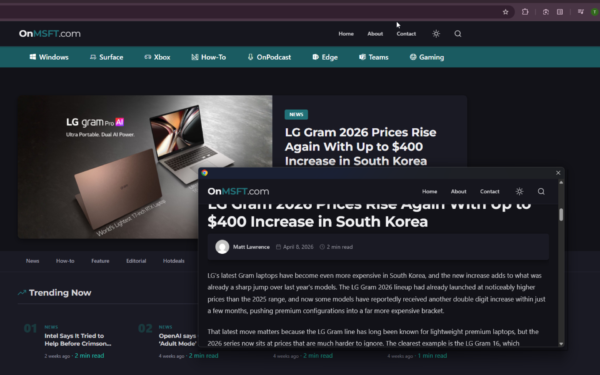
Chrome Link Preview feature showing a webpage in a floating window on desktop

Google is Killing Chrome’s Link Preview Feature from Desktop

April 8, 2026

Leave a Comment Cancel reply

Your email address will not be published. Required fields are marked *

Recent Posts

  • Snapdragon X2 Elite Gaming Shows Real Progress but Still Falls Short for Serious Players
  • ASUS Says No New Motherboards Needed for Intel Core Ultra 200S Plus
  • Google is Killing Chrome’s Link Preview Feature from Desktop
  • ASUS Snapdragon X2 Laptops Get Sudden Price Increase After Reviews
  • Intel Adds Arc Pro B70 and B65 Support to Gaming Driver in Latest Update

Recent Comments

  1. XxRIVTYxX on Intel Says It Tried to Help Before Crimson Desert Dropped Arc Support
  2. Gaurav Kumar on Chrome Prepares Nudge to ‘Move Tabs to the Side’ as Vertical Tabs Near Release
OnMSFT.com

The Tech News Site

Categories

  • Windows
  • Surface
  • Xbox
  • How-To
  • OnPodcast
  • Gaming
  • Edge
  • Teams

Recent Posts

  • Snapdragon X2 Elite Gaming Shows Real Progress but Still Falls Short for Serious Players
  • ASUS Says No New Motherboards Needed for Intel Core Ultra 200S Plus
  • Google is Killing Chrome's Link Preview Feature from Desktop
  • ASUS Snapdragon X2 Laptops Get Sudden Price Increase After Reviews
  • Intel Adds Arc Pro B70 and B65 Support to Gaming Driver in Latest Update

Quick Links

  • About OnMSFT.com
  • Contact OnMSFT
  • Join Our Team
  • Privacy Policy
© 2010–2026 OnMSFT.com LLC. All rights reserved.
About OnMSFT.comContact OnMSFTPrivacy Policy