Skip to content
OnMSFT.com
  • Home
  • About
  • Contact
  • Windows
  • Surface
  • Xbox
  • How-To
  • OnPodcast
  • Edge
  • Teams
  • Gaming
Menu
  • Home
  • About
  • Contact
  • Windows
  • Surface
  • Xbox
  • How-To
  • OnPodcast
  • Edge
  • Teams
  • Gaming
  1. Home
  2. News
  3. Microsoft To Do now auto populates tasks due today in the My Day list – onmsft.com

Microsoft To Do now auto populates tasks due today in the My Day list – onmsft.com

Kevin Okemwa Kevin Okemwa
December 7, 2022
1 min read

If you’re not conversant with Microsoft To Do, it is an app that can help you increase your productivity by helping you remember the tasks you need to accomplish each day. Building upon this premise, Microsoft has announced that it is adding support auto population of tasks due today in the My Day list.

How does this feature work? Well, it automatically populates your tasks in My Day on their due dates. This is an important and useful addition to the app because it will assist users to stay on track and plan their days accordingly. It is also more efficient and effective compared to the previous approach where users needed to add the tasks manually in My Day.
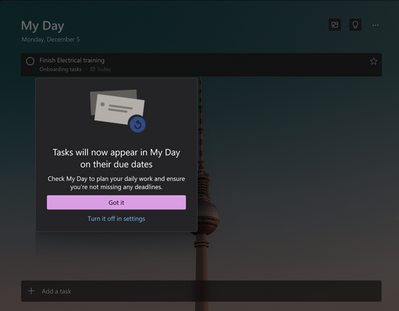
thumbnail image 1 of blog post titled Microsoft To Do now supports auto population of tasks due today in the My Day list!

If you want to make use of this feature, simply launch the app and click on the My Day list. You’ll then be able to view a list that contains all of your tasks due today. This is inclusive of any tasks that were previously added to your lists and are due today.

Microsoft has stated that it has rolled out this feature to 5% of its audience already. The feature is expected to hit general availability in the coming weeks. If you are just learning about Microsoft To Do, be sure to check out our expert guide that will help you get started.

Via: Microsoft

Share This Post:

Share this article:
Tags:
Microsoft To Do
Previous Article Cameyo adds support for Linux apps to their Cloud Desktops – onmsft.com Next Article PowerToys v0.65.0 is now available, features a bunch of fixes and improvements – onmsft.com

Related Articles

NASA Artemis II astronauts report Outlook not working in space as both versions fail during historic lunar mission testing and operations

NASA Artemis II astronauts face Outlook issues in space as mission hits unexpected software glitch

April 4, 2026

Microsoft Publisher Will Shut Down in October 2026 and Users Are Not Happy

April 4, 2026

State of Decay 3 Returns With Alpha Playtests After Years of Silence

April 4, 2026

Leave a Comment Cancel reply

Your email address will not be published. Required fields are marked *

Recent Posts

  • NASA Artemis II astronauts face Outlook issues in space as mission hits unexpected software glitch
  • Microsoft Publisher Will Shut Down in October 2026 and Users Are Not Happy
  • State of Decay 3 Returns With Alpha Playtests After Years of Silence
  • Memory costs surge to 30% of AI spending, NVIDIA holds an advantage
  • PEAK Players Want More Updates, But Landfall Says Extra Content Is “a Bonus not a Right”

Recent Comments

  1. XxRIVTYxX on Intel Says It Tried to Help Before Crimson Desert Dropped Arc Support
  2. Gaurav Kumar on Chrome Prepares Nudge to ‘Move Tabs to the Side’ as Vertical Tabs Near Release
OnMSFT.com

The Tech News Site

Categories

  • Windows
  • Surface
  • Xbox
  • How-To
  • OnPodcast
  • Gaming
  • Edge
  • Teams

Recent Posts

  • NASA Artemis II astronauts face Outlook issues in space as mission hits unexpected software glitch
  • Microsoft Publisher Will Shut Down in October 2026 and Users Are Not Happy
  • State of Decay 3 Returns With Alpha Playtests After Years of Silence
  • Memory costs surge to 30% of AI spending, NVIDIA holds an advantage
  • PEAK Players Want More Updates, But Landfall Says Extra Content Is “a Bonus not a Right”

Quick Links

  • About OnMSFT.com
  • Contact OnMSFT
  • Join Our Team
  • Privacy Policy
© 2010–2026 OnMSFT.com LLC. All rights reserved.
About OnMSFT.comContact OnMSFTPrivacy Policy

