Skip to content
OnMSFT.com
  • Home
  • About
  • Contact
  • Windows
  • Surface
  • Xbox
  • How-To
  • OnPodcast
  • Edge
  • Teams
  • Gaming
Menu
  • Home
  • About
  • Contact
  • Windows
  • Surface
  • Xbox
  • How-To
  • OnPodcast
  • Edge
  • Teams
  • Gaming
  1. Home
  2. News
  3. Microsoft Teams Displays Now Support Custom Backgrounds And Live Reactions For Meetings – onmsft.com

Microsoft Teams Displays Now Support Custom Backgrounds And Live Reactions For Meetings – onmsft.com

Rabia Noureen Rabia Noureen
March 22, 2021
1 min read

Microsoft today announced a handful of new features that are making their way to Teams Displays. The March 2021 update to the Teams Display experience brings new meeting and chat capabilities such as custom backgrounds, live reactions, quick responses, and more. The company has made some important enhancements to the Cortana experience, too.

First off, Teams Displays now support custom backgrounds, making it easier for users to hide their messy backgrounds during video calls and meetings. Furthermore, it’s now possible to use six different emojis to react to messages from teammates. Microsoft Teams displays are also getting a new AI-based feature, which lets users instantly send a quick response from a list of options.
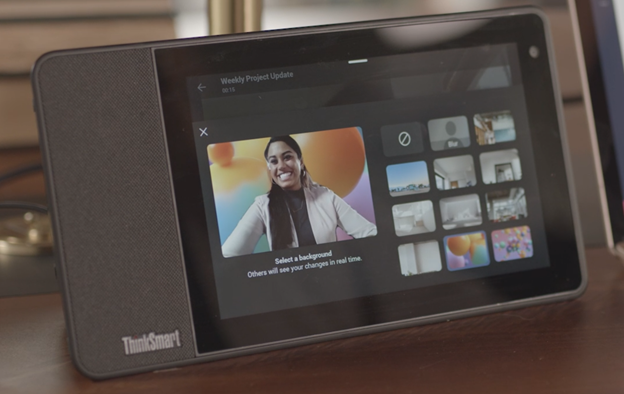
thumbnail image 3 of blog post titled Microsoft Teams Displays Update | March 2021

Next up, Microsoft has released live reactions for meetings, something which is already available on the desktop and mobile. The Teams display experience users can now react to meetings with emojis like support, applause, love, and laughter, making it easier for participants to communicate without speaking.

thumbnail image 4 of blog post titled Microsoft Teams Displays Update | March 2021

Lastly, Microsoft has announced the general availability of new Cortana capabilities for Teams Displays. Cortana will now leverage the power of Bing to get information from the web. This should help users to collaborate with people in different time zones. Starting today, users in select English-speaking regions will be able to access the aforementioned features, and the personal productivity assistant is launching in new markets, including Canada, Australia, UK, and India.


Share This Post:

Share this article:
Tags:
Microsoft 365 Microsoft Teams
Previous Article How To Clear Browser History Automatically On Microsoft Edge – onmsft.com Next Article Microsoft And Google Join New Compat2021 Initiative To Improve Browser Compatibility

Related Articles

Chrome and Gemini icons representing Gemini Live voice assistant integration in Chrome

Chrome tests Gemini Live voice assistant in a floating overlay panel

March 14, 2026

Chrome’s Organizer feature may sync Gemini and AI conversations across devices

March 14, 2026

After Chrome, Edge tests launching the browser automatically when you sign into Windows

March 13, 2026

Leave a Comment Cancel reply

Your email address will not be published. Required fields are marked *

Recent Posts

  • Chrome tests Gemini Live voice assistant in a floating overlay panel
  • Chrome’s Organizer feature may sync Gemini and AI conversations across devices
  • After Chrome, Edge tests launching the browser automatically when you sign into Windows
  • iPhone Fold Latest Rumors: Display, Cameras, RAM and Price Details Revealed
  • Samsung fears first mobile operating loss due to memory price surge

Recent Comments

No comments to show.
OnMSFT.com

OnMSFT.com covers Microsoft news, reviews, and how-to guides. Formerly known as WinBeta, we have been your source for Microsoft news since 1998.

Categories

  • Windows
  • Surface
  • Xbox
  • How-To
  • OnPodcast
  • Gaming
  • Edge
  • Teams

Recent Posts

  • Chrome tests Gemini Live voice assistant in a floating overlay panel
  • Chrome’s Organizer feature may sync Gemini and AI conversations across devices
  • After Chrome, Edge tests launching the browser automatically when you sign into Windows
  • iPhone Fold Latest Rumors: Display, Cameras, RAM and Price Details Revealed
  • Samsung fears first mobile operating loss due to memory price surge

Quick Links

  • About OnMSFT.com
  • Contact OnMSFT
  • Join Our Team
  • Privacy Policy
© 2010–2026 OnMSFT.com LLC. All rights reserved.
About OnMSFT.comContact OnMSFTPrivacy Policy
