
Yesterday, Microsoft announced that it is adding a new feature, Sign Language View in Public Preview to Microsoft Teams to further elevate the meeting experience. The Microsoft Teams Calling, Meeting, and Devices team has been working on creating “a best-in-class experience” for users with hearing impairment.
The team’s efforts were majorly community-driven, as they depended on feedback from affected parties and incorporated the concerns and needs they highlighted into the design rather than building it from scratch without consulting users of the end product.
While the team is still in the process of improving the overall meeting experience for the Deaf and hard of hearing (D/HH) community, they have made a new entry that has gotten them a step closer.
According to Microsoft:
Sign language view, which will enable you to prioritize up to two other participants’ videos so they stay visible and in a consistent location throughout the meeting.
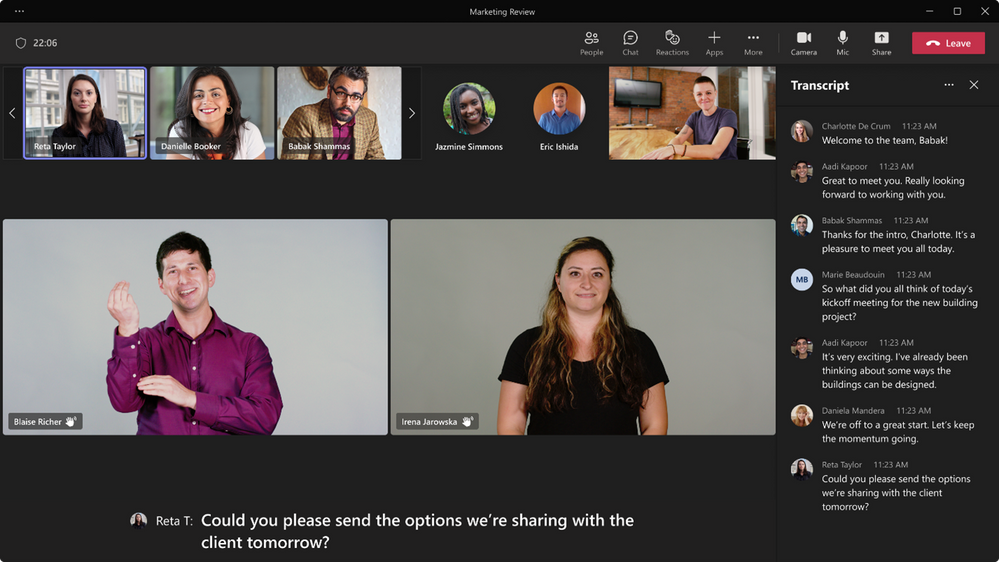
With this feature in place, both interpreters’ and other signers’ video feeds will be placed in a consistent location and the video feeds will also be sizable enough or sign language to be visible. What’s more, it will also allow participants to have up to two other signers in view throughout each meeting and finally, it will also cut down on repetitive tasks such pinning interpreters and turning on captions whenever you hop on a meeting. Your settings can be saved for future use via the new Accessibility pane in the Settings menu.
Once you have enabled the feature, prioritized video streams will feature at the right aspect ratio with the highest available quality automatically. However, certain aspects like sign language view and captioning are user-specific, meaning other meeting participants will not be affected when you make these changes.
What happens if someone shares content during the meeting? The prioritized interpreter’s video feed changes position. However, this will not affect the quality of the video. It will also be larger compared to those of other participants. What’s more, the feed of the participant that you have prioritized remains at the center of attention provided they keep their video on. You can also pin other participants’ video feeds, this will not impact the designated signer’s position or size in the display.
Both the Sign language view and the accessibility settings pane are available in Public Preview, but Microsoft has indicated they will hit broad availability for the Teams desktop and web clients for commercial and GCC customers in the coming weeks.


