Skip to content
OnMSFT.com
  • Home
  • About
  • Contact
  • Windows
  • Surface
  • Xbox
  • How-To
  • OnPodcast
  • Edge
  • Teams
  • Gaming
Menu
  • Home
  • About
  • Contact
  • Windows
  • Surface
  • Xbox
  • How-To
  • OnPodcast
  • Edge
  • Teams
  • Gaming
  1. Home
  2. News
  3. Microsoft Excel makes it easier to check formulas

Microsoft Excel makes it easier to check formulas

Kevin Okemwa Kevin Okemwa
January 26, 2023
1 min read

Microsoft has announced the incorporation of new tooltips in Excel designed to help users check their formulas directly in the formula bar or in the cell they are editing. Here’s everything you need to know about this neat feature:

Once you select part of the formula, Excel will in turn show you a tooltip that features the current value of the section you are on. Here’s an illustration of how the feature works:
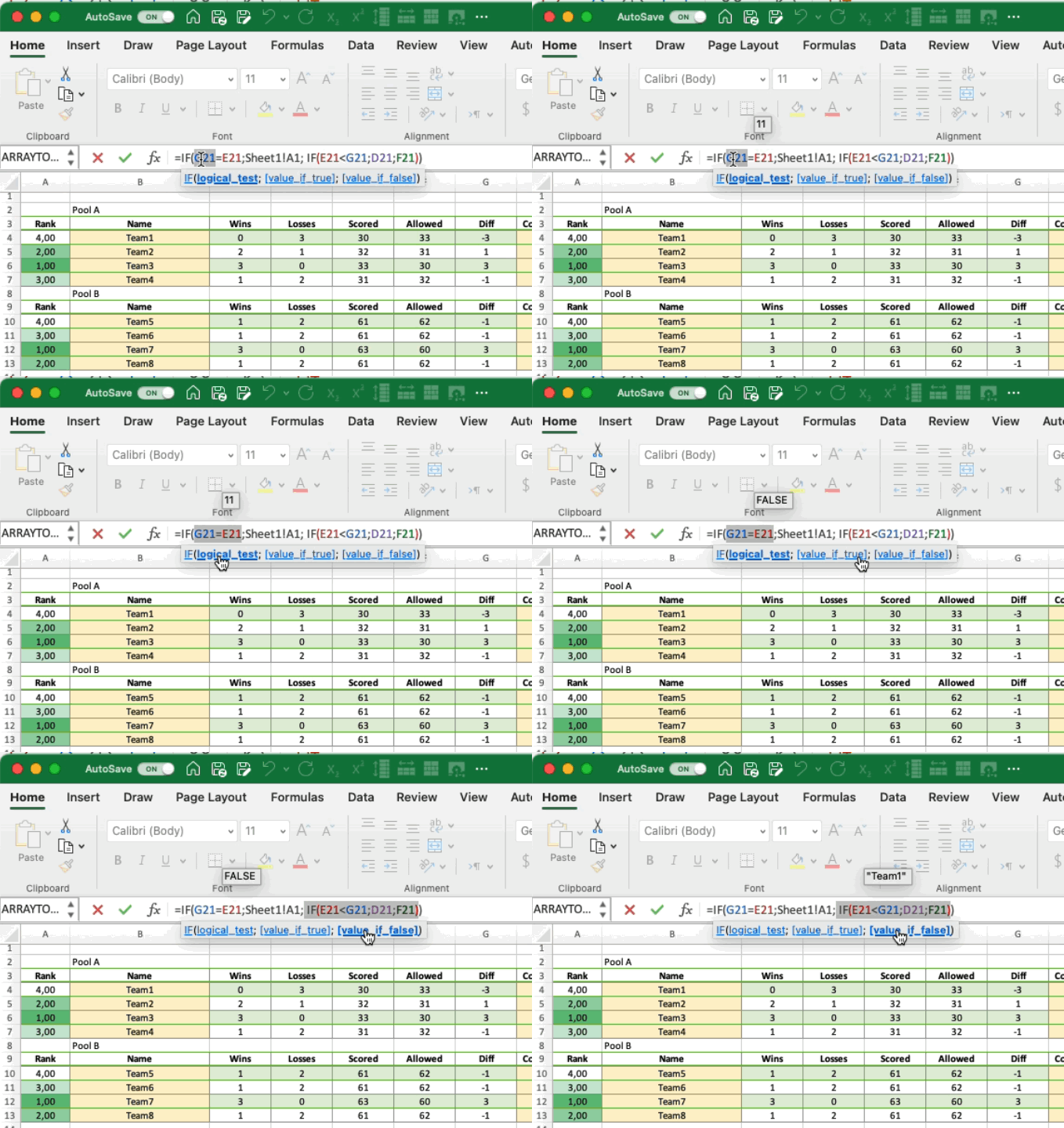
Animation of the Value Preview feature

Microsoft further indicated:

A common trick to get the current value of part of a formula is to select that part, then press F9. Doing so replaces the selected part of the formula with its current value. So, you would likely only do this to check the value, and then you press ESC to avoid keeping it as a hard-coded value in your formula.

Alternatively, you can make use of the Evaluate Formula dialog which will also let you see the current value of each part of your formula. If you are part of the Beta channel and running on Windows Version 2302 (Build 16116.20000) or later or Mac Version 16. 70 (Build 230116) or later you should be able to access this feature.

In related news, Excel also got a nifty feature that lets users record repetitive spreadsheet tasks earlier this month dubbed Action Recorder. Share your thoughts with us in the comment section.


Share this article:
Previous Article Latest Edge Dev build adds new features for Android users Next Article Microsoft Teams gets Presenter window while screen sharing enhancements

Related Articles

Chrome and Gemini icons representing Gemini Live voice assistant integration in Chrome

Chrome tests Gemini Live voice assistant in a floating overlay panel

March 14, 2026

Chrome’s Organizer feature may sync Gemini and AI conversations across devices

March 14, 2026

After Chrome, Edge tests launching the browser automatically when you sign into Windows

March 13, 2026

Leave a Comment Cancel reply

Your email address will not be published. Required fields are marked *

Recent Posts

  • Chrome tests Gemini Live voice assistant in a floating overlay panel
  • Chrome’s Organizer feature may sync Gemini and AI conversations across devices
  • After Chrome, Edge tests launching the browser automatically when you sign into Windows
  • iPhone Fold Latest Rumors: Display, Cameras, RAM and Price Details Revealed
  • Samsung fears first mobile operating loss due to memory price surge

Recent Comments

No comments to show.
OnMSFT.com

OnMSFT.com covers Microsoft news, reviews, and how-to guides. Formerly known as WinBeta, we have been your source for Microsoft news since 1998.

Categories

  • Windows
  • Surface
  • Xbox
  • How-To
  • OnPodcast
  • Gaming
  • Edge
  • Teams

Recent Posts

  • Chrome tests Gemini Live voice assistant in a floating overlay panel
  • Chrome’s Organizer feature may sync Gemini and AI conversations across devices
  • After Chrome, Edge tests launching the browser automatically when you sign into Windows
  • iPhone Fold Latest Rumors: Display, Cameras, RAM and Price Details Revealed
  • Samsung fears first mobile operating loss due to memory price surge

Quick Links

  • About OnMSFT.com
  • Contact OnMSFT
  • Join Our Team
  • Privacy Policy
© 2010–2026 OnMSFT.com LLC. All rights reserved.
About OnMSFT.comContact OnMSFTPrivacy Policy
