Skip to content
OnMSFT.com
  • Home
  • About
  • Contact
  • Windows
  • Surface
  • Xbox
  • How-To
  • OnPodcast
  • Edge
  • Teams
  • Gaming
Menu
  • Home
  • About
  • Contact
  • Windows
  • Surface
  • Xbox
  • How-To
  • OnPodcast
  • Edge
  • Teams
  • Gaming
  1. Home
  2. News
  3. Microsoft Edge’s Super Duper Secure Mode addresses Javascript vulnerabilities in a brand new way – onmsft.com

Microsoft Edge’s Super Duper Secure Mode addresses Javascript vulnerabilities in a brand new way – onmsft.com

Rabia Noureen Rabia Noureen
August 5, 2021
2 min read

Microsoft Edge has started testing a new “Super Duper Secure Mode” that should make browsing more secure by addressing Javascript vulnerabilities within the browser. The feature is currently available for Edge Insiders, and it’s hidden behind an experimental flag in the Canary, Dev, and Beta channels.

Microsoft’s research has revealed that attackers usually target the JavaScript engine called “Just-In-Time (JIT) compilation” to hack web browsers. JIT is basically a complex pipeline of processes used to optimize JavaScript code for performance. Once enabled, the new Super Duper Secure Mode will actually disable the JavaScript just-in-time (JIT) compiler to prevent attackers from hacking into systems of Microsoft Edge users.

With the JIT engine disabled, the Microsoft Edge team enabled additional security features including Control Flow Guard (CFG), Windows’ Arbitrary Code Guard (ACG) as well as Intel’s Control-flow Enforcement Technology (CET). According to Microsoft, JIT had compatibility issues with all these features, and turning off the JavaScript engine should help to provide a more secure browsing experience.

“By disabling JIT, we can enable both mitigations and make exploitation of security bugs in any renderer process component more difficult,” explained Johnathan Norman, Microsoft Edge Vulnerability Research Lead. “This reduction in attack surface kills half of the bugs we see in exploits and every remaining bug becomes more difficult to exploit. To put it another way, we lower costs for users but increase costs for attackers.”
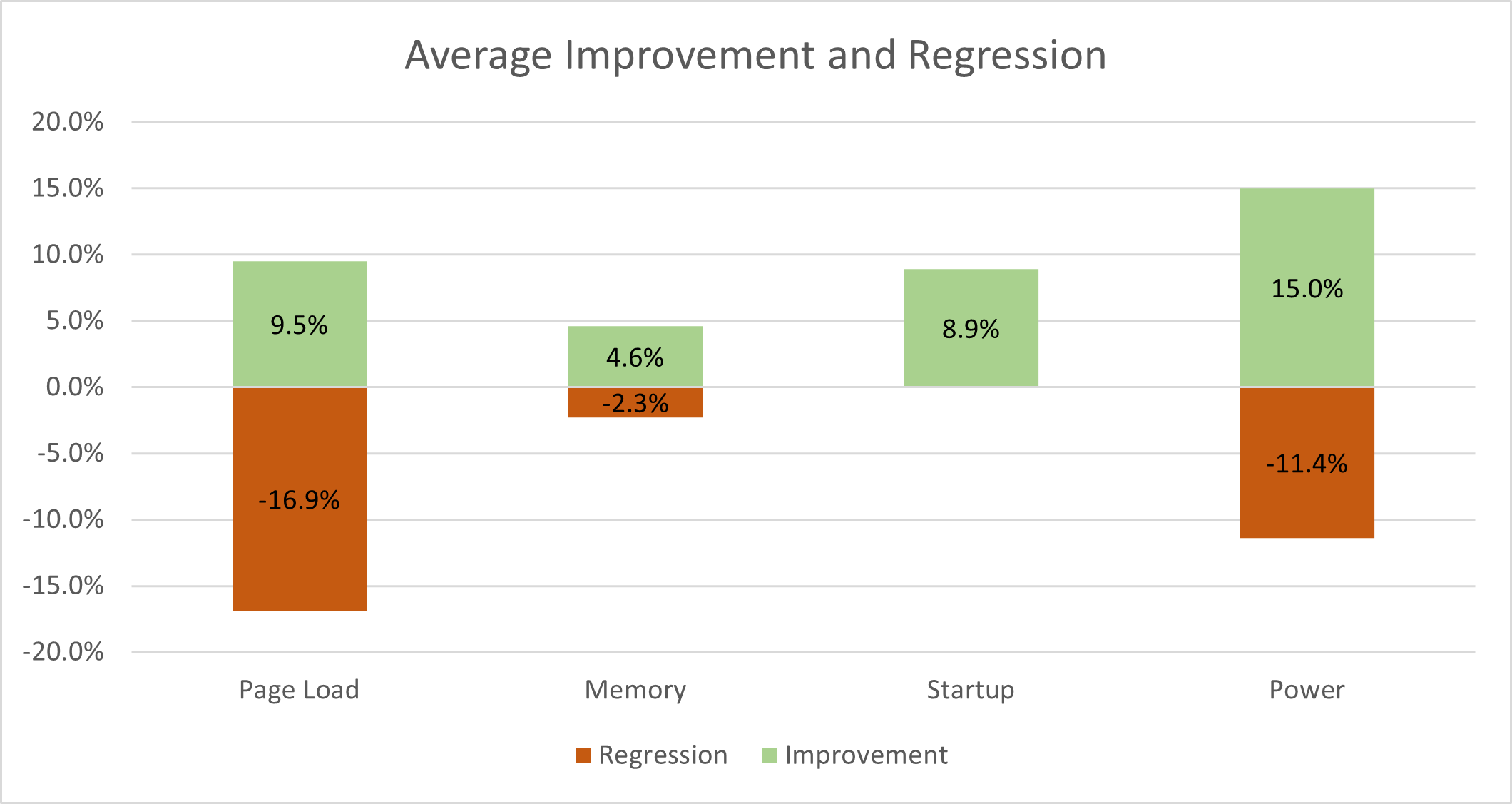
Average improvement and regression chart

If you want to try out Super Duper Secure Mode, you will need to open Microsoft Edge and go to the edge://flags page. Then type “Super Duper Secure Mode” in the search bar, enable this feature, and finally restart the browser.

Super duper secure mode flag

However, keep in mind that the Super Duper Secure Mode is an experimental feature in Microsoft Edge, and it may break some websites. Norman noted that the company plans to bring this feature to other platforms, including macOS and Android.

In the meantime, Microsoft will keep listening to user feedback to improve this new Super Duper Secure Mode before making it generally available for everyone. “Our hope is to build something that changes the modern exploit landscape and significantly raises the cost of exploitation for attackers. Mitigations have a long history of being bypassed, so we are seeking feedback from the community to build something of lasting value,” Norman said today.


Share This Post:

Share this article:
Tags:
Edge Insider Microsoft Edge
Previous Article New Asus BIOS updates enable TPM 2.0 support ahead of Windows 11’s release Next Article Zoom’s early adoption missteps cost them $85M in class action lawsuit

Related Articles

Nvidia CEO Jensen Huang says demand for Blackwell and Rubin AI chips could reach $1 trillion as AI infrastructure spending grows rapidly.

Nvidia CEO Jensen Huang sees $1 trillion demand for Blackwell and Rubin AI chips

March 16, 2026
Nvidia introduces DLSS 5 to improve game realism with generative AI

Nvidia introduces DLSS 5 to improve game realism with generative AI

March 16, 2026
Dictionary Publisher Files Copyright Lawsuit Against OpenAI

Dictionary Publisher Files Copyright Lawsuit Against OpenAI

March 16, 2026

Leave a Comment Cancel reply

Your email address will not be published. Required fields are marked *

Recent Posts

  • Nvidia CEO Jensen Huang sees $1 trillion demand for Blackwell and Rubin AI chips
  • Nvidia introduces DLSS 5 to improve game realism with generative AI
  • Dictionary Publisher Files Copyright Lawsuit Against OpenAI
  • Shopify exec says AI shopping agents are the future of e-commerce
  • WhatsApp beta introduces guest chats for messaging without an account

Recent Comments

No comments to show.
OnMSFT.com

The Tech News Site

Categories

  • Windows
  • Surface
  • Xbox
  • How-To
  • OnPodcast
  • Gaming
  • Edge
  • Teams

Recent Posts

  • Nvidia CEO Jensen Huang sees $1 trillion demand for Blackwell and Rubin AI chips
  • Nvidia introduces DLSS 5 to improve game realism with generative AI
  • Dictionary Publisher Files Copyright Lawsuit Against OpenAI
  • Shopify exec says AI shopping agents are the future of e-commerce
  • WhatsApp beta introduces guest chats for messaging without an account

Quick Links

  • About OnMSFT.com
  • Contact OnMSFT
  • Join Our Team
  • Privacy Policy
© 2010–2026 OnMSFT.com LLC. All rights reserved.
About OnMSFT.comContact OnMSFTPrivacy Policy
