Skip to content
OnMSFT.com
  • Home
  • About
  • Contact
  • Windows
  • Surface
  • Xbox
  • How-To
  • OnPodcast
  • Edge
  • Teams
  • Gaming
Menu
  • Home
  • About
  • Contact
  • Windows
  • Surface
  • Xbox
  • How-To
  • OnPodcast
  • Edge
  • Teams
  • Gaming
  1. Home
  2. News
  3. Microsoft announces big updates for Yammer, rolls out new Yammer tab for Teams

Microsoft announces big updates for Yammer, rolls out new Yammer tab for Teams

Rabia Noureen Rabia Noureen
January 12, 2021
2 min read

Microsoft announced some important updates for its enterprise collaboration tool, Yammer, yesterday. These new Yammer experiences are designed to enhance employee engagement across Microsoft 365 and make corporate communications more impactful.

The first new feature coming soon to Yammer is the ability to share SharePoint pages with Yammer communities. With this feature, users will be able to create new posts, polls, questions, and praise their colleagues directly from SharePoint pages. The company has also introduced the full fidelity Yammer publishing experiences. This should allow users to add rich text and images to their Yammer content and customize it according to their needs.

thumbnail image 1 of blog post titled New Year, new experiences rolling out for Yammer

Next up, the company has started rolling out a new Yammer tab within Microsoft Teams. The update brings the new Yammer experiences, including modern styling and features for Teams users. In addition, Yammer will add the ability to use the new embed function for adding the new styling and capabilities to a webpage.

thumbnail image 3 of blog post titled New Year, new experiences rolling out for Yammer

Yammer has picked up a visual redesign for hashtags and topics. As a part of this redesign effort, users will now be able to open a community search results page by click on a specific hashtag. Furthermore, Yammer will soon let users post a hashtag without automatically adding a topic. This feature will be generally available later this month. You can check out the blog post to learn more about upcoming updates.
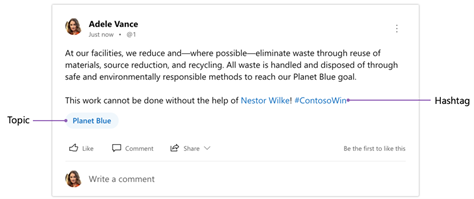
thumbnail image 1 of blog post titled Topics and Hashtags in Yammer

Yammer’s improved virtual event viewing experience is also available from today. This update allows users to collapse pinned conversations to focus on new conversations. Users will now be able to view conversation threads in a brand new feed. Moreover, Yammer has added a side-by-side viewer to make it easier to engage in a conversation while watching the video.

thumbnail image 4 of blog post titled New Year, new experiences rolling out for Yammer

Last but not least, Microsoft has announced its plans to ship some updates to insights for conversations and events and new Yammer features in the coming months. Meanwhile, the Yammer team is working to improve the integration between Yammer, Microsoft Teams, and SharePoint.

It is worth noting that some of these new Yammer experiences are starting to roll out now for Microsoft 365 subscribers, and the rest should be available to users around the globe in the next few months.


Share This Post:

Tags: Microsoft Teams | Yammer
Share this article:
Tags:
Microsoft Teams Yammer
Previous Article Star Wars Jedi: Fallen Order is now optimized for Xbox Series X|S consoles Next Article Bethesda is working on a new Indiana Jones game from Wolfenstein developer MachineGames

Related Articles

Chrome and Gemini icons representing Gemini Live voice assistant integration in Chrome

Chrome tests Gemini Live voice assistant in a floating overlay panel

March 14, 2026

Chrome’s Organizer feature may sync Gemini and AI conversations across devices

March 14, 2026

After Chrome, Edge tests launching the browser automatically when you sign into Windows

March 13, 2026

Leave a Comment Cancel reply

Your email address will not be published. Required fields are marked *

Recent Posts

  • Chrome tests Gemini Live voice assistant in a floating overlay panel
  • Chrome’s Organizer feature may sync Gemini and AI conversations across devices
  • After Chrome, Edge tests launching the browser automatically when you sign into Windows
  • iPhone Fold Latest Rumors: Display, Cameras, RAM and Price Details Revealed
  • Samsung fears first mobile operating loss due to memory price surge

Recent Comments

No comments to show.
OnMSFT.com

OnMSFT.com covers Microsoft news, reviews, and how-to guides. Formerly known as WinBeta, we have been your source for Microsoft news since 1998.

Categories

  • Windows
  • Surface
  • Xbox
  • How-To
  • OnPodcast
  • Gaming
  • Edge
  • Teams

Recent Posts

  • Chrome tests Gemini Live voice assistant in a floating overlay panel
  • Chrome’s Organizer feature may sync Gemini and AI conversations across devices
  • After Chrome, Edge tests launching the browser automatically when you sign into Windows
  • iPhone Fold Latest Rumors: Display, Cameras, RAM and Price Details Revealed
  • Samsung fears first mobile operating loss due to memory price surge

Quick Links

  • About OnMSFT.com
  • Contact OnMSFT
  • Join Our Team
  • Privacy Policy
© 2010–2026 OnMSFT.com LLC. All rights reserved.
About OnMSFT.comContact OnMSFTPrivacy Policy
