Skip to content
OnMSFT.com
  • Home
  • About
  • Contact
  • Windows
  • Surface
  • Xbox
  • How-To
  • OnPodcast
  • Edge
  • Teams
  • Gaming
Menu
  • Home
  • About
  • Contact
  • Windows
  • Surface
  • Xbox
  • How-To
  • OnPodcast
  • Edge
  • Teams
  • Gaming
  1. Home
  2. News
  3. Here’s what’s new in Microsoft 365 this week: Group chat message copy links in Teams

Here’s what’s new in Microsoft 365 this week: Group chat message copy links in Teams

Ron Ron
June 16, 2023
2 min read

In this article

  • Outlook to replace Mail and Calendar next year
  • Group chat message copy links are now available
  • Navigation Layout Options in OneNote Win32
  • Present a Local File From PowerPoint app to PowerPoint Live in Teams

It’s Friday once more, which means it’s time for our weekly recap, where we give you a comprehensive roundup of everything new announced as coming to the Microsoft 365 suite. Here’s everything you need to know:

Outlook to replace Mail and Calendar next year

Microsoft announced that beginning in September 2024 the new Outlook app will replace Mail and Calendar in Windows.

Group chat message copy links are now available

Teams users will soon be able to create and share links to specific messages within a group chat. The feature tagged 122522 in the Microsoft 365 Roadmap is designed to help enhance communication and better organization in group chats.

The feature is expected to start rolling out to users in early July and should ship to general availability by the end of August.

Navigation Layout Options in OneNote Win32

Microsoft is making it easier for OneNote users to hide horizontal section tabs and streamline the user experience via the new vertical tabs feature. The feature tagged 100492 in the Microsoft 365 Roadmap is already available.

It’s worth noting that users running the Win32 client of OneNote will also have the option to change their layout options. Also, if you recently installed Win32 on your device, this new layout option will be enabled by default.

Present a Local File From PowerPoint app to PowerPoint Live in Teams

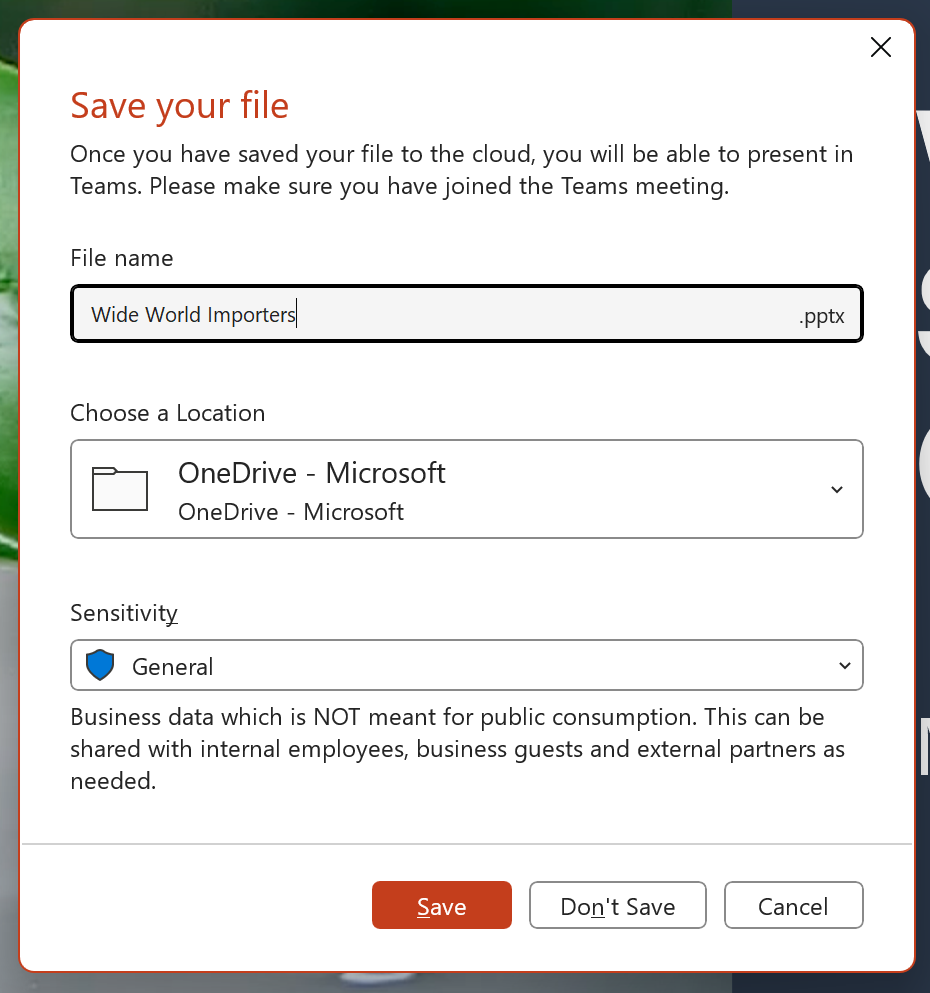
Microsoft has announced that it will be shipping the “Present in Teams” button in the PowerPoint app to the PowerPoint files that are not stored in Microsoft 365 Clouds. The feature 117477 in the Microsoft 365 Roadmap can be used to make presentations via PowerPoint Live in Teams meetings.
RW15qZY?ver=a265

You’ll need to hit the “Present in Teams” button which will direct you to the Save As dialog to store the file to the Microsoft 365 Cloud. Once you’ve saved the file, it will be automatically triggered to present the file in a Teams meeting. The feature is rolling out to the PowerPoint app for Windows in July and should ship to general availability by late July.

That’s it for this week, folks. Be sure to let us know which feature you anticipate in the comments below.

Featured Image via Bing Image Creator
Related

Share this article:
Previous Article New Outlook for Windows to replace Mail and Calendar apps in Windows in September 2024 Next Article Microsoft news recap: purchase spare parts for Surface devices from Microsoft Store, Bing Image Creator images watermarked, and more

Related Articles

What Is NemoClaw and How Does It Work?

March 21, 2026
Moore Threads v330.140 driver adds MTVSR AI video upscaling for real-time playback, improving video quality, not gaming performance.

Moore Threads introduces MTVSR video upscaling in v330.140 driver update

March 21, 2026
MINISFORUM MS-A2 update adds new Ryzen 9 8945HX tier

MINISFORUM MS-A2 update adds new Ryzen 9 8945HX tier

March 21, 2026

Leave a Comment Cancel reply

Your email address will not be published. Required fields are marked *

Recent Posts

  • What Is NemoClaw and How Does It Work?
  • Moore Threads introduces MTVSR video upscaling in v330.140 driver update
  • MINISFORUM MS-A2 update adds new Ryzen 9 8945HX tier
  • Thermal Grizzly releases Mycro Pro RGB CPU blocks with built-in filter
  • Elon Musk Guilty of Misleading Twitter Shareholders in Acquisition Dispute

Recent Comments

No comments to show.
OnMSFT.com

The Tech News Site

Categories

  • Windows
  • Surface
  • Xbox
  • How-To
  • OnPodcast
  • Gaming
  • Edge
  • Teams

Recent Posts

  • What Is NemoClaw and How Does It Work?
  • Moore Threads introduces MTVSR video upscaling in v330.140 driver update
  • MINISFORUM MS-A2 update adds new Ryzen 9 8945HX tier
  • Thermal Grizzly releases Mycro Pro RGB CPU blocks with built-in filter
  • Elon Musk Guilty of Misleading Twitter Shareholders in Acquisition Dispute

Quick Links

  • About OnMSFT.com
  • Contact OnMSFT
  • Join Our Team
  • Privacy Policy
© 2010–2026 OnMSFT.com LLC. All rights reserved.
About OnMSFT.comContact OnMSFTPrivacy Policy

