
Google’s latest Gemma 4 models now run efficiently on NVIDIA RTX GPUs, bringing faster local AI performance and stronger support for agent-based workflows across everyday devices, workstations, and edge systems, while reducing reliance on cloud processing.
NVIDIA confirmed the update in its latest announcement, highlighting how this collaboration with Google improves how developers deploy open models across different hardware setups.
“Open models are driving a new wave of on-device AI, extending innovation beyond the cloud to everyday devices.”
— NVIDIA
That shift shows up clearly in Gemma 4, which focuses on running AI locally while still handling complex workloads like reasoning, coding, and multimodal tasks without heavy infrastructure.
Gemma 4 Models Built for Local AI
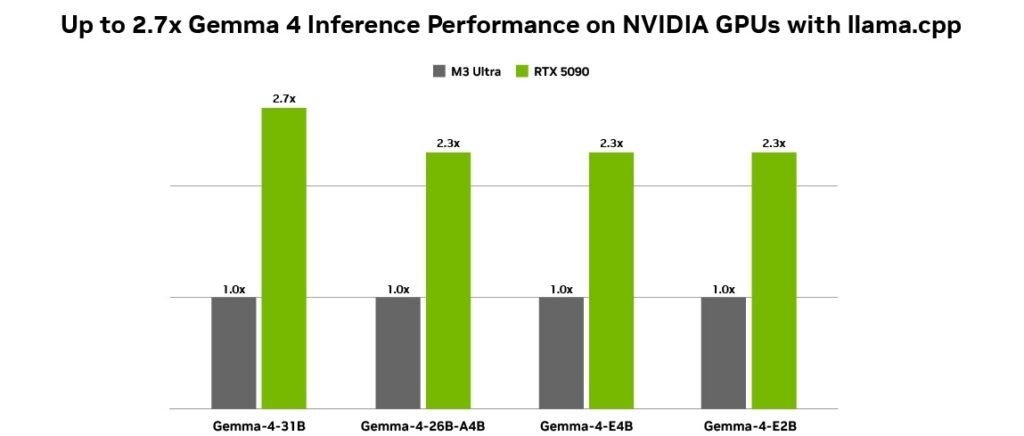
Google designed the Gemma 4 lineup to scale across multiple environments, starting from small edge devices to high-performance GPUs, while maintaining strong efficiency and speed across all variants.
The model lineup includes:
- E2B and E4B models for low-latency, offline use on edge devices like Jetson modules
- 26B and 31B models for advanced reasoning, coding, and agent workflows
- Multimodal support for text, images, video, and audio inputs in a single prompt
- Multilingual capability with support for 35+ languages and training across 140+ languages
These capabilities allow developers to run AI tasks directly on local machines, which improves response time and enables better use of real-time context from files and apps.
Optimized for RTX and Local Workflows
NVIDIA optimized Gemma 4 for its RTX GPUs using Tensor Cores and the CUDA stack, which improves inference speed and reduces latency during execution, especially in tools like llama.cpp and Ollama.
“Designed for this shift, Google’s latest additions to the Gemma 4 family introduce a class of small, fast and omni-capable models built for efficient local execution.”
— NVIDIA
The setup works across RTX PCs, workstations, DGX Spark systems, and Jetson devices, which means developers can deploy the same models without heavy changes or extra optimization.
How to Run Gemma 4 Locally
Developers can start using Gemma 4 with simple tools that already support local AI deployment:
- Install Ollama to run models directly on your system
- Use llama.cpp with GGUF checkpoints for optimized inference
- Fine-tune models using Unsloth Studio with quantized versions
This setup supports workflows where AI agents access local data, automate tasks, and run continuously without sending data to external servers.
What This Means for AI Development
Local agentic AI continues to grow as developers build assistants that work directly with personal files, apps, and workflows, and Gemma 4 fits into this shift by combining compact design with strong performance on widely available RTX hardware.
That combination gives developers a practical way to build faster, always-on AI systems that run closer to the user while keeping full control over data and performance.