

Google continues to work on Gemini inside Chrome. The latest Chrome Canary for Android now includes a setting called “Let Chrome browse for you.”
The description says Gemini can work in your tabs and complete tasks that you give it. The option appears inside the Gemini in Chrome settings page. Chrome still does not activate the feature on Android.
Chrome places the toggle alongside other permissions that control how Gemini interacts with the browser. The page lists options for precise location, sharing the current tab by default, Gemini Apps activity, and connected apps management.
These controls determine what information Gemini can access when users start a conversation in Chrome. The new toggle gives Gemini permission to operate inside open tabs.
Users can find the setting in Chrome by navigating to Settings > Gemini > Let Chrome browse for you.
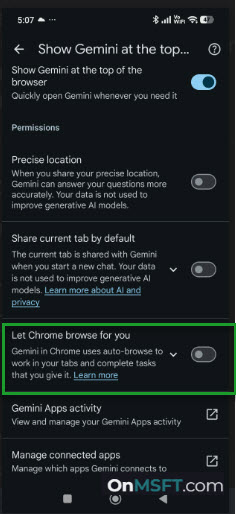
A recent Chromium Gerrit change with the message “[GlicSettings] Add Auto Browse Entry” adds this option to Chrome’s Android settings. The change introduces the toggle inside the Gemini settings section.
Google introduced the Gemini feature in Chrome that completes tasks across webpages instead of only answering questions. On desktop, Chrome is also preparing ways to surface Gemini activity inside the browser, such as the upcoming Projects Panel that can track Gemini and AI Mode activity.
Gemini can search sites, open pages, compare information across sources, and complete tasks that involve several steps.
Google currently offers this feature only on desktop Chrome and restricts access to certain paid Gemini tiers in the United States.
Canary version of Chrome now includes the settings entry, though the feature does not activate on Android yet.
Chrome often adds interface controls early. The new toggle shows that Chrome for Android already includes settings for Gemini browsing tasks.