

Chrome for Android is getting a new feature that lets users continue their browsing on nearby devices.
Android 17 includes a system called Handoff, which lets apps continue tasks across devices, as explained in Google’s documentation. As Google explains, “Handoff lets users start an app activity on one device and continue it on another.
Similar features already exist on platforms like Apple Handoff. Users can move tasks between devices, such as an iPhone and a Mac. On Windows, tools like Microsoft Phone Link provide basic cross-device features between Android phones and PCs.
It runs in the background and shows tasks from nearby devices through the launcher or taskbar.
These tasks can come from apps like Chrome.
Google introduced Handoff in Android 17 beta, and Chrome is now adding support for it. In Chrome, a recent commit adds support for “Cross-device task handoff,” behind a flag.
The description reads:
“Allows users to pick up where they left off in Chrome by transferring tasks and states to nearby devices.”
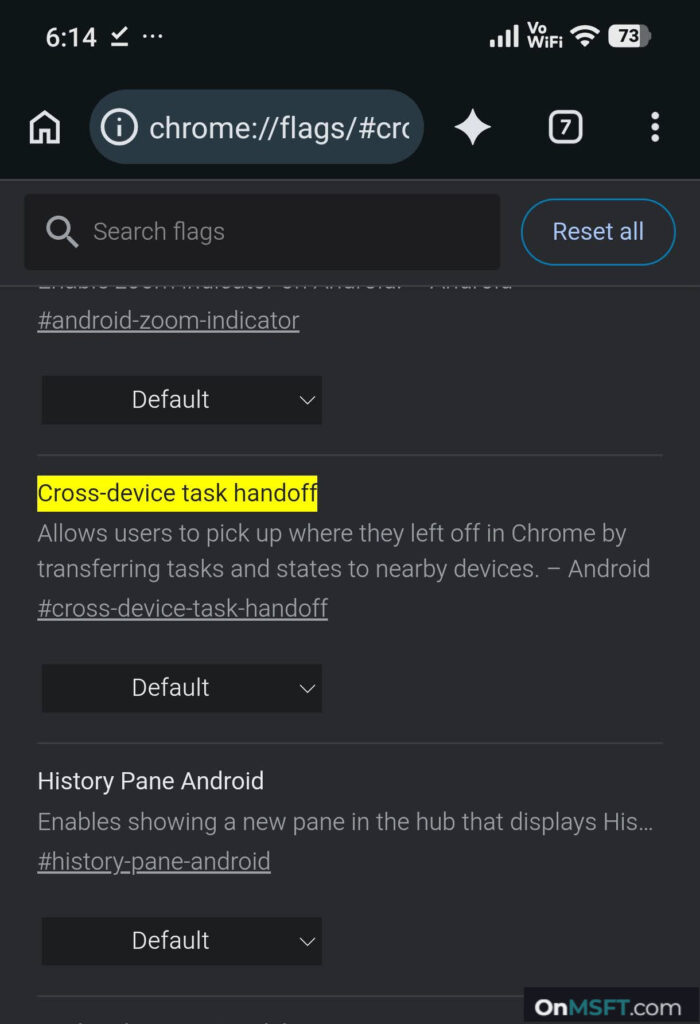
The feature lets users move browsing activity between devices while keeping the session state.
It works with Android 17’s Handoff system, where apps can share activity between nearby devices linked to the same account.
Apps must support Handoff to share an activity.
When Chrome is available on the receiving device, it can open the same activity directly.
If it’s not available, Android can fall back to a web version of the task in the browser.
Both devices need Android 17+ and the same Google account.
Users can start a page or task on their phone and continue it on another device without searching again.
The exact details on what state transfers, such as scroll position or form data, are not clear at this stage.
The feature is still in development, and there are no settings for it yet. It is not clear how much of the browsing state carries over. More details may come through Android 17 beta builds.