Skip to content
OnMSFT.com
  • Home
  • About
  • Contact
  • Windows
  • Surface
  • Xbox
  • How-To
  • OnPodcast
  • Edge
  • Teams
  • Gaming
Menu
  • Home
  • About
  • Contact
  • Windows
  • Surface
  • Xbox
  • How-To
  • OnPodcast
  • Edge
  • Teams
  • Gaming
  1. Home
  2. Microsoft / office 365
  3. Microsoft Teams will let users turn off message previews in desktop notifications next month

Microsoft Teams will let users turn off message previews in desktop notifications next month

Rabia Noureen Rabia Noureen
September 15, 2020
1 min read

In July, we first heard that Microsoft is working on a new privacy feature that will allow users to turn off message previews in toast notifications in Microsoft Teams. Now, the company has announced via the Microsoft 365 Admin Center that the change will begin rolling out in early October. 

With this new functionality, users will get better control over privacy by changing their settings to disable chat notification previews during Teams meetings. When the feature rolls out, users will be able to access the new setting “Show message preview” under the Notifications section. Keep in mind that it will be an optional feature, and the users’ setting will be respected across all notifications on Teams clients.
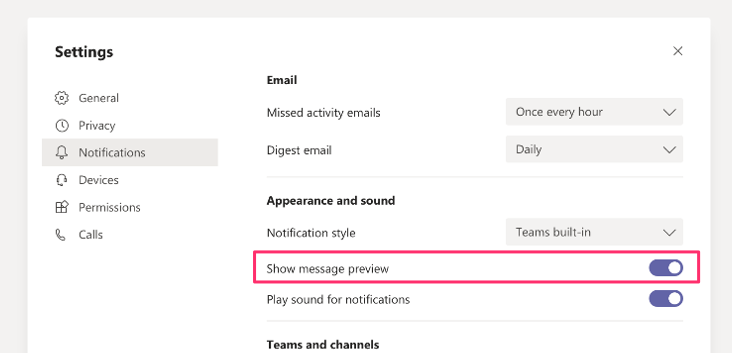
Teams notification settings

Moreover, Microsoft Teams users will be able to configure native OS notifications on Windows and macOS next month. According to a new message in the Microsoft 365 Admin Center, the company has postponed the release date for the new notification experience from the end of September to mid-October 2020. Microsoft has quietly updated the Microsoft 365 Roadmap item earlier this month to reflect the updated timeline. In case you missed, it the feature is currently in preview, and you can check out our separate post for more details. 

Share This Post:

Tags: Microsoft | Microsoft 365 | Microsoft Teams | Office 365
Share this article:
Tags:
Microsoft Microsoft 365 Microsoft Teams Office 365
Previous Article Top 8 tips and tricks for using Microsoft Whiteboard Next Article Yammer adds Reactions, rolling out starting today

Related Articles

Intel Panther Lake laptops see major price hikes due to component shortages, while Apple MacBook M5 models continue with unchanged pricing globally.

Intel Laptop Price Increase Hits Panther Lake Models, Apple MacBook M5 Stays Stable

April 5, 2026
State of Decay 3 Playtests Confirmed With Mutated Zombies and Co-op

State of Decay 3 Playtests Confirmed With Mutated Zombies and Co-op

April 5, 2026
Starfield launches on PS5 with 4K visual mode, 60FPS performance option, DualSense features, and new DLC available at release for players

Starfield Launches on PS5 With Two Modes and Full DualSense Support

April 5, 2026

Leave a Comment Cancel reply

Your email address will not be published. Required fields are marked *

Recent Posts

  • Intel Laptop Price Increase Hits Panther Lake Models, Apple MacBook M5 Stays Stable
  • State of Decay 3 Playtests Confirmed With Mutated Zombies and Co-op
  • Starfield Launches on PS5 With Two Modes and Full DualSense Support
  • ASUS Accused of Failing to Fix Laptop After 10 RMAs, User Denied 11th Request
  • New Rowhammer Attacks Turn NVIDIA GPUs Into a System-Level Security Risk

Recent Comments

  1. XxRIVTYxX on Intel Says It Tried to Help Before Crimson Desert Dropped Arc Support
  2. Gaurav Kumar on Chrome Prepares Nudge to ‘Move Tabs to the Side’ as Vertical Tabs Near Release
OnMSFT.com

The Tech News Site

Categories

  • Windows
  • Surface
  • Xbox
  • How-To
  • OnPodcast
  • Gaming
  • Edge
  • Teams

Recent Posts

  • Intel Laptop Price Increase Hits Panther Lake Models, Apple MacBook M5 Stays Stable
  • State of Decay 3 Playtests Confirmed With Mutated Zombies and Co-op
  • Starfield Launches on PS5 With Two Modes and Full DualSense Support
  • ASUS Accused of Failing to Fix Laptop After 10 RMAs, User Denied 11th Request
  • New Rowhammer Attacks Turn NVIDIA GPUs Into a System-Level Security Risk

Quick Links

  • About OnMSFT.com
  • Contact OnMSFT
  • Join Our Team
  • Privacy Policy
© 2010–2026 OnMSFT.com LLC. All rights reserved.
About OnMSFT.comContact OnMSFTPrivacy Policy

