Skip to content
OnMSFT.com
  • Home
  • About
  • Contact
  • Windows
  • Surface
  • Xbox
  • How-To
  • OnPodcast
  • Edge
  • Teams
  • Gaming
Menu
  • Home
  • About
  • Contact
  • Windows
  • Surface
  • Xbox
  • How-To
  • OnPodcast
  • Edge
  • Teams
  • Gaming
  1. Home
  2. How-to
  3. How to enable Internet Explorer mode on Microsoft Edge

How to enable Internet Explorer mode on Microsoft Edge

admin admin
February 20, 2023
3 min read

\n

\n

\n

In this article

\n

\n

  • How to enable Internet Explorer mode on Microsoft Edge
  • How to launch legacy websites using IE mode on Microsoft Edge
  • Get your groove on with IE mode on Edge

\n

After almost 27 years, Microsoft has finally pulled the plug on Internet Explorer. A move that hasn’t been well received, especially by enterprise users who depended on the browser to leverage its Internet Explorer Mode feature to visit older websites that aren’t supported by more modern browsers.

\n

The company has been urging users to transition from Internet Explorer in favor of its browser Microsoft Edge, and even incorporated Internet Explorer mode to make it seamless. Microsoft has indicated that it is more secure and runs well with Windows 11.

\n

\n

\n

\n

\n

\n

\n

\n

\n

\n

\n

\n

\n

\n

With this feature, users will be able to access both modern and legacy websites within Edge. It has also created a new avenue that allows users to continue using apps that only run on IE mode. This cancels out the need for developers to rewrite the apps, thus allowing them to save on cost.

\n

Besides, the Edge Chromium compatibility mode features most of Internet Explorer’s capabilities such as document modes, security zone policies, Internet Explorer F12 developer tools, and more. Though it doesn’t support navigation menu policies, Internet Explorer toolbars, or Edge F12 developer tools.

\n

If you still need IE Mode to enhance your productivity, you’re in the right place. We’ll walk you through the steps you need to enable it. Here’s how to do it:

\n

How to enable Internet Explorer mode on Microsoft Edge

\n

    \n

  1. Launch your Microsoft Edge browser and click on the Ellipsis on the top-right of the menu icon.
  2. \n

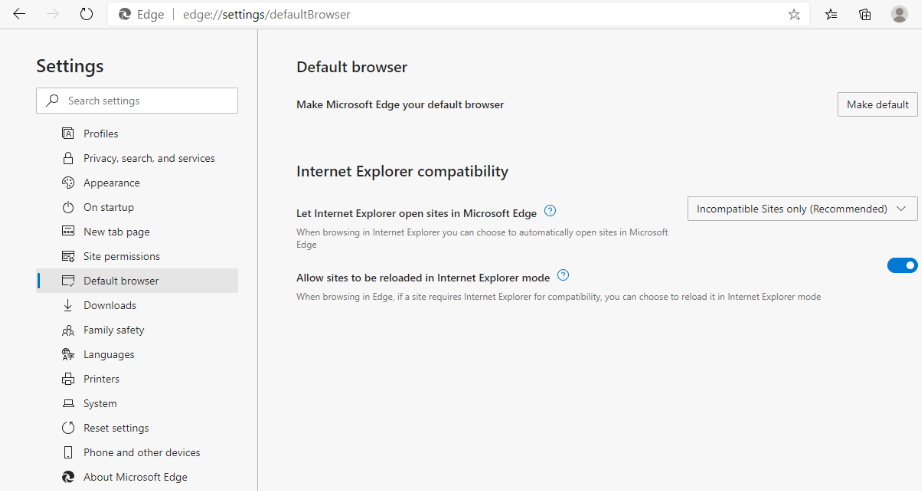
  3. Click on Settings and select the Default browser option.
  4. \n

  5. Under the Internet Explorer compatibility option, head to the Allow sites to be reloaded in Internet Explorer mode section, click on Allow and hit the Restart button to save the changes.enable Internet explorer on Microsoft Edge
  6. \n

\n

At this point, you should now be able to access IE mode in Microsoft Edge. We invite you to check out our separate guide that will assist you to change your default browser in Windows 11. It is worth considering setting Microsoft Edge as your default browser, especially if you rely on IE mode a lot.

\n

How to launch legacy websites using IE mode on Microsoft Edge

\n

    \n

  1. Launch Microsoft Edge and click on the Ellipsis in the top-right corner.
  2. \n

  3. Select the Reload in Internet Explorer mode option.
  4. \n

\n

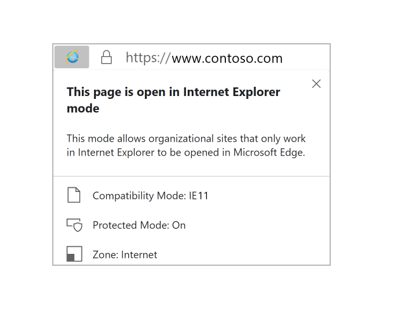
Microsoft Edge will display an Internet Explorer logo on the left of the address bar to signify that the feature has been enabled. You should now be able to open legacy websites or run apps that are dependent on IE mode.

\n

\n

\n

\n

\n

\n

\n
\n

\n

\n

\n

\n

\n

\n

IE logo indicator

\n

It is worth noting that only the sites you’ve configured to use IE mode will leverage this capability, the rest will continue to run on Microsoft Edge. Microsoft also has a video detailing how you can use the IE mode button in Edge, check it out below:

\n

\n

Get your groove on with IE mode on Edge

\n

Despite Microsoft retiring Internet Explorer, you should be able to visit legacy websites and use apps dependent on IE mode in Microsoft Edge. The feature is limited to Windows users, meaning Mac and Linux users can’t access it.

\n

Microsoft plans to retire this feature in 2029 since most IE-based apps would’ve hit the end of support and transitioned to up-to-date technology that is supported by modern browsers.

\n

Do you use the IE mode feature in Microsoft Edge? Share your experience with us below.

\n

\n

\n

\n

\n

\n

\n

\n

\n

\n

\n

\n

\n

\n\n

Share this article:
Previous Article Meta launches Meta Verified to help creators “establish their presence” Next Article What’s going on with Outlook.com spam?

Related Articles

43 Microsoft Edge keyboard shortcuts to remember for stylish and speedy web surfing

October 31, 2023

How to use accessibility features in Microsoft 365 like Narrator, Read aloud and Voice Search easily

October 30, 2023

How to use Windows Backup on Windows 11 for efficient data protection

October 26, 2023

Leave a Comment Cancel reply

Your email address will not be published. Required fields are marked *

Recent Posts

  • PowerToys 0.75 released; Environment Variables editor is here
  • Former Halo developer Bungie announces layoffs in wake of game delays
  • Siemens and Microsoft partner to bring GenAI to industries worldwide
  • 43 Microsoft Edge keyboard shortcuts to remember for stylish and speedy web surfing
  • Here is what’s coming to (and leaving) Xbox Game Pass soon

Recent Comments

No comments to show.

Archives

  • October 2023
  • September 2023
  • August 2023
  • July 2023
  • June 2023
  • May 2023
  • April 2023
  • March 2023
  • February 2023
  • January 2023
  • December 2022
  • November 2022
  • October 2022
  • September 2022
  • August 2022
  • July 2022
  • June 2022
  • May 2022
  • April 2022
  • March 2022
  • February 2022
  • January 2022
  • December 2021
  • November 2021
  • October 2021
  • September 2021
  • August 2021
  • July 2021
  • June 2021
  • May 2021
  • April 2021
  • March 2021
  • February 2021
  • January 2021
  • December 2020
  • November 2020
  • October 2020
  • September 2020
  • August 2020
  • July 2020
  • June 2020
  • May 2020
  • April 2020
  • March 2020
  • February 2020
  • January 2020
  • December 2019
  • November 2019
  • October 2019
  • September 2019
  • August 2019
  • July 2019
  • June 2019
  • May 2019
  • April 2019
  • March 2019
  • February 2019
  • January 2019
  • December 2018
  • November 2018
  • October 2018
  • September 2018
  • August 2018
  • July 2018
  • June 2018
  • May 2018
  • April 2018
  • March 2018
  • February 2018
  • January 2018
  • December 2017
  • November 2017
  • October 2017
  • September 2017
  • August 2017
  • July 2017
  • June 2017
  • May 2017
  • April 2017
  • March 2017
  • February 2017
  • January 2017
  • December 2016
  • November 2016
  • October 2016
  • September 2016
  • August 2016
  • July 2016
  • June 2016
  • May 2016
  • April 2016
  • March 2016
  • February 2016
  • January 2016
  • December 2015
  • November 2015
  • October 2015
  • September 2015
  • August 2015
  • July 2015
  • June 2015
  • May 2015
  • April 2015
  • March 2015
  • February 2015
  • January 2015
  • December 2014
  • November 2014
  • October 2014
  • September 2014
  • August 2014
  • July 2014
  • June 2014
  • May 2014
  • April 2014
  • March 2014
  • February 2014
  • January 2014
  • December 2013
  • November 2013
  • October 2013
  • September 2013
  • August 2013
  • July 2013
  • June 2013
  • May 2013
  • April 2013
  • March 2013
  • February 2013
  • January 2013
  • December 2012
  • November 2012
  • October 2012
  • September 2012
  • August 2012
  • July 2012
  • June 2012
  • May 2012
  • April 2012
  • March 2012
  • February 2012
  • January 2012
  • December 2011
  • November 2011
  • October 2011
  • September 2011
  • August 2011
  • July 2011
  • June 2011
  • May 2011
  • April 2011
  • March 2011
  • February 2011
  • January 2011
  • December 2010
  • November 2010
  • October 2010
  • September 2010

Categories

  • Announcements
  • Deals
  • Developer
  • Editorial
  • Feature
  • Feature stories
  • Hero-post
  • Hotdeals
  • How-to
  • Latest news
  • Microsoft / office 365
  • News
  • Office 365
  • Onpodcast
  • Opinion
  • Our featured post
  • Polls
  • Review
  • Reviews
  • Videos
OnMSFT.com

OnMSFT.com covers Microsoft news, reviews, and how-to guides. Formerly known as WinBeta, we have been your source for Microsoft news since 1998.

Categories

  • Windows
  • Surface
  • Xbox
  • How-To
  • OnPodcast
  • Gaming
  • Edge
  • Teams

Recent Posts

  • PowerToys 0.75 released; Environment Variables editor is here
  • Former Halo developer Bungie announces layoffs in wake of game delays
  • Siemens and Microsoft partner to bring GenAI to industries worldwide
  • 43 Microsoft Edge keyboard shortcuts to remember for stylish and speedy web surfing
  • Here is what’s coming to (and leaving) Xbox Game Pass soon

Quick Links

  • About OnMSFT.com
  • Contact OnMSFT
  • Join Our Team
© 2010–2026 OnMSFT.com LLC. All rights reserved.
About OnMSFT.comContact OnMSFT