Skip to content
OnMSFT.com
  • Home
  • About
  • Contact
  • Windows
  • Surface
  • Xbox
  • How-To
  • OnPodcast
  • Edge
  • Teams
  • Gaming
Menu
  • Home
  • About
  • Contact
  • Windows
  • Surface
  • Xbox
  • How-To
  • OnPodcast
  • Edge
  • Teams
  • Gaming
  1. Home
  2. Robo & Kala 2-in 1 Laptop Review: The Surface Pro alternative that’s a solid choice

Robo & Kala 2-in 1 Laptop Review: The Surface Pro alternative that’s a solid choice

admin admin
August 31, 2023
5 min read

\n

\n

\n

In this article

\n

\n

  • Specifications and Design
  • The Experience
  • Bringing it Home

\n

\n

\n

\n

\n

\n

\n

\n

\n

\n

\n

\n

\n

\n

\n

\n

\n

\n

\n

The Good The Not So Good
Great OLED Screen No LTE/5G Options
Good Battery Life Keyboard/Trackpad Could be More Rigid
Amazing Price Kickstand Needs Smoother Corners

\n

\n

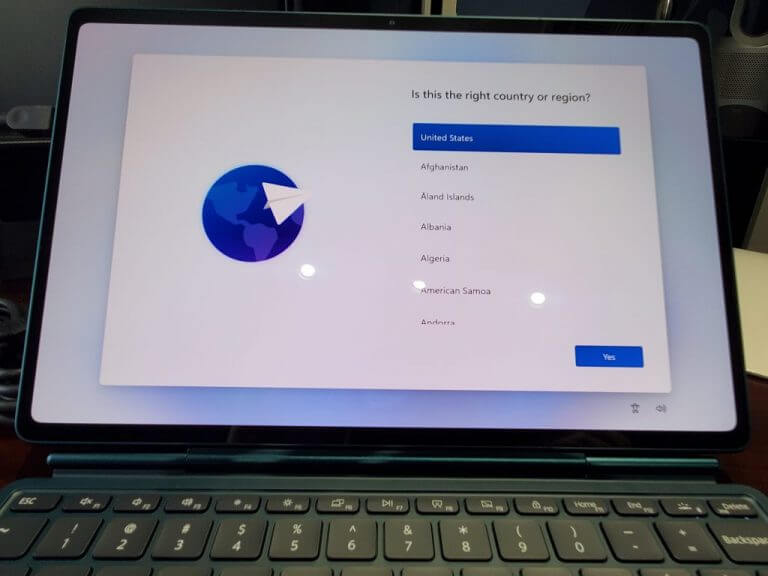
When I think of 2-in-1 tablet form factor devices I automatically think of the Microsoft Surface Pro lineup as most do.  After all, they’ve been at it for ten years.  A few others have tried their take on the form factor, but none have made a dent in the Surface Pro market share.  In researching the form factor out of my interest I ran across a company called Robo & Kala, a name I had never heard of.  They make the little-known “Robo and Kala 2-in-1 Laptop.”  Hang in there, let me tell you a little bit about the device, Microsoft might have someone coming up in the rearview mirror on this one.

\n
20230713 160619

\n

Specifications and Design

\n

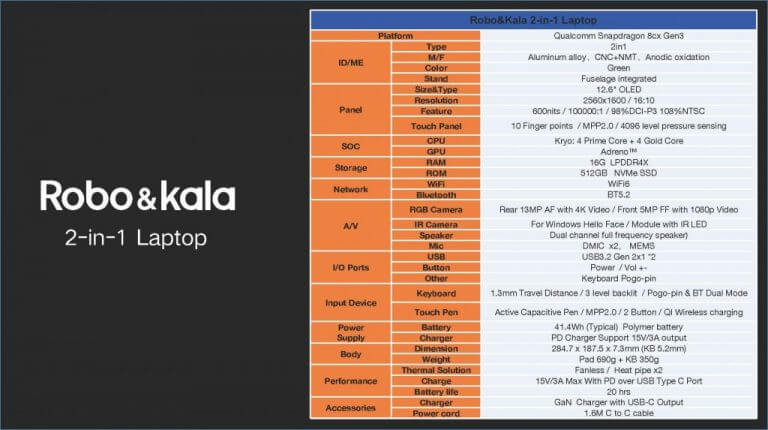
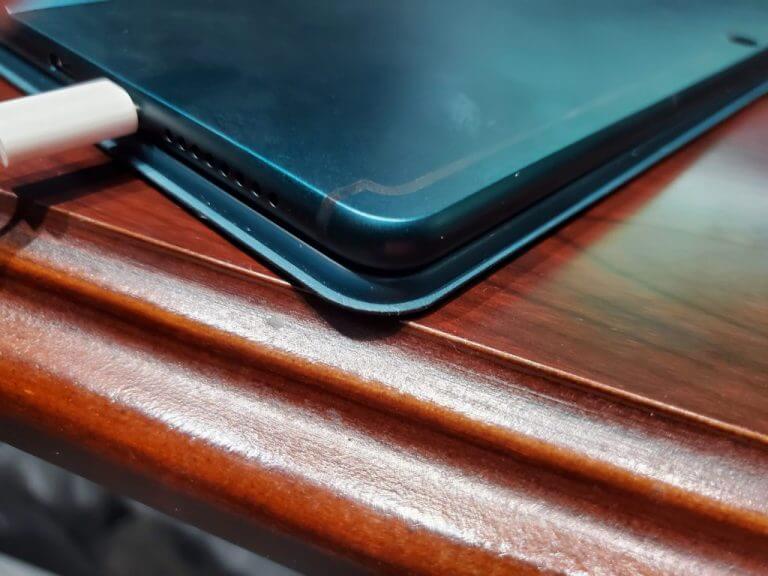
There’s only one model available, so there are no configuration options available.  That being said the specs are top-of-the-line for a Windows on ARM device.  The device is powered by the Snapdragon 8cx Gen3 SoC with 16GB of RAM and a 512GB SSD.  The only color is mint green, and unfortunately, there are no mobile broadband connectivity options, somewhat unusual for an ARM device.  The device is just 7.3mm thick and completing the rear of the device you will find a kickstand that looks very similar to the one used on the Microsoft Surface Pro.  Speaking of the kickstand a minor gripe I had about the device is the rough edges.  It would be easy to scratch the surface of your desk when sliding across it. You do get two full-function USB C ports on the left side, that’s it for I/O.  A 65-watt USB C charger is included in the box.

\n
Specsjpeg

\n

The Experience

\n

Coming in at the $799 price point with the keyboard cover and pen included in the box I believe the entire package does deserve a free pass on a few things.  It’s clear the idea here was to produce a quality device at a reasonable price point with everything included.  I’m willing to give a break to there not being a rubber guard on the kickstand, I’m also willing to give a break on the aluminum chassis being a bit of a fingerprint magnet.  The speakers are serviceable at best with no bass and sounding small.  Watching your favorite video or streaming TV show works well, for anything else, use a good set of Bluetooth headphones.  The 12.6 2K AMOLED display is amazing, the colors are bright, with a resolution of 2560 x 1600 everything is crisp and the text is easy to read.

\n
20230829 204009

\n

The screen is where the Robo & Kala gains points back for some of its shortcomings.  This screen nails it, a quality screen, the part we use the most looks fantastic. The touch screen is responsive, the pen works well enough for basic note-taking, and charges on the right side of the device.  The cameras work well, the front-facing camera is 1080P with Windows Hello built-in,  a nice luxury at this price point.  The rear camera is a 13MP camera capable of 4K.  In my meetings both the front-facing camera and microphones didn’t draw any complaints.

\n

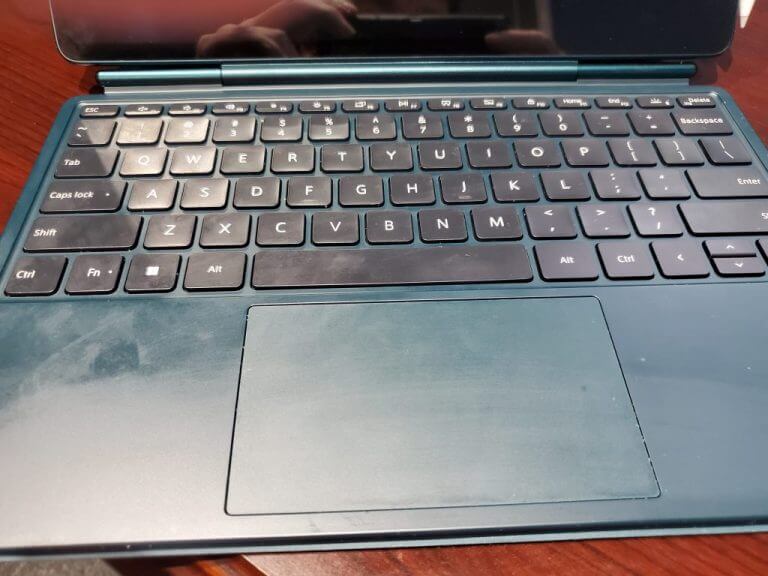
The type cover/keyboard mouse combo has its positives and negatives.  The keyboard is comfortable with large keys, and plenty of space between them, with a short travel distance, which is to be expected.  The trackpad is spacious for a device of this size with a firm clicking surface.  The negative is you really need to be working on a solid surface at all times, or you can click the trackpad from the bottom by accident.  So working on your lap is really not an option. A more rigid keyboard would help here.   Unlike the Microsoft Surface Pro, the keyboard does function as a stand-alone Bluetooth keyboard if desired so you don’t have to be physically connected to the tablet at all times.

\n
20230829 203840

\n

The elephant in the room is still Windows on Arm.  Microsoft still has some work to do here.  Most everyday productivity apps ran well in my testing.  However, you can still tell which apps have been optimized for ARM and which have not.  Microsoft 365 apps for example right lightning quick as they are optimized.  While apps like Google Chrome and Slack run a bit slower.  You’ll notice this in your battery life as well, while 8 hours was the average in my workday at 50 percent brightness if I stuck to optimized apps 10 hours was possible.   Running unoptimized apps would also make the back of the device get warm, which does impact battery life as well.

\n

Bringing it Home

\n

There are no deal-stoppers in the Robo & Kala 2-in-1 laptop.  At a $799 price point that has been as low as $599 when on sale with everything in the box it’s one heck of a deal. Productivity warriors will love it, I do.  Where the unit fell short, such as speaker quality and the keyboard needing to be a bit more rigid I can tolerate those shortcomings at this price point.  Would I like to see them fixed? Yes, but I realize that comes at a cost.  Even if the price was increased to $899 the keyboard was more rigid, and the speakers were a bit better, it’s still more than competitive.  I’d still rather see a mobile broadband option, even if nothing else was improved, again, at a cost, but I think that’s what most people look for in a Windows on ARM experience.  If you want to get a first taste of Windows on ARM without the large upfront investment of the Microsoft Surface Pro 9 5G, the Robo & Kala 2-in-1 laptop is a good way to do that.

\n\n

\n

Robo & Kala 2 in 1 Laptop, 690g Lightweight, Up to 20H Long Battery Life, 12.6’AMOLED Touchscreen, Snapdragon 5nm PC Processor, 16GB RAM, 512GB SSD, WiFi Bluetooth, Win 11, 4K Webcam, Backlit Keyboard

\n

\nRobo & Kala 2 in 1 Laptop, 690g Lightweight, Up to 20H Long Battery Life, 12.6’AMOLED Touchscreen, Snapdragon 5nm PC Processor, 16GB RAM, 512GB SSD, WiFi Bluetooth, Win 11, 4K Webcam, Backlit Keyboard\n

\n

\n

\nDownload\nQR-Code\n

\n

\n

\n

Robo & Kala 2 in 1 Laptop, 690g Lightweight, Up to 20H Long Battery Life, 12.6’AMOLED Touchscreen, Snapdragon 5nm PC Processor, 16GB RAM, 512GB SSD, WiFi Bluetooth, Win 11, 4K Webcam, Backlit Keyboard

\n

\nDeveloper: \nUnknown\n

\n

\nPrice: \nunknown\n\n

\n

\n

\n

\n

Related

\n

Share this article:
Previous Article Xbox Free Play Days: Dead by Daylight, LEGO 2K Drive and Tom Clancy’s Rainbow Six Siege Next Article 4 best tools to repair corrupt files on your Windows PC

Related Articles

PowerToys 0.75 released; Environment Variables editor is here

October 31, 2023

Former Halo developer Bungie announces layoffs in wake of game delays

October 31, 2023

Siemens and Microsoft partner to bring GenAI to industries worldwide

October 31, 2023

Leave a Comment Cancel reply

Your email address will not be published. Required fields are marked *

Recent Posts

  • PowerToys 0.75 released; Environment Variables editor is here
  • Former Halo developer Bungie announces layoffs in wake of game delays
  • Siemens and Microsoft partner to bring GenAI to industries worldwide
  • 43 Microsoft Edge keyboard shortcuts to remember for stylish and speedy web surfing
  • Here is what’s coming to (and leaving) Xbox Game Pass soon

Recent Comments

No comments to show.

Archives

  • October 2023
  • September 2023
  • August 2023
  • July 2023
  • June 2023
  • May 2023
  • April 2023
  • March 2023
  • February 2023
  • January 2023
  • December 2022
  • November 2022
  • October 2022
  • September 2022
  • August 2022
  • July 2022
  • June 2022
  • May 2022
  • April 2022
  • March 2022
  • February 2022
  • January 2022
  • December 2021
  • November 2021
  • October 2021
  • September 2021
  • August 2021
  • July 2021
  • June 2021
  • May 2021
  • April 2021
  • March 2021
  • February 2021
  • January 2021
  • December 2020
  • November 2020
  • October 2020
  • September 2020
  • August 2020
  • July 2020
  • June 2020
  • May 2020
  • April 2020
  • March 2020
  • February 2020
  • January 2020
  • December 2019
  • November 2019
  • October 2019
  • September 2019
  • August 2019
  • July 2019
  • June 2019
  • May 2019
  • April 2019
  • March 2019
  • February 2019
  • January 2019
  • December 2018
  • November 2018
  • October 2018
  • September 2018
  • August 2018
  • July 2018
  • June 2018
  • May 2018
  • April 2018
  • March 2018
  • February 2018
  • January 2018
  • December 2017
  • November 2017
  • October 2017
  • September 2017
  • August 2017
  • July 2017
  • June 2017
  • May 2017
  • April 2017
  • March 2017
  • February 2017
  • January 2017
  • December 2016
  • November 2016
  • October 2016
  • September 2016
  • August 2016
  • July 2016
  • June 2016
  • May 2016
  • April 2016
  • March 2016
  • February 2016
  • January 2016
  • December 2015
  • November 2015
  • October 2015
  • September 2015
  • August 2015
  • July 2015
  • June 2015
  • May 2015
  • April 2015
  • March 2015
  • February 2015
  • January 2015
  • December 2014
  • November 2014
  • October 2014
  • September 2014
  • August 2014
  • July 2014
  • June 2014
  • May 2014
  • April 2014
  • March 2014
  • February 2014
  • January 2014
  • December 2013
  • November 2013
  • October 2013
  • September 2013
  • August 2013
  • July 2013
  • June 2013
  • May 2013
  • April 2013
  • March 2013
  • February 2013
  • January 2013
  • December 2012
  • November 2012
  • October 2012
  • September 2012
  • August 2012
  • July 2012
  • June 2012
  • May 2012
  • April 2012
  • March 2012
  • February 2012
  • January 2012
  • December 2011
  • November 2011
  • October 2011
  • September 2011
  • August 2011
  • July 2011
  • June 2011
  • May 2011
  • April 2011
  • March 2011
  • February 2011
  • January 2011
  • December 2010
  • November 2010
  • October 2010
  • September 2010

Categories

  • Announcements
  • Deals
  • Developer
  • Editorial
  • Feature
  • Feature stories
  • Hero-post
  • Hotdeals
  • How-to
  • Latest news
  • Microsoft / office 365
  • News
  • Office 365
  • Onpodcast
  • Opinion
  • Our featured post
  • Polls
  • Review
  • Reviews
  • Videos
OnMSFT.com

OnMSFT.com covers Microsoft news, reviews, and how-to guides. Formerly known as WinBeta, we have been your source for Microsoft news since 1998.

Categories

  • Windows
  • Surface
  • Xbox
  • How-To
  • OnPodcast
  • Gaming
  • Edge
  • Teams

Recent Posts

  • PowerToys 0.75 released; Environment Variables editor is here
  • Former Halo developer Bungie announces layoffs in wake of game delays
  • Siemens and Microsoft partner to bring GenAI to industries worldwide
  • 43 Microsoft Edge keyboard shortcuts to remember for stylish and speedy web surfing
  • Here is what’s coming to (and leaving) Xbox Game Pass soon

Quick Links

  • About OnMSFT.com
  • Contact OnMSFT
  • Join Our Team
© 2010–2026 OnMSFT.com LLC. All rights reserved.
About OnMSFT.comContact OnMSFT