Skip to content
OnMSFT.com
  • Home
  • About
  • Contact
  • Windows
  • Surface
  • Xbox
  • How-To
  • OnPodcast
  • Edge
  • Teams
  • Gaming
Menu
  • Home
  • About
  • Contact
  • Windows
  • Surface
  • Xbox
  • How-To
  • OnPodcast
  • Edge
  • Teams
  • Gaming
  1. Home
  2. Everything new in Microsoft Teams in December 2022

Everything new in Microsoft Teams in December 2022

Kevin Okemwa Kevin Okemwa
January 4, 2023
3 min read

In this article

  • Chat and collaboration
  • Devices
  • Platform
    • Share This Post

Last year, Microsoft unpacked a ton of neat features to Teams in a bid to enhance the meeting and communication experience in the workplace. In the month of December, the company incorporated new Whiteboard features, ways to clear up your chats, and more to the platform. Here's everything you need to know:

Chat and collaboration

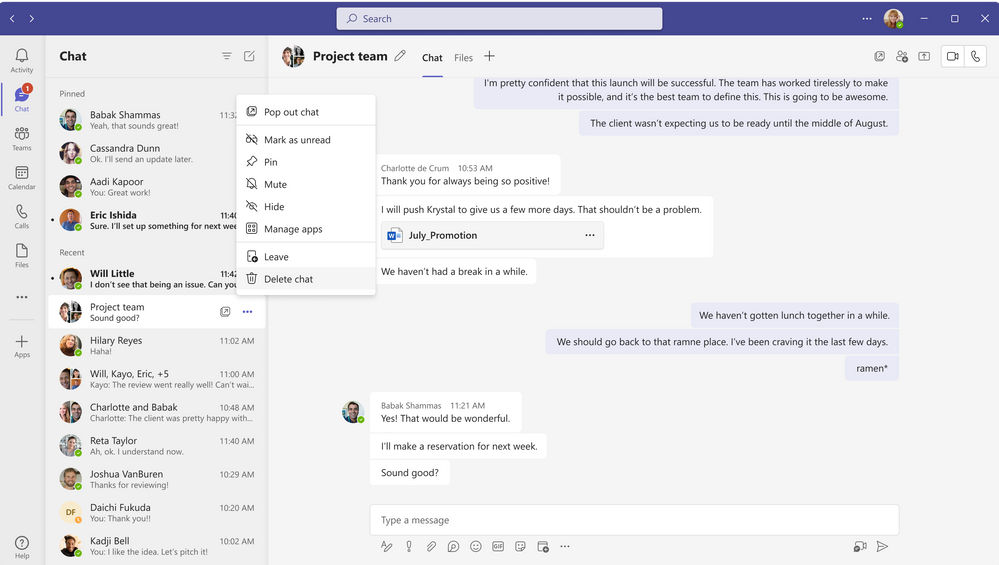
Microsoft has now made it for Teams users to delete and organize their chats. What's more, this feature is user specific meaning that you can delete chats that you no longer find useful without affecting other users that are part of the chat.
thumbnail image 1 of blog post titled What’s New in Microsoft Teams | December 2022

Aside from the enhanced ability to manage your chats, Teams users will also be able to express themselves better with over 800 emojis that have been added. Therefore, you can now apply any emoji as a reaction to chat or channel messages.

Moreover, Microsoft has made it easier to add people to a group chat. Now, you can simply add new participants to the chat with @mention rather than having to navigate to the add-dialog. What's more, you'll have control over how much of the chat history the new participants can access.

Furthermore, Teams chat has been enhanced making it easier for users to initiate conversations. The feature is powered by AI and recommends colleagues based on your previous collaborations. The feature is generally available.

thumbnail image 4 of blog post titled What’s New in Microsoft Teams | December 2022

The resource-specific consent (RSC) permissions model developed for Teams Graph APIs is now available for both the chat and channel scope. This means users can now ask "team owners to consent for a bot to receive user messages across standard group chats without being @mentioned."

And finally, you can now pin up to two other participants' videos for sign language in meetings to enhance their visibility and ultimately make communication better. On top of this, you can also set captions to stay on across all meetings so that you don't miss out on anything.

Devices

With the just released Microsoft Teams Rooms on Android Update 3 (App version: 1449/1.0.96.2022120503), users can leverage the touch-enabled experiences to enhance their meeting and collaboration experience on touch-enabled devices. For instance, the Walk up and use Microsoft Whiteboard feature which lets you initiate whiteboard sessions from any supported displays whenever you want.

thumbnail image 5 of blog post titled What’s New in Microsoft Teams | December 2022

Moreover, users can now easily navigate between a local collaboration experience to an online co-creation space by hitting the Start meeting button on the local Whiteboard screen. This will then kick off an ad hoc meeting and present the Whiteboard already started on the home screen onto the meeting stage. From this point, you can add participants remotely to the meeting, what's more, you can work on the project simultaneously across the same board in real time.

thumbnail image 6 of blog post titled What’s New in Microsoft Teams | December 2022

What's more, the share menu has been redesigned to enhance content sharing while in a meeting. " including Microsoft Whiteboard," says Microsoft. This feature is supported on resource accounts.

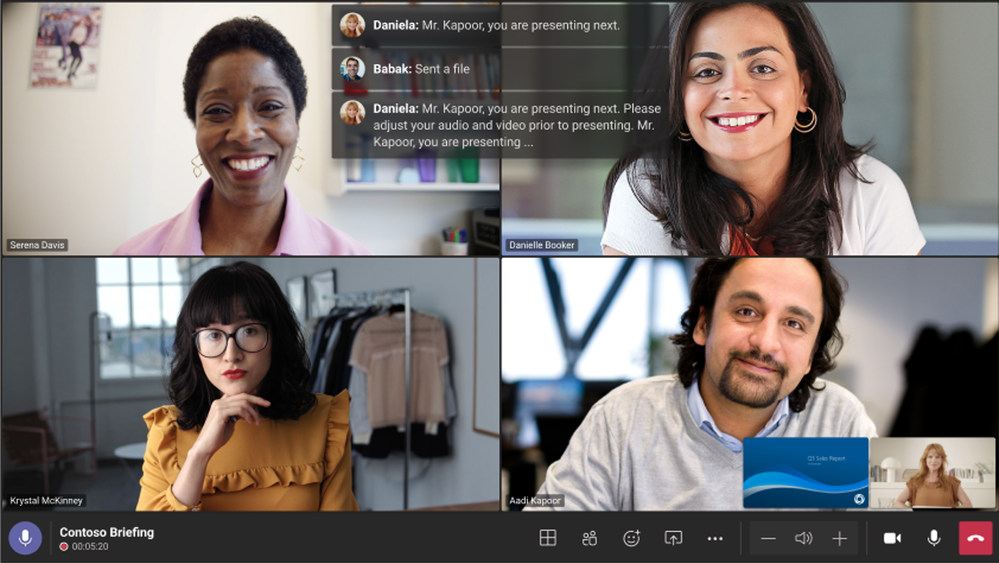
And finally, you'll be able to see chats sent during a Teams meeting on the front-of-room display when using Microsoft Teams Rooms on Android. The messages will be shown as chat bubbles over the current view thus encouraging more engagement while the meeting is in progress.
thumbnail image 9 of blog post titled What’s New in Microsoft Teams | December 2022

Platform

You can now transfer your proof of approval as a PDF to another system. The feature lets Approval creators save a completed approval request to a PDF file and even provides them with an option to print it.

Besides this, Teams users can now set Adobe Acrobat as their default PDF app thus making it easier to "share and review PDFs, collaborate with comments and annotations, easily access PDFs stored in Microsoft SharePoint and Microsoft OneDrive, and more."

That's it for the month of December, while we only hit the key features that made it Teams, there are still plenty of other features nifty features including newly certified devices that we didn't cover like the Neat Bar Pro, Jabra Evolve Buds, and more. Be sure to check out Microsoft's blog for more details. We also invite you to check out November's post in case you missed it.


Share This Post:

  • Everything new in Microsoft Teams in December 2022 - OnMSFT.com - January 4, 2023
  • Everything new in Microsoft Teams in December 2022 - OnMSFT.com - January 4, 2023
  • Everything new in Microsoft Teams in December 2022 - OnMSFT.com - January 4, 2023
  • Everything new in Microsoft Teams in December 2022 - OnMSFT.com - January 4, 2023
Share this article:
Kevin Okemwa
Written by

Kevin Okemwa

Hardworking, young, and full of life. His goal is to make your life easier by deciphering the latest in gadgets and trends. At OnMSFT.com, he covers How-to guides, breaking news, and featured stories.

Previous Article System Shock remake to launch in March according to latest developer update Next Article Busy on Busy setting coming to Microsoft Teams in February

Related Articles

PowerToys 0.75 released; Environment Variables editor is here

October 31, 2023

Former Halo developer Bungie announces layoffs in wake of game delays

October 31, 2023

Siemens and Microsoft partner to bring GenAI to industries worldwide

October 31, 2023

Leave a Comment Cancel reply

Your email address will not be published. Required fields are marked *

Recent Posts

  • PowerToys 0.75 released; Environment Variables editor is here
  • Former Halo developer Bungie announces layoffs in wake of game delays
  • Siemens and Microsoft partner to bring GenAI to industries worldwide
  • 43 Microsoft Edge keyboard shortcuts to remember for stylish and speedy web surfing
  • Here is what’s coming to (and leaving) Xbox Game Pass soon

Recent Comments

No comments to show.

Archives

  • October 2023
  • September 2023
  • August 2023
  • July 2023
  • June 2023
  • May 2023
  • April 2023
  • March 2023
  • February 2023
  • January 2023
  • December 2022
  • November 2022
  • October 2022
  • September 2022
  • August 2022
  • July 2022
  • June 2022
  • May 2022
  • April 2022
  • March 2022
  • February 2022
  • January 2022
  • December 2021
  • November 2021
  • October 2021
  • September 2021
  • August 2021
  • July 2021
  • June 2021
  • May 2021
  • April 2021
  • March 2021
  • February 2021
  • January 2021
  • December 2020
  • November 2020
  • October 2020
  • September 2020
  • August 2020
  • July 2020
  • June 2020
  • May 2020
  • April 2020
  • March 2020
  • February 2020
  • January 2020
  • December 2019
  • November 2019
  • October 2019
  • September 2019
  • August 2019
  • July 2019
  • June 2019
  • May 2019
  • April 2019
  • March 2019
  • February 2019
  • January 2019
  • December 2018
  • November 2018
  • October 2018
  • September 2018
  • August 2018
  • July 2018
  • June 2018
  • May 2018
  • April 2018
  • March 2018
  • February 2018
  • January 2018
  • December 2017
  • November 2017
  • October 2017
  • September 2017
  • August 2017
  • July 2017
  • June 2017
  • May 2017
  • April 2017
  • March 2017
  • February 2017
  • January 2017
  • December 2016
  • November 2016
  • October 2016
  • September 2016
  • August 2016
  • July 2016
  • June 2016
  • May 2016
  • April 2016
  • March 2016
  • February 2016
  • January 2016
  • December 2015
  • November 2015
  • October 2015
  • September 2015
  • August 2015
  • July 2015
  • June 2015
  • May 2015
  • April 2015
  • March 2015
  • February 2015
  • January 2015
  • December 2014
  • November 2014
  • October 2014
  • September 2014
  • August 2014
  • July 2014
  • June 2014
  • May 2014
  • April 2014
  • March 2014
  • February 2014
  • January 2014
  • December 2013
  • November 2013
  • October 2013
  • September 2013
  • August 2013
  • July 2013
  • June 2013
  • May 2013
  • April 2013
  • March 2013
  • February 2013
  • January 2013
  • December 2012
  • November 2012
  • October 2012
  • September 2012
  • August 2012
  • July 2012
  • June 2012
  • May 2012
  • April 2012
  • March 2012
  • February 2012
  • January 2012
  • December 2011
  • November 2011
  • October 2011
  • September 2011
  • August 2011
  • July 2011
  • June 2011
  • May 2011
  • April 2011
  • March 2011
  • February 2011
  • January 2011
  • December 2010
  • November 2010
  • October 2010
  • September 2010

Categories

  • Announcements
  • Deals
  • Developer
  • Editorial
  • Feature
  • Feature stories
  • Hero-post
  • Hotdeals
  • How-to
  • Latest news
  • Microsoft / office 365
  • News
  • Office 365
  • Onpodcast
  • Opinion
  • Our featured post
  • Polls
  • Review
  • Reviews
  • Videos
OnMSFT.com

OnMSFT.com covers Microsoft news, reviews, and how-to guides. Formerly known as WinBeta, we have been your source for Microsoft news since 1998.

Categories

  • Windows
  • Surface
  • Xbox
  • How-To
  • OnPodcast
  • Gaming
  • Edge
  • Teams

Recent Posts

  • PowerToys 0.75 released; Environment Variables editor is here
  • Former Halo developer Bungie announces layoffs in wake of game delays
  • Siemens and Microsoft partner to bring GenAI to industries worldwide
  • 43 Microsoft Edge keyboard shortcuts to remember for stylish and speedy web surfing
  • Here is what’s coming to (and leaving) Xbox Game Pass soon

Quick Links

  • About OnMSFT.com
  • Contact OnMSFT
  • Join Our Team
© 2010–2026 OnMSFT.com LLC. All rights reserved.
About OnMSFT.comContact OnMSFT