Skip to content
OnMSFT.com
  • Home
  • About
  • Contact
  • Windows
  • Surface
  • Xbox
  • How-To
  • OnPodcast
  • Edge
  • Teams
  • Gaming
Menu
  • Home
  • About
  • Contact
  • Windows
  • Surface
  • Xbox
  • How-To
  • OnPodcast
  • Edge
  • Teams
  • Gaming
  1. Home
  2. Here’s everything new in Microsoft Teams in January 2023

Here’s everything new in Microsoft Teams in January 2023

admin admin
January 31, 2023
3 min read

In this article

  • Meetings
  • Calling
  • Chat and collaboration
  • Teams Rooms and Devices
  • Management

We are at the end of the first month this year, an eventful one, especially for Teams users as Microsoft has been unpacking a host of new capabilities and features designed to enhance the tool’s meeting experience. Here’s everything you need to know:

Meetings

First up is the added capability that lets both course facilitators and students access video recordings as well as attendance inside LMS via the Teams Meeting LTI app.

Microsoft has also incorporated a new feature that adds navigation controls below the Video Gallery, this way if you happen to be in a meeting and not all participants can fit in the scene all at once, you can use these quick navigation tools to check out the rest.

What’s more, Microsoft has enhanced the Meeting toolbar in Teams with a dedicated button for raising hands and switching between view modes thus making it easier for the users to transition to the next meeting.
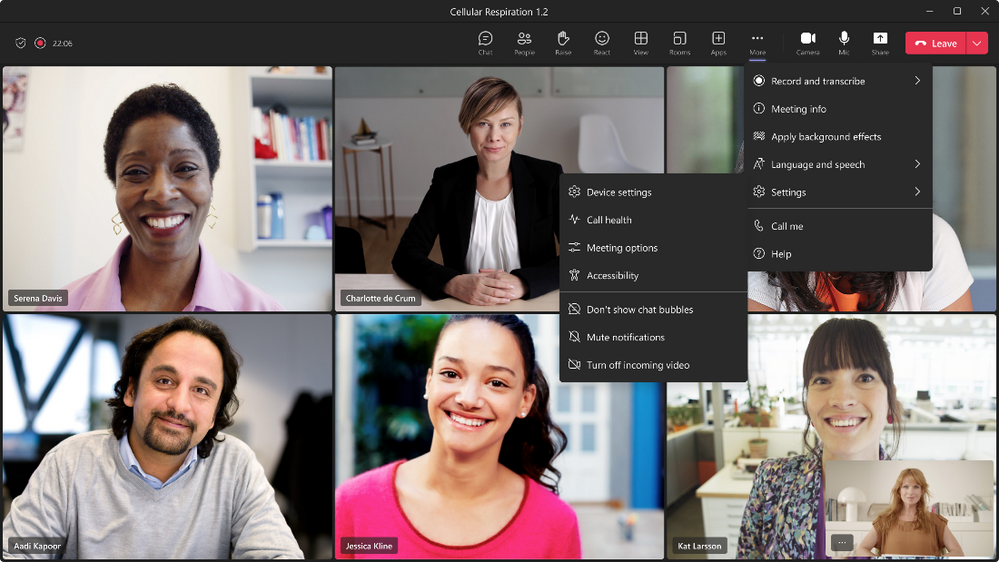
thumbnail image 1 of blog post titled What’s New in Microsoft Teams | January 2023

And finally, you can now live stream Team meetings to Meta Workplace Live directly using the new Workplace Live app integration. This has made it easier for users to catch up with work as they can now refer back to recordings on Workplace.

Calling

Teams has now made it easier for users to initiate group calls with federated users outside the organization over an internet connection without incurring any additional PSTN usage charges. Video and screen sharing are also inclusive.

Chat and collaboration

Microsoft will now show you the full context history of a chat when you click on a message search result option. This is regardless of how far back the message was sent.
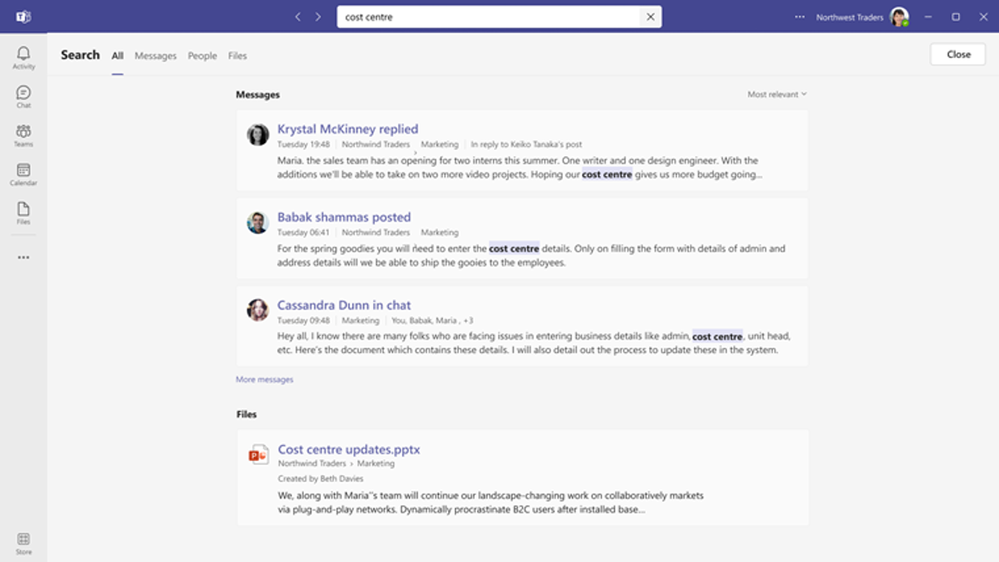
thumbnail image 6 of blog post titled What’s New in Microsoft Teams | January 2023

Teams Rooms and Devices

Teams Rooms users on Windows can make use of their consoles to show or hide chat on the front-of-room display alongside meeting participants and/or content when in Gallery, Large Gallery, or Together mode. You can access this capability via the View Switcher on meeting room consoles.

Microsoft is also making in-meeting notifications for Teams Rooms on Windows similar to those on the Teams desktop client. However, important notifications that call for the user’s attention will still appear on the front of the room screen. The company also indicated that there were plans underway to revamp Teams Rooms on Windows with a refreshed UI.

The integration between Teams and Microsoft Whiteboard will now all users to “start a Microsoft Whiteboard in Teams meetings using the one-touch in-meeting share content function from meeting room consoles” to further enhance the meeting experience.

Management

Developers can now access, edit, or delete event updates on messages in user:bot chats. Users will also be able to view details of files uploaded within the Power Automate portal in the window of an approval request within Teams. And finally, through Intune admins will be able to tell the type of content a user gets to see in a notification on their mobile device is locked.

That’s it for the month of January folks! While we only hit some of the key features released this month, there are still plenty of features that we didn’t highlight in this post like the certified devices and more. Be sure to check out Microsoft’s TechCommunity post for more details.

Share this article:
Previous Article How to share new LinkedIn posts with your followers Next Article Running out of storage on Outlook and OneDrive? Here are how to optimize your cloud storage quotas on Microsoft 365 like an expert

Related Articles

PowerToys 0.75 released; Environment Variables editor is here

October 31, 2023

Former Halo developer Bungie announces layoffs in wake of game delays

October 31, 2023

Siemens and Microsoft partner to bring GenAI to industries worldwide

October 31, 2023

Leave a Comment Cancel reply

Your email address will not be published. Required fields are marked *

Recent Posts

  • PowerToys 0.75 released; Environment Variables editor is here
  • Former Halo developer Bungie announces layoffs in wake of game delays
  • Siemens and Microsoft partner to bring GenAI to industries worldwide
  • 43 Microsoft Edge keyboard shortcuts to remember for stylish and speedy web surfing
  • Here is what’s coming to (and leaving) Xbox Game Pass soon

Recent Comments

No comments to show.

Archives

  • October 2023
  • September 2023
  • August 2023
  • July 2023
  • June 2023
  • May 2023
  • April 2023
  • March 2023
  • February 2023
  • January 2023
  • December 2022
  • November 2022
  • October 2022
  • September 2022
  • August 2022
  • July 2022
  • June 2022
  • May 2022
  • April 2022
  • March 2022
  • February 2022
  • January 2022
  • December 2021
  • November 2021
  • October 2021
  • September 2021
  • August 2021
  • July 2021
  • June 2021
  • May 2021
  • April 2021
  • March 2021
  • February 2021
  • January 2021
  • December 2020
  • November 2020
  • October 2020
  • September 2020
  • August 2020
  • July 2020
  • June 2020
  • May 2020
  • April 2020
  • March 2020
  • February 2020
  • January 2020
  • December 2019
  • November 2019
  • October 2019
  • September 2019
  • August 2019
  • July 2019
  • June 2019
  • May 2019
  • April 2019
  • March 2019
  • February 2019
  • January 2019
  • December 2018
  • November 2018
  • October 2018
  • September 2018
  • August 2018
  • July 2018
  • June 2018
  • May 2018
  • April 2018
  • March 2018
  • February 2018
  • January 2018
  • December 2017
  • November 2017
  • October 2017
  • September 2017
  • August 2017
  • July 2017
  • June 2017
  • May 2017
  • April 2017
  • March 2017
  • February 2017
  • January 2017
  • December 2016
  • November 2016
  • October 2016
  • September 2016
  • August 2016
  • July 2016
  • June 2016
  • May 2016
  • April 2016
  • March 2016
  • February 2016
  • January 2016
  • December 2015
  • November 2015
  • October 2015
  • September 2015
  • August 2015
  • July 2015
  • June 2015
  • May 2015
  • April 2015
  • March 2015
  • February 2015
  • January 2015
  • December 2014
  • November 2014
  • October 2014
  • September 2014
  • August 2014
  • July 2014
  • June 2014
  • May 2014
  • April 2014
  • March 2014
  • February 2014
  • January 2014
  • December 2013
  • November 2013
  • October 2013
  • September 2013
  • August 2013
  • July 2013
  • June 2013
  • May 2013
  • April 2013
  • March 2013
  • February 2013
  • January 2013
  • December 2012
  • November 2012
  • October 2012
  • September 2012
  • August 2012
  • July 2012
  • June 2012
  • May 2012
  • April 2012
  • March 2012
  • February 2012
  • January 2012
  • December 2011
  • November 2011
  • October 2011
  • September 2011
  • August 2011
  • July 2011
  • June 2011
  • May 2011
  • April 2011
  • March 2011
  • February 2011
  • January 2011
  • December 2010
  • November 2010
  • October 2010
  • September 2010

Categories

  • Announcements
  • Deals
  • Developer
  • Editorial
  • Feature
  • Feature stories
  • Hero-post
  • Hotdeals
  • How-to
  • Latest news
  • Microsoft / office 365
  • News
  • Office 365
  • Onpodcast
  • Opinion
  • Our featured post
  • Polls
  • Review
  • Reviews
  • Videos
OnMSFT.com

OnMSFT.com covers Microsoft news, reviews, and how-to guides. Formerly known as WinBeta, we have been your source for Microsoft news since 1998.

Categories

  • Windows
  • Surface
  • Xbox
  • How-To
  • OnPodcast
  • Gaming
  • Edge
  • Teams

Recent Posts

  • PowerToys 0.75 released; Environment Variables editor is here
  • Former Halo developer Bungie announces layoffs in wake of game delays
  • Siemens and Microsoft partner to bring GenAI to industries worldwide
  • 43 Microsoft Edge keyboard shortcuts to remember for stylish and speedy web surfing
  • Here is what’s coming to (and leaving) Xbox Game Pass soon

Quick Links

  • About OnMSFT.com
  • Contact OnMSFT
  • Join Our Team
© 2010–2026 OnMSFT.com LLC. All rights reserved.
About OnMSFT.comContact OnMSFT