
\n
Microsoft just held a new OneDrive dedicated online event where the company showed the next generation of the cloud storage platform that will soon include new visuals, shared views, Offline mode, media views, artificial intelligence, and more.
\n
In a thirty minute meeting, Microsoft’s president of Collaborative Apps and Platforms Jeff Teper walked through the plethora of upgrades and new features that will be coming to the 3.0 version that starts with a visual redesign of the app across the web and within specific apps.
\n
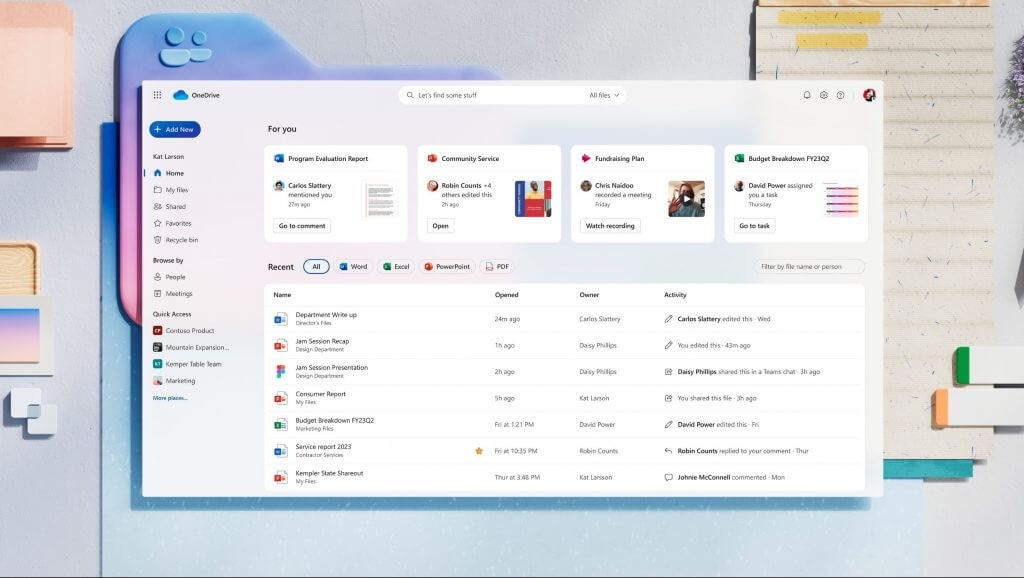
The new look is said to be uniformed when using OneDrive on the web or within apps such as Microsoft Teams. Users will soon be greeted with more rounded corners, brighter accent colors and larger icons throughout the new OneDrive interface.
\n
\n
The new UI changes also offer some new organizational changes coming to OneDrive will soon include the following:
\n
- \n
- For you: This section, at the top of the OneDrive home page, surfaces AI-powered file recommendations to you at the right time, so you have what you need at your fingertips.
- Meetings view: The Meetings view shows your upcoming and past meetings along with meeting recordings and shared files. Whether these files were shared in chat or the meeting invite, you’ll find them all here.
- People view: Sometimes you don’t remember the name of a file, but you do remember the person who shared with you. Context is vital when looking for the right file. The People view organizes your files by the people you work with.
- Shared view: Any file that’s been shared with you, regardless of how it was shared or who shared it, now shows up in the Shared view. It’s your go to spot to get back to all the files you are collaborating on.
- Colorful folders: Express yourself by choosing the color of your folders and stay organized your way.
- Favorites: Keeping track of important files is now easier with Favorites. You can mark any file as a favorite and access it from your Favorites list across OneDrive, Teams, File Explorer, Microsoft 365 apps, and more.
- Shortcuts: For quick access to files shared with you or residing in shared team locations, just create a shortcut to them in your OneDrive. This simplifies collecting files for projects, regardless of their original location.
- Simplified sharing: Sharing files and copying links is now the most user-friendly it’s ever been, and there’s less clicks involved.
\n
\n
\n
\n
\n
\n
\n
\n
\n
The more functional features planned for the newest version of OneDrive will a new Open-in-app experience that allows users to “open any file in its desktop app, edit it, and changes will sync to OneDrive.” The new in-app experience is made possible by some recent tweaks to OneDrive and SharePoint libraries.
\n
The Open-in-app experience extends to Word, PowerPoint, Excel, and Outlook which should make it easier and more streamlined to copy, paste, and attach documents in a single app instance.
\n
The new OneDrive experience will also incorporate the following additions:
\n
- \n
- Files On-Demand for Web: Offline file access and sync in fundamental to OneDrive. Now, we’re extending sync to the browser experience. When you want files and folders available for offline access on your device, just select them to be always available locally directly from OneDrive for Web. No more navigating away to Windows File Explorer or Mac Finder to perform this action. Once selected you’ll have offline access to these files. We expect this feature to become available worldwide in early 2024.
- Offline mode: When your files are available for offline access you can open and work on them in your browser even if you are offline. All of the changes you make offline in the browser will be automatically synced back to OneDrive when your Internet connection is restored. Plus, you can launch OneDrive in your browser to view, sort, rename, move, copy, and delete files without internet access. We expect offline mode to become available worldwide in early 2024.
- Add new: When you are ready to create a new file without leaving OneDrive just tap the “Add new” button. From here you can launch a blank document or choose from rich templates to jump-start your work. We expect to roll out this experience in Summer of 2024.
- Media view: This new view will organize all your images, videos, and media in one place, and it lets you visually browse your content. We expect to release the Media view in Summer of 2024.
\n
\n
\n
\n
\n
Users will also receive an updated search engine that enables searching photos using natural language to surface images, and scroll through images based on peoples names (with permissions granted).
\n
The last major consumer-facing feature introduced today was Copilot coming to OneDrive. Microsoft has teased Copilot for OneDrive several times, but the company seemed prepared to show more of its functionality in detail today.
\n
Similar to how Microsoft’s generative AI works across its other properties, Copilot will offer more granular search capabilities as well as suggested or associated file types within context of prompts.
\n
\n
Now let’s look at our vision for Copilot in OneDrive. We’re working on new Copilot skills that will help you find what you need and stay organized. Imagine you’ve just started working on a new project called Munson, and you need to quickly get up to speed. You ask Copilot, “Show all the files shared with me on Project Munson in the last week.” Once Copilot has helped you find the relevant files, it understands that you might benefit from adding them to a new folder. Copilot then adds these files to the new folder, and recommends other files related to Project Munson that were not part of your original search, so that you can add them to your newly created folder. What started as a simple natural language search has now resulted in your personal knowledge library on Project Munson.
\n
When you want to share these files with other people, Copilot can generate summaries to include with the share links so your coworkers have more context. Lastly, Copilot can make it easier than ever to catchup on important updates to your content. Imagine seeing a daily digest in OneDrive that shows new files shared with you, changes to files you’ve shared, new comments, documents relevant to upcoming meetings, and suggestions for follow-up actions.
\n
OneDrive will also give Admins a host of new security features to help maintain a company’s data in the cloud.
\n
- \n
- Advance Security and Governance tools will now be available in the SharePoint Advance Management (SAM) interface.
- Granular conditional access policies
- Restricted Access controls
- Cross-Tenant OneDrive Migration which will allow moving OneDrive accounts across tenants.
- Block download Policy
- Collaboration insights
- Data export for OneDrive sync client admin reports as part of the Microsoft Graph Data Connect for SharePoint.
\n
\n
\n
\n
\n
\n
\n
\n
Microsoft’s timetable for the roll of these new features starts as early as next week for those in preview for OneDrive for Web and OneDrive Mobile Apps. A larger participation pool will be tapped in 2024 for an early public preview, so there is still some time b
\n