Skip to content
OnMSFT.com
  • Home
  • About
  • Contact
  • Windows
  • Surface
  • Xbox
  • How-To
  • OnPodcast
  • Edge
  • Teams
  • Gaming
Menu
  • Home
  • About
  • Contact
  • Windows
  • Surface
  • Xbox
  • How-To
  • OnPodcast
  • Edge
  • Teams
  • Gaming
  1. Home
  2. Here’s all the new features added to Microsoft Teams (free) & Teams for Education in February 2023

Here’s all the new features added to Microsoft Teams (free) & Teams for Education in February 2023

admin admin
March 1, 2023
3 min read

In this article

  • Meetings
  • Virtual Appointments
  • Calling
  • Chat and collaboration
  • Teams for Education

As highlighted in our previous post, Microsoft is handling the announcement of new Teams features differently, Previously, the announcement was bundled up together, but now it’s grouped into two different categories, that is, Teams Premium and Non-Teams Premium.

This change comes after Microsoft shipped the Teams Premium add-on to general availability early last month. We’ve already highlighted some of the key features that were added to add-on in February.

In this post, we’ll focus on the key features that were added to the free version last month. Here’s everything you need to know:

Meetings

First up, Microsoft is adding support for tabs for anonymous users in meetings. This will allow developers to show tab experiences for anonymous users in Teams meetings. Additionally, the free version will now let users send in-meeting notifications to specific attendees using a bot.

Virtual Appointments

Microsoft has incorporated a new capability that allows users to create an external meeting using the Virtual Appointments Teams meeting template directly from the Teams calendar. Unlike the basic Teams meeting, the template features custom fields that can be used to personalize the experience.

The company further added that:

Employees get a hassle-free meeting experience without having to set up, learn, or manage new tools. The template also lays out a routine scheduling flow, but with valuable B2C features, such as a tailored meeting invitation for external guests, the ability to join on any device without first having to install Teams, and a pre-appointment lobby that guests can enter before their meeting begins.

Calling

Teams’ calling experience has been enhanced with a host of new capabilities as well as features. First up is the new capability that allows users to multitask with Picture in Picture mode on their iPhones or iPads.

You can now adjust the meeting window with your finger and move it to another location so that you can use your phone to do other things while the meeting is ongoing.

Additionally, the presenter window has also gotten usability improvements in screen sharing and are now at the top to make the active speakers’ face visible when screen sharing is enabled. What’s more, you’ll also get “raise hand” notifications instantly.

Other key calling improvements made to the platform include the capability to enable new cal controls with Survivable Branch Appliance, support for Android devices in the Teams Rooms Pro Management portal, authentication improvements, and more.

Chat and collaboration

To expand your reach, Microsoft now lets users initiate a chat with distribution Groups, mail-enabled security groups, and Microsoft 365 groups. This way, you can share important information with a wider audience.
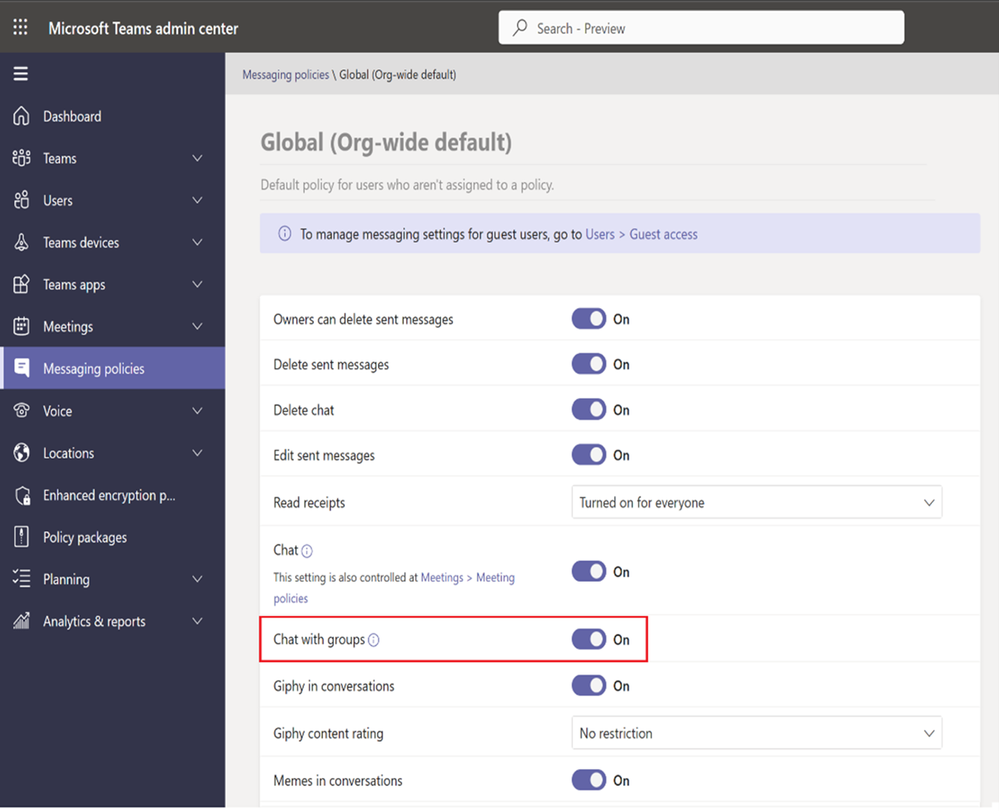
thumbnail image 19 of blog post titled What’s New in Microsoft Teams | February 2023

What’s more, communication in group chats has gotten simpler, rather than having to tag everyone in the message individually, you can simply type @ everyone. All participants will then receive a notification thus saving you time while fostering effective communication.

thumbnail image 22 of blog post titled What’s New in Microsoft Teams | February 2023

Additionally, Microsoft is expanding the suggested replies in chats capability. Now, your most recently used files will also be suggested whenever AI detects that you want to share a file with someone.

Other notable enhancements include: schedule send suggestions with Viva Insights, Missed call notifications in the activity feed, and more.

Teams for Education

Teams for Education has also got two new features, Invite parents via SMS for Communication and Parent-teacher meetings.

The former enhances the communication between the course facilitator and the parent, where admins get to choose either email or SMS as their preferred Parent Connection invitation channel, whereas the latter lets teachers schedule virtual meetings with parents easily.

We’ve only highlighted some of the key features incorporated into Teams in February, we invite you to check out Microsoft’s blog post for more details. Be sure to also check out our informative guide on how to make the most out of Teams features.

Share this article:
Previous Article Microsoft’s Translator app for iOS gets a refreshed look and other key enhancements Next Article Dell’s 2023 XPS lineup includes 60% faster clock speeds, 32GB of RAM, 13th Gen Intel, and more

Related Articles

PowerToys 0.75 released; Environment Variables editor is here

October 31, 2023

Former Halo developer Bungie announces layoffs in wake of game delays

October 31, 2023

Siemens and Microsoft partner to bring GenAI to industries worldwide

October 31, 2023

Leave a Comment Cancel reply

Your email address will not be published. Required fields are marked *

Recent Posts

  • PowerToys 0.75 released; Environment Variables editor is here
  • Former Halo developer Bungie announces layoffs in wake of game delays
  • Siemens and Microsoft partner to bring GenAI to industries worldwide
  • 43 Microsoft Edge keyboard shortcuts to remember for stylish and speedy web surfing
  • Here is what’s coming to (and leaving) Xbox Game Pass soon

Recent Comments

No comments to show.

Archives

  • October 2023
  • September 2023
  • August 2023
  • July 2023
  • June 2023
  • May 2023
  • April 2023
  • March 2023
  • February 2023
  • January 2023
  • December 2022
  • November 2022
  • October 2022
  • September 2022
  • August 2022
  • July 2022
  • June 2022
  • May 2022
  • April 2022
  • March 2022
  • February 2022
  • January 2022
  • December 2021
  • November 2021
  • October 2021
  • September 2021
  • August 2021
  • July 2021
  • June 2021
  • May 2021
  • April 2021
  • March 2021
  • February 2021
  • January 2021
  • December 2020
  • November 2020
  • October 2020
  • September 2020
  • August 2020
  • July 2020
  • June 2020
  • May 2020
  • April 2020
  • March 2020
  • February 2020
  • January 2020
  • December 2019
  • November 2019
  • October 2019
  • September 2019
  • August 2019
  • July 2019
  • June 2019
  • May 2019
  • April 2019
  • March 2019
  • February 2019
  • January 2019
  • December 2018
  • November 2018
  • October 2018
  • September 2018
  • August 2018
  • July 2018
  • June 2018
  • May 2018
  • April 2018
  • March 2018
  • February 2018
  • January 2018
  • December 2017
  • November 2017
  • October 2017
  • September 2017
  • August 2017
  • July 2017
  • June 2017
  • May 2017
  • April 2017
  • March 2017
  • February 2017
  • January 2017
  • December 2016
  • November 2016
  • October 2016
  • September 2016
  • August 2016
  • July 2016
  • June 2016
  • May 2016
  • April 2016
  • March 2016
  • February 2016
  • January 2016
  • December 2015
  • November 2015
  • October 2015
  • September 2015
  • August 2015
  • July 2015
  • June 2015
  • May 2015
  • April 2015
  • March 2015
  • February 2015
  • January 2015
  • December 2014
  • November 2014
  • October 2014
  • September 2014
  • August 2014
  • July 2014
  • June 2014
  • May 2014
  • April 2014
  • March 2014
  • February 2014
  • January 2014
  • December 2013
  • November 2013
  • October 2013
  • September 2013
  • August 2013
  • July 2013
  • June 2013
  • May 2013
  • April 2013
  • March 2013
  • February 2013
  • January 2013
  • December 2012
  • November 2012
  • October 2012
  • September 2012
  • August 2012
  • July 2012
  • June 2012
  • May 2012
  • April 2012
  • March 2012
  • February 2012
  • January 2012
  • December 2011
  • November 2011
  • October 2011
  • September 2011
  • August 2011
  • July 2011
  • June 2011
  • May 2011
  • April 2011
  • March 2011
  • February 2011
  • January 2011
  • December 2010
  • November 2010
  • October 2010
  • September 2010

Categories

  • Announcements
  • Deals
  • Developer
  • Editorial
  • Feature
  • Feature stories
  • Hero-post
  • Hotdeals
  • How-to
  • Latest news
  • Microsoft / office 365
  • News
  • Office 365
  • Onpodcast
  • Opinion
  • Our featured post
  • Polls
  • Review
  • Reviews
  • Videos
OnMSFT.com

OnMSFT.com covers Microsoft news, reviews, and how-to guides. Formerly known as WinBeta, we have been your source for Microsoft news since 1998.

Categories

  • Windows
  • Surface
  • Xbox
  • How-To
  • OnPodcast
  • Gaming
  • Edge
  • Teams

Recent Posts

  • PowerToys 0.75 released; Environment Variables editor is here
  • Former Halo developer Bungie announces layoffs in wake of game delays
  • Siemens and Microsoft partner to bring GenAI to industries worldwide
  • 43 Microsoft Edge keyboard shortcuts to remember for stylish and speedy web surfing
  • Here is what’s coming to (and leaving) Xbox Game Pass soon

Quick Links

  • About OnMSFT.com
  • Contact OnMSFT
  • Join Our Team
© 2010–2026 OnMSFT.com LLC. All rights reserved.
About OnMSFT.comContact OnMSFT