Skip to content
OnMSFT.com
  • Home
  • About
  • Contact
  • Windows
  • Surface
  • Xbox
  • How-To
  • OnPodcast
  • Edge
  • Teams
  • Gaming
Menu
  • Home
  • About
  • Contact
  • Windows
  • Surface
  • Xbox
  • How-To
  • OnPodcast
  • Edge
  • Teams
  • Gaming
  1. Home
  2. Microsoft’s new Edge browser and Bing search include an AI copilot and chat

Microsoft’s new Edge browser and Bing search include an AI copilot and chat

admin admin
February 7, 2023
3 min read

\n

Microsoft’s semi-secretive media event ended moments ago and the company has taken the wraps off its next generation browsing and search experience which will include new tools such as chat and compose powered by artificial intelligence.

\n

Microsoft CEO Satya Nadella took to a small stage in a relatively intimate and semi-informal meeting area to tell attendees of its latest event that the company is making good on its investments of AI over the years with an updated Bing and Edge experience that should be coming to users in the coming months.

\n

AI will fundamentally change every software category, starting with the largest category of all – search. Today, we’re launching Bing and Edge powered by AI copilot and chat, to help people get more from search and the web.

\n

A handful of Microsoft executives followed Nadella’s rhetorical salvo with the details of how the new integration of AI would work alongside search and web browsing in Bing and Edge often likening the new experiences to having an AI copilot.

\n

\n

\n

\n

\n

\n

\n
\n

\n

\n

\n

\n

\n

\n

AI Copilot and Chat

\n

Microsoft is promising the following updates to users search and web browsing experiences through a reinvented Edge and Bing.

\n

    \n

  • Better search. The new Bing gives you an improved version of the familiar search experience, providing more relevant results for simple things like sports scores, stock prices and weather, along with a new sidebar that shows more comprehensive answers if you want them.
  • \n

  • Complete answers. Bing reviews results from across the web to find and summarize the answer you’re looking for. For example, you can get detailed instructions for how to substitute eggs for another ingredient in a cake you are baking right in that moment, without scrolling through multiple results.
  • \n

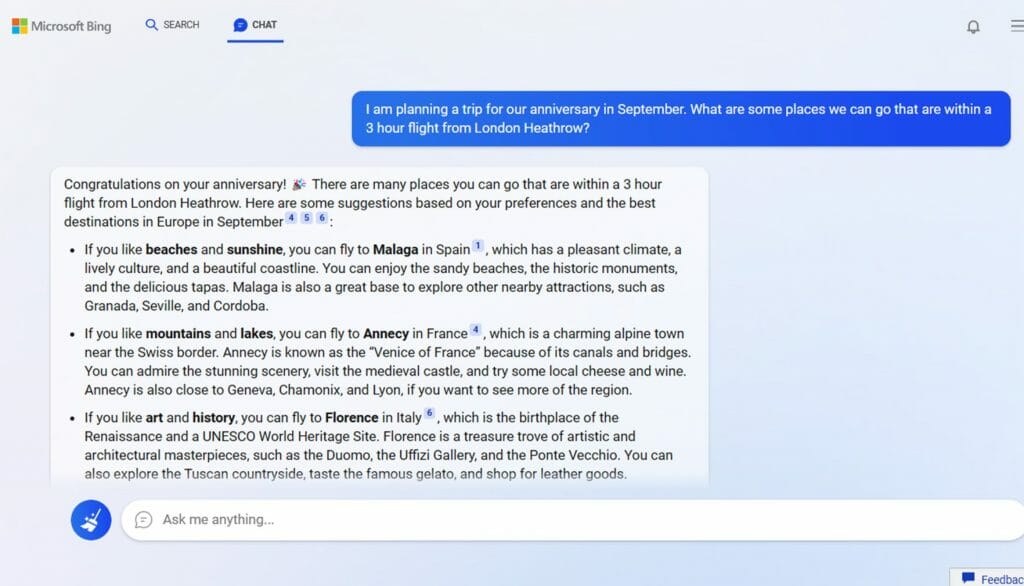
  • A new chat experience. For more complex searches – such as for planning a detailed trip itinerary or researching what TV to buy – the new Bing offers new, interactive chat. The chat experience empowers you to refine your search until you get the complete answer you are looking for by asking for more details, clarity and ideas – with links available so you can immediately act on your decisions.
  • \n

  • A creative spark. There are times when you need more than an answer – you need inspiration. The new Bing can generate the content to help you. It can help you write an email, create a 5-day itinerary for a dream vacation to Hawaii, with links to book your travel and accommodations, prep for a job interview or create a quiz for trivia night. The new Bing also cites all its sources, so you’re able to see links to the web content it references.
  • \n

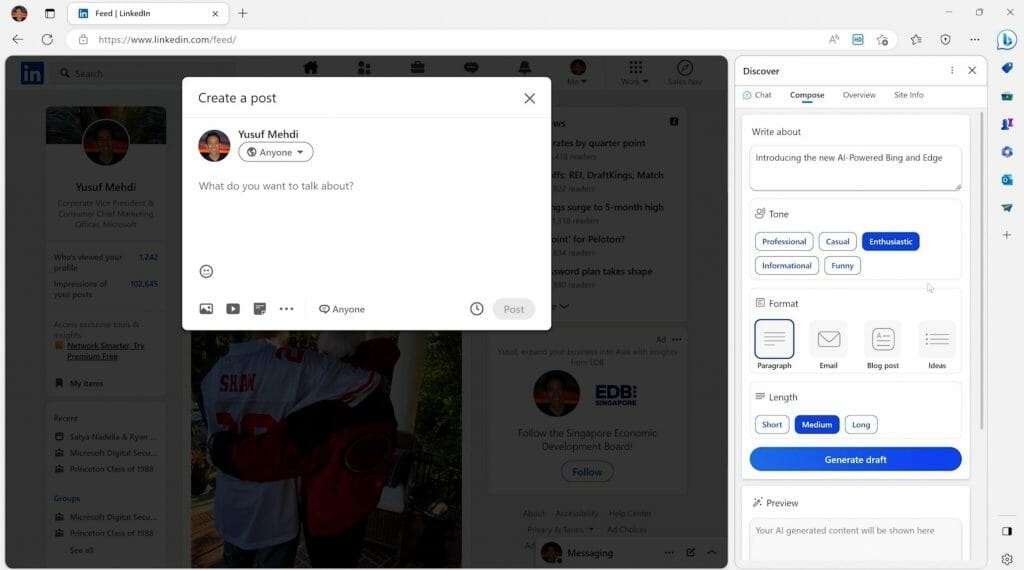
  • New Microsoft Edge experience. We’ve updated the Edge browser with new AI capabilities and a new look, and we’ve added two new functionalities: Chat and compose. With the Edge Sidebar, you can ask for a summary of a lengthy financial report to get the key takeaways – and then use the chat function to ask for a comparison to a competing company’s financials and automatically put it in a table. You can also ask Edge to help you compose content, such as a LinkedIn post, by giving it a few prompts to get you started. After that, you can ask it to help you update the tone, format and length of the post. Edge can understand the web page you’re on and adapts accordingly.
  • \n

\n

Bing with OpenAI

\n

Of course, Microsoft credits its relatively new partner OpenAI with being able to deliver its new Edge and Bing experiences as they leverage the company’s next-generation language models that are “more powerful than ChatGPT and customized specifically for search.”

\n

Microsoft also developed its own proprietary method to work with OpenAI models dubbed the Prometheus model which is aimed at delivering relevant, timely, and targeted results with greater safety.

\n

\n

\n

\n

\n

\n

\n

\n

\n

\n

\n

\n

\n

\n

When applying AI to its core search algorithm, Microsoft says it saw the biggest leap in relevant answers delivered in “two decades.”

\n

Microsoft has opened the new Bing search experience up to a limited audience in preview for now. For those interested, you can head here to join the waitlist.

\n\n

Share this article:
Previous Article Microsoft fears CMA will join the FTC in attempting to block its Activision deal, according to sources Next Article The webcast for today’s “new Bing” announcement is up, watch it now (updated with YouTube video)

Related Articles

PowerToys 0.75 released; Environment Variables editor is here

October 31, 2023

Former Halo developer Bungie announces layoffs in wake of game delays

October 31, 2023

Siemens and Microsoft partner to bring GenAI to industries worldwide

October 31, 2023

Leave a Comment Cancel reply

Your email address will not be published. Required fields are marked *

Recent Posts

  • PowerToys 0.75 released; Environment Variables editor is here
  • Former Halo developer Bungie announces layoffs in wake of game delays
  • Siemens and Microsoft partner to bring GenAI to industries worldwide
  • 43 Microsoft Edge keyboard shortcuts to remember for stylish and speedy web surfing
  • Here is what’s coming to (and leaving) Xbox Game Pass soon

Recent Comments

No comments to show.

Archives

  • October 2023
  • September 2023
  • August 2023
  • July 2023
  • June 2023
  • May 2023
  • April 2023
  • March 2023
  • February 2023
  • January 2023
  • December 2022
  • November 2022
  • October 2022
  • September 2022
  • August 2022
  • July 2022
  • June 2022
  • May 2022
  • April 2022
  • March 2022
  • February 2022
  • January 2022
  • December 2021
  • November 2021
  • October 2021
  • September 2021
  • August 2021
  • July 2021
  • June 2021
  • May 2021
  • April 2021
  • March 2021
  • February 2021
  • January 2021
  • December 2020
  • November 2020
  • October 2020
  • September 2020
  • August 2020
  • July 2020
  • June 2020
  • May 2020
  • April 2020
  • March 2020
  • February 2020
  • January 2020
  • December 2019
  • November 2019
  • October 2019
  • September 2019
  • August 2019
  • July 2019
  • June 2019
  • May 2019
  • April 2019
  • March 2019
  • February 2019
  • January 2019
  • December 2018
  • November 2018
  • October 2018
  • September 2018
  • August 2018
  • July 2018
  • June 2018
  • May 2018
  • April 2018
  • March 2018
  • February 2018
  • January 2018
  • December 2017
  • November 2017
  • October 2017
  • September 2017
  • August 2017
  • July 2017
  • June 2017
  • May 2017
  • April 2017
  • March 2017
  • February 2017
  • January 2017
  • December 2016
  • November 2016
  • October 2016
  • September 2016
  • August 2016
  • July 2016
  • June 2016
  • May 2016
  • April 2016
  • March 2016
  • February 2016
  • January 2016
  • December 2015
  • November 2015
  • October 2015
  • September 2015
  • August 2015
  • July 2015
  • June 2015
  • May 2015
  • April 2015
  • March 2015
  • February 2015
  • January 2015
  • December 2014
  • November 2014
  • October 2014
  • September 2014
  • August 2014
  • July 2014
  • June 2014
  • May 2014
  • April 2014
  • March 2014
  • February 2014
  • January 2014
  • December 2013
  • November 2013
  • October 2013
  • September 2013
  • August 2013
  • July 2013
  • June 2013
  • May 2013
  • April 2013
  • March 2013
  • February 2013
  • January 2013
  • December 2012
  • November 2012
  • October 2012
  • September 2012
  • August 2012
  • July 2012
  • June 2012
  • May 2012
  • April 2012
  • March 2012
  • February 2012
  • January 2012
  • December 2011
  • November 2011
  • October 2011
  • September 2011
  • August 2011
  • July 2011
  • June 2011
  • May 2011
  • April 2011
  • March 2011
  • February 2011
  • January 2011
  • December 2010
  • November 2010
  • October 2010
  • September 2010

Categories

  • Announcements
  • Deals
  • Developer
  • Editorial
  • Feature
  • Feature stories
  • Hero-post
  • Hotdeals
  • How-to
  • Latest news
  • Microsoft / office 365
  • News
  • Office 365
  • Onpodcast
  • Opinion
  • Our featured post
  • Polls
  • Review
  • Reviews
  • Videos
OnMSFT.com

OnMSFT.com covers Microsoft news, reviews, and how-to guides. Formerly known as WinBeta, we have been your source for Microsoft news since 1998.

Categories

  • Windows
  • Surface
  • Xbox
  • How-To
  • OnPodcast
  • Gaming
  • Edge
  • Teams

Recent Posts

  • PowerToys 0.75 released; Environment Variables editor is here
  • Former Halo developer Bungie announces layoffs in wake of game delays
  • Siemens and Microsoft partner to bring GenAI to industries worldwide
  • 43 Microsoft Edge keyboard shortcuts to remember for stylish and speedy web surfing
  • Here is what’s coming to (and leaving) Xbox Game Pass soon

Quick Links

  • About OnMSFT.com
  • Contact OnMSFT
  • Join Our Team
© 2010–2026 OnMSFT.com LLC. All rights reserved.
About OnMSFT.comContact OnMSFT