Skip to content
OnMSFT.com
  • Home
  • About
  • Contact
  • Windows
  • Surface
  • Xbox
  • How-To
  • OnPodcast
  • Edge
  • Teams
  • Gaming
Menu
  • Home
  • About
  • Contact
  • Windows
  • Surface
  • Xbox
  • How-To
  • OnPodcast
  • Edge
  • Teams
  • Gaming
  1. Home
  2. Microsoft adds new capabilities across Loop, Teams, and Viva Goals

Microsoft adds new capabilities across Loop, Teams, and Viva Goals

admin admin
February 24, 2023
3 min read

In this article

  • Stay aligned with Viva Goals
  • Enhance collaboration on projects with Loop components
  • Microsoft 365 advanced deployment guides

In a bid to “help organizations adapt flexible work, reduce costs, and do more with less” Microsoft has been incorporating new capabilities across Microsoft 365. Here’s what you need to know:

Stay aligned with Viva Goals

Last year, Microsoft Viva Goals hit general availability, a new goal-setting framework module. To build further upon this premise, the module comes with integrations in Teams. With this in place, users can create, edit, update, and share OKRs with fellow workmates in a Teams chat thus allowing the to stay within the flow of work.

What’s more, with the new and richer analytics capabilities that are now part of the module, admins will be check the organization’s OKR adoption metrics.  This way it is easier to keep tabs on active users as well as the total number of users who are working with the tool to access their productivity and overall performance index.

According to Microsoft:

We’re also making it easier than ever to get started with Viva Goals with new capabilities to create and set goals. If you’re standing up a different kind of goal or starting a new team and don’t have baseline metrics to shoot for, you can use the Phased Target feature. This new capability—broadly available this quarter—gives leaders flexibility to adjust their goals as new data becomes available. For more specifics about all the integrations and features Viva Goals just announced,

Enhance collaboration on projects with Loop components

Microsoft has made it easier for users to collaborate on projects across Outlook, Whiteboard, and Teams using loop components. Loop components promote teamwork and enhance transparency, in that, you can track changes made on the shared document in real-time.

The feature was already available in Teams chat and is now available in Outlook for Windows and the web. With this, Loop components can be sent directly to your email where you can make edits directly without switching to another app.

What’s more, using saving and sharing templates in Whiteboard, “users can create and save customized layouts and content that can be used to create new whiteboards easily.” This is especially useful for users that often use the same design. Moreover, you can share these templates with other individual users and distribution lists.

Teams also has a new feature dubbed Polls in meetings, it essentially lets organizers foster better communication with employees and meeting attendees. Meeting attendees can use the multi-question poll feature to make queries while the instant poll gives the meeting organizer immediate feedback regarding a particular issue that they raised. Users can also add images to meeting polls to enhance engagement.

Microsoft 365 advanced deployment guides

Microsoft has also incorporated advanced deployment guides, designed to help admins understand the needs of an employee. With this, it is easier for them to facilitate their needs and ensure that the organization is running at optimum since there’s no deterrent hindering their productivity.
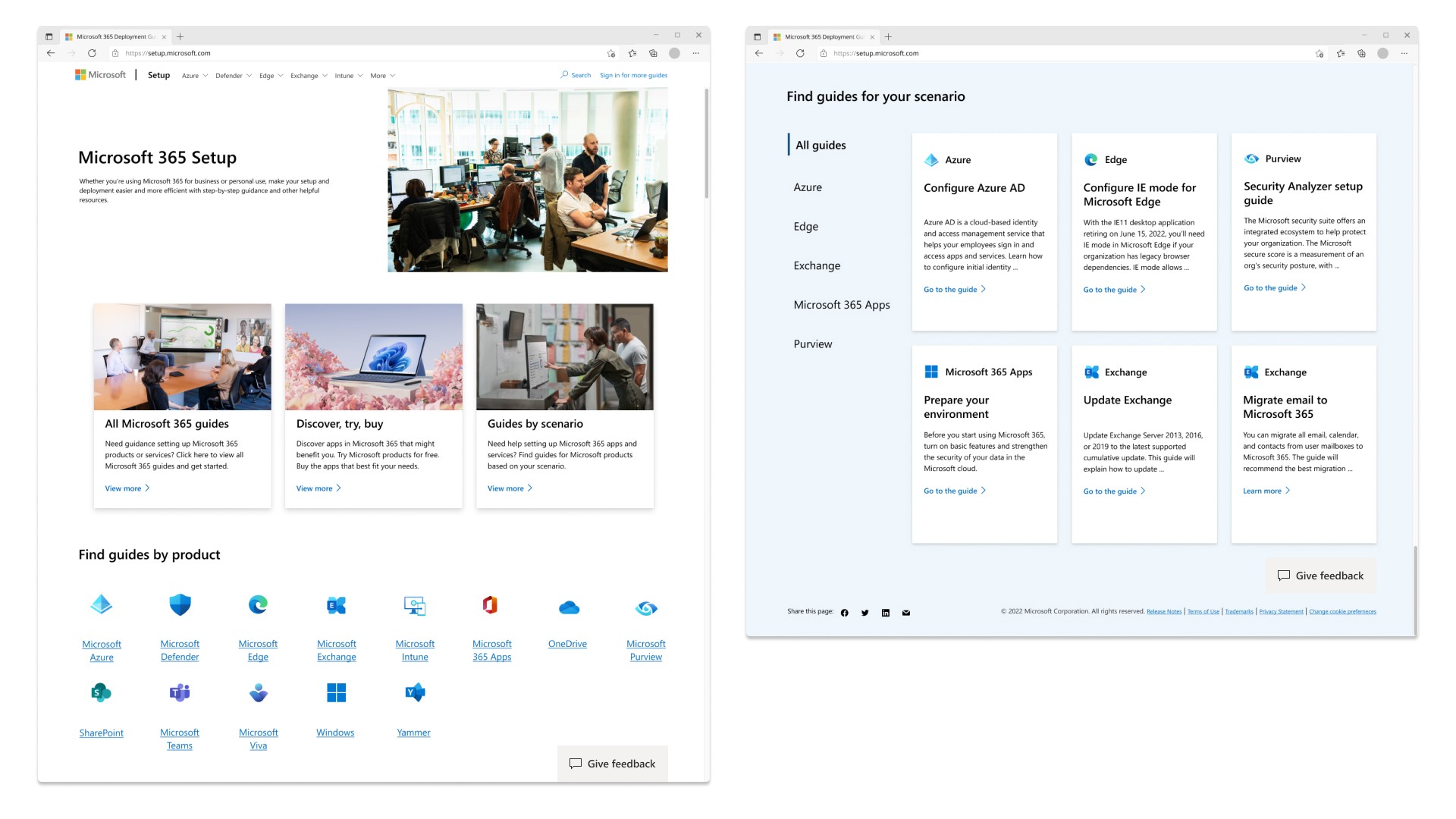
The updated design of the setup.microsoft.com site with new areas to find guides by product or scenario.

According to Microsoft:

Based on Microsoft 365 deployment best practices, the guides help organizations accelerate time to value, minimize deployment time, and free up admins to focus on other tasks. The experiences include a series of setup guides or wizards that provide customized advice for evaluating, planning, and deploying cloud services as well as built-in automation to configure the services.

Microsoft is committed to ensuring that end users get to make the most out of Microsoft 365 and has promised to continue making additions across its services and products to enhance their efficiency and effectiveness. Share your thoughts with us below.

Share this article:
Previous Article Hogwarts Legacy has sold over 12 million copies in two weeks Next Article Microsoft news recap: Bing Chat arrives on mobile apps, Inspire 2023 dates announced, and more

Related Articles

PowerToys 0.75 released; Environment Variables editor is here

October 31, 2023

Former Halo developer Bungie announces layoffs in wake of game delays

October 31, 2023

Siemens and Microsoft partner to bring GenAI to industries worldwide

October 31, 2023

Leave a Comment Cancel reply

Your email address will not be published. Required fields are marked *

Recent Posts

  • PowerToys 0.75 released; Environment Variables editor is here
  • Former Halo developer Bungie announces layoffs in wake of game delays
  • Siemens and Microsoft partner to bring GenAI to industries worldwide
  • 43 Microsoft Edge keyboard shortcuts to remember for stylish and speedy web surfing
  • Here is what’s coming to (and leaving) Xbox Game Pass soon

Recent Comments

No comments to show.

Archives

  • October 2023
  • September 2023
  • August 2023
  • July 2023
  • June 2023
  • May 2023
  • April 2023
  • March 2023
  • February 2023
  • January 2023
  • December 2022
  • November 2022
  • October 2022
  • September 2022
  • August 2022
  • July 2022
  • June 2022
  • May 2022
  • April 2022
  • March 2022
  • February 2022
  • January 2022
  • December 2021
  • November 2021
  • October 2021
  • September 2021
  • August 2021
  • July 2021
  • June 2021
  • May 2021
  • April 2021
  • March 2021
  • February 2021
  • January 2021
  • December 2020
  • November 2020
  • October 2020
  • September 2020
  • August 2020
  • July 2020
  • June 2020
  • May 2020
  • April 2020
  • March 2020
  • February 2020
  • January 2020
  • December 2019
  • November 2019
  • October 2019
  • September 2019
  • August 2019
  • July 2019
  • June 2019
  • May 2019
  • April 2019
  • March 2019
  • February 2019
  • January 2019
  • December 2018
  • November 2018
  • October 2018
  • September 2018
  • August 2018
  • July 2018
  • June 2018
  • May 2018
  • April 2018
  • March 2018
  • February 2018
  • January 2018
  • December 2017
  • November 2017
  • October 2017
  • September 2017
  • August 2017
  • July 2017
  • June 2017
  • May 2017
  • April 2017
  • March 2017
  • February 2017
  • January 2017
  • December 2016
  • November 2016
  • October 2016
  • September 2016
  • August 2016
  • July 2016
  • June 2016
  • May 2016
  • April 2016
  • March 2016
  • February 2016
  • January 2016
  • December 2015
  • November 2015
  • October 2015
  • September 2015
  • August 2015
  • July 2015
  • June 2015
  • May 2015
  • April 2015
  • March 2015
  • February 2015
  • January 2015
  • December 2014
  • November 2014
  • October 2014
  • September 2014
  • August 2014
  • July 2014
  • June 2014
  • May 2014
  • April 2014
  • March 2014
  • February 2014
  • January 2014
  • December 2013
  • November 2013
  • October 2013
  • September 2013
  • August 2013
  • July 2013
  • June 2013
  • May 2013
  • April 2013
  • March 2013
  • February 2013
  • January 2013
  • December 2012
  • November 2012
  • October 2012
  • September 2012
  • August 2012
  • July 2012
  • June 2012
  • May 2012
  • April 2012
  • March 2012
  • February 2012
  • January 2012
  • December 2011
  • November 2011
  • October 2011
  • September 2011
  • August 2011
  • July 2011
  • June 2011
  • May 2011
  • April 2011
  • March 2011
  • February 2011
  • January 2011
  • December 2010
  • November 2010
  • October 2010
  • September 2010

Categories

  • Announcements
  • Deals
  • Developer
  • Editorial
  • Feature
  • Feature stories
  • Hero-post
  • Hotdeals
  • How-to
  • Latest news
  • Microsoft / office 365
  • News
  • Office 365
  • Onpodcast
  • Opinion
  • Our featured post
  • Polls
  • Review
  • Reviews
  • Videos
OnMSFT.com

OnMSFT.com covers Microsoft news, reviews, and how-to guides. Formerly known as WinBeta, we have been your source for Microsoft news since 1998.

Categories

  • Windows
  • Surface
  • Xbox
  • How-To
  • OnPodcast
  • Gaming
  • Edge
  • Teams

Recent Posts

  • PowerToys 0.75 released; Environment Variables editor is here
  • Former Halo developer Bungie announces layoffs in wake of game delays
  • Siemens and Microsoft partner to bring GenAI to industries worldwide
  • 43 Microsoft Edge keyboard shortcuts to remember for stylish and speedy web surfing
  • Here is what’s coming to (and leaving) Xbox Game Pass soon

Quick Links

  • About OnMSFT.com
  • Contact OnMSFT
  • Join Our Team
© 2010–2026 OnMSFT.com LLC. All rights reserved.
About OnMSFT.comContact OnMSFT