Skip to content
OnMSFT.com
  • Home
  • About
  • Contact
  • Windows
  • Surface
  • Xbox
  • How-To
  • OnPodcast
  • Edge
  • Teams
  • Gaming
Menu
  • Home
  • About
  • Contact
  • Windows
  • Surface
  • Xbox
  • How-To
  • OnPodcast
  • Edge
  • Teams
  • Gaming
  1. Home
  2. Lenovo ThinkPad T16 Gen 1 Review:  All about the business

Lenovo ThinkPad T16 Gen 1 Review:  All about the business

admin admin
May 16, 2023
5 min read

\n

\n

\n

In this article

\n

\n

  • Specifications and Design
  • Experience and Performance
  • Wrapping it Up

\n


\n

\n

\n

\n

\n

\n

\n

\n

\n

\n

\n

\n

\n

\n

\n

\n

\n

\n

The Good The Not So Good
Only 3.9 Pounds Heavy Throttling Under Load
Large 16 Inch Screen Fingerprint Magnet
Very Quiet Large Charger For 135 Watts

\n

The Lenovo T16 series was created to address a core need of the business audience.  The first generation of the T16 Lenovo accomplished those basic needs with a thin, light boardroom-ready laptop with a 16:10 screen, an array of Thunderbolt 4 ports, and a built-in smart card reader, all packed into a thin and light design.

\n

\n

\n

\n

\n

\n

\n

\n

\n

\n

\n

\n

\n

\n

Specifications and Design

\n

Being local to one of Lenovo’s main offices I was introduced to the ThinkPad lineup in the late 1990s when given a tour of the local assembly line.  I was impressed with the build quality then and even more so more than twenty years later. The build quality caught my attention when I pulled the T16 from its packaging.  Lenovo uses an aluminum top and a Polyphenylene sulfide bottom.  These materials help create a design that’s just 0.81 inches thick and weighs just 3.9 pounds.

\n

\n

Lenovo took the build quality one step further and tested the laptop against 12 military-grade certification methods and over 20 procedures.  When reviewing the T16 I made it my daily driver, in a typical workday it traveled, it was taken in and out of different bags, used on various surfaces and after two months of heavy use no scratches or scuffs were made.  If your travel bag has room for the 16-inch screen the T16 should be a joy to take along for any workday.  Being this thin and light doesn’t come without some drawbacks which we will discuss later in the review.  You can see the specifications table below for all the available configuration options.

\n

\n

\n

\n

\n

\n

\n

\n

\n

\n

\n

\n

\n

\n

\n

\n

\n

\n

\n

\n

\n

\n

\n

\n

\n

\n

\n

\n

\n

\n

\n

\n

\n

\n

\n

\n

\n

\n

\n

\n

\n

\n

\n

\n

\n

\n

\n

\n

\n

\n

\n

\n

\n

\n

\n

\n

\n

\n

\n

\n

\n

\n

\n

\n

\n

\n

\n

\n

\n

\n

\n

\n

Product ThinkPad T16 Gen 1
OS Up to Windows 11 Pro 64 or Linux
Processor Up to Core i7-1280P 14(6 P-Core + 8 E-Core), P-core 1.8GHz/ E-Core 1.3GHz
Graphics Up to NVIDIA GeForce MX550 2GB GDDR6
Memory Up to 48GB (16GB soldered + 32GB SO-DIMM) DDR4-3200
Display \n

    \n

  • 16” WUXGA 16:10 (1920×1200), Anti-glare, 45% NTSC, 300 nits
  • \n

  • 16” WUXGA 16:10 (1920×1200), Anti-glare, 45% NTSC, 300 nits, Touch
  • \n

  • 16” WUXGA 16:10 (1920×1200), Anti-glare, 100% sRGB, 400 nits, Low power, Eyesafe Certified
  • \n

  • 16” WUXGA 16:10 (1920×1200), Anti-glare, 100% sRGB, 500 nits, ThinkPad Privacy Guard, Touch
  • \n

  • 16” WQXGA 16:10 (2560×1600), Anti-glare, 100%sRGB, 400 nits, Eyesafe Certified
  • \n

\n

Storage One drive, up to 2TB M.2 2280 SSD
WLAN Intel Wi-Fi 6E AX211 + Bluetooth™ 5.1
Ports \n

    \n

  • (1) USB 3.2 Gen 1
  • \n

  • (1) USB 3.2 Gen 1 (Always On)
  • \n

  • (2) Thunderbolt 4/ USB4 40Gbps (support data transfer, Power Delivery 3.0, and DisplayPort 1.4)
  • \n

  • (1) HDMI, up to 4K/60Hz
  • \n

  • (1) Ethernet (RJ-45)
  • \n

  • (1) Headphone/microphone combo jack (3.5mm)
  • \n

  • Optional Ports:
  • \n

  • (1) Smart Card Reader
  • \n

  • (1) Nano-SIM card slot (WWAN support models)
  • \n

\n

Camera Up to FHD 1080p + IR Camera with ThinkPad Webcam Privacy Shutter
Keyboard 6-row, spill-resistant, numeric keypad, backlit, optional LED backlight
Navigation TrackPoint® pointing device and mylar surface multi-touch touchpad (67.6mm x 115mm/ 2.67 x 4.53 inches)
Audio 2 x 2W Stereo speakers, Dolby® Audio
Security Discrete TPM 2.0, TCG certified, Optional Touch style fingerprint reader in power button (match-on-chip), BIOS Security- Power-on password, supervisor password, system management password, NVMe password, USB FIDO device integration, Firmware Resiliency 3.0
Battery Up to 86Wh, Supports Rapid Charge (up to 80% in 1 hr) with 135W AC adapter
Mechanical Starting at 361.9 x 255.5 x 20.5mm (14.25 x 10.06 x 0.81 inches)

\n

Starting at 1.769kg (3.9 lbs)

Color/Materials Storm Grey: Aluminum top, PPS bottom / Thunder Black: PC + 20%CF + 50% GF top, PPS bottom

\n


\n

\n

\n

\n

\n

\n

\n

\n

\n

\n

\n

\n

\n

\n

Experience and Performance

\n

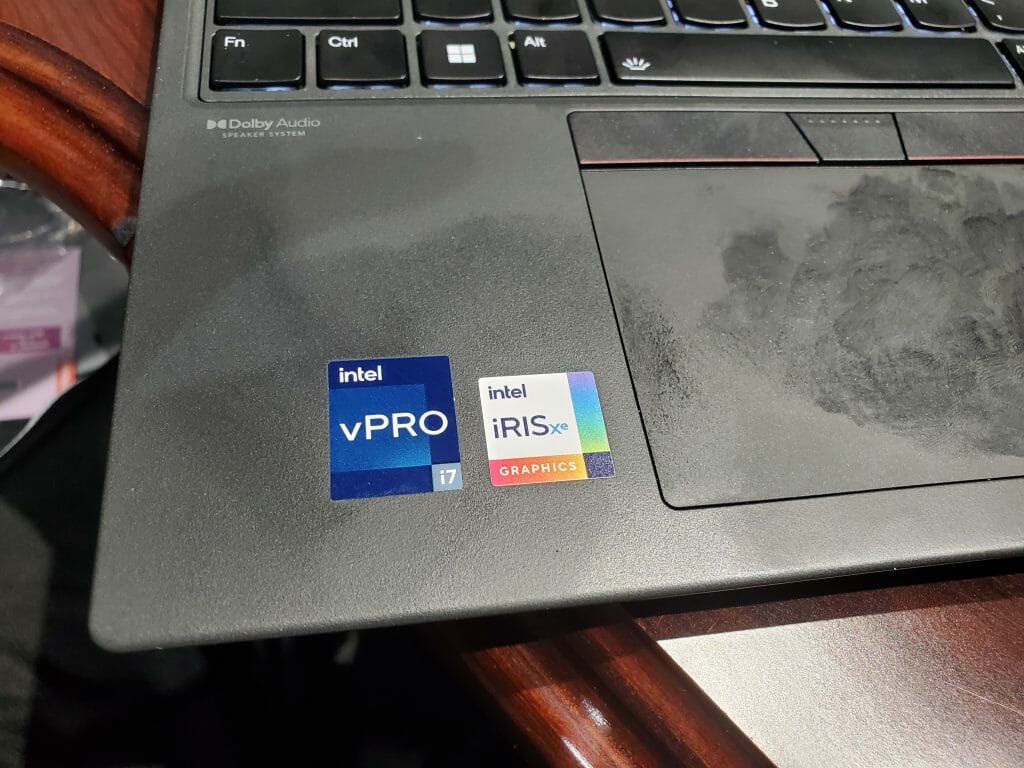
When thinking about the user experience with the T16 we must consider the ideal customer.  The ideal buyer would be a small business or corporation that would likely be buying multiple units.  The look and feel in this scenario has less of an impact than being able to get the job done comfortably for the user. In our testing, this is where the T16 shined its brightest.  Opening the lid, immediately seeing the smile-shaped keys, with the red TrackPoint input system in the middle offers something familiar if you’re a long-time Lenovo user, if not the purpose of the TrackPoint can be a bit confusing, it’s not for everyone.  The ample-sized, easy-click diving board-style trackpad will likely be what most users choose for input.  One thing about the keyboard deck that was a bit disappointing is the fingerprint magnet.  So, if appearance during business interactions matters to you.  Make sure you pack your cleaning cloth.

\n
\n

Once you’ve opened the lid and it’s time to tap the power button and get to work, you’re going to notice something right away, near silence. Lenovo really managed to tune the fan curves down on the T-16, but that doesn’t come without some drawbacks we’ll get to in a minute.  Our model came equipped with the Intel Core-I7 1240P CPU.  The 12th generation Intel chip is what I like to call a “short sprinter” chip, it’s good for quick office tasks, compiling some code perhaps, but quickly hits its thermal limits with longer tasks under load such as simple 1080P video edits, while the fans did ramp up a bit if you are attempting some multitasking during the render process, you’d certainly see some slowdowns.

\n

While slowdowns are typical when doing any rendering on a machine that doesn’t have a dedicated GPU, I bring this up for a specific reason.  While with most machines’ light multitasking, and rendering is certainly possible, you would observe screen flicker or a moment of the screen turning off and back on.  This would happen using the laptop screen or an external screen.  The T16 would return to normal operations when the intensive task was over. I attributed this to hitting the thermal limits of the machine.  While this doesn’t ruin the experience of using the T16, it is something prospective buyers should keep in mind.

\n

Wrapping it Up

\n

This is the first generation of the T16 lineup, and as expected nothing is perfect the first time.  However, Lenovo did get a lot right in this first generation. The T16 is a lightweight business machine with a 16:10 screen and ample connectivity with multiple Thunderbolt 4 ports. The 135-watt USB-C charger is a little large for a backpack but you can get 80 percent charge in just one hour, so it’s a good tradeoff when zipping between meetings or traveling.  With the proper expectations going in the first-generation T16 is a solid start opening for this lineup.  The entry-level spec of the T-16 starts just below $1200.

\n

\n

Check out more from OnMSFT.com!

\n

\n

Share this article:
Previous Article Windows Subsystem for Android gets a May 2023 update Next Article Elon Musk claims Microsoft controls ChatGPT Creator OpenAI, Satya Nadella disagrees

Related Articles

PowerToys 0.75 released; Environment Variables editor is here

October 31, 2023

Former Halo developer Bungie announces layoffs in wake of game delays

October 31, 2023

Siemens and Microsoft partner to bring GenAI to industries worldwide

October 31, 2023

Leave a Comment Cancel reply

Your email address will not be published. Required fields are marked *

Recent Posts

  • PowerToys 0.75 released; Environment Variables editor is here
  • Former Halo developer Bungie announces layoffs in wake of game delays
  • Siemens and Microsoft partner to bring GenAI to industries worldwide
  • 43 Microsoft Edge keyboard shortcuts to remember for stylish and speedy web surfing
  • Here is what’s coming to (and leaving) Xbox Game Pass soon

Recent Comments

No comments to show.

Archives

  • October 2023
  • September 2023
  • August 2023
  • July 2023
  • June 2023
  • May 2023
  • April 2023
  • March 2023
  • February 2023
  • January 2023
  • December 2022
  • November 2022
  • October 2022
  • September 2022
  • August 2022
  • July 2022
  • June 2022
  • May 2022
  • April 2022
  • March 2022
  • February 2022
  • January 2022
  • December 2021
  • November 2021
  • October 2021
  • September 2021
  • August 2021
  • July 2021
  • June 2021
  • May 2021
  • April 2021
  • March 2021
  • February 2021
  • January 2021
  • December 2020
  • November 2020
  • October 2020
  • September 2020
  • August 2020
  • July 2020
  • June 2020
  • May 2020
  • April 2020
  • March 2020
  • February 2020
  • January 2020
  • December 2019
  • November 2019
  • October 2019
  • September 2019
  • August 2019
  • July 2019
  • June 2019
  • May 2019
  • April 2019
  • March 2019
  • February 2019
  • January 2019
  • December 2018
  • November 2018
  • October 2018
  • September 2018
  • August 2018
  • July 2018
  • June 2018
  • May 2018
  • April 2018
  • March 2018
  • February 2018
  • January 2018
  • December 2017
  • November 2017
  • October 2017
  • September 2017
  • August 2017
  • July 2017
  • June 2017
  • May 2017
  • April 2017
  • March 2017
  • February 2017
  • January 2017
  • December 2016
  • November 2016
  • October 2016
  • September 2016
  • August 2016
  • July 2016
  • June 2016
  • May 2016
  • April 2016
  • March 2016
  • February 2016
  • January 2016
  • December 2015
  • November 2015
  • October 2015
  • September 2015
  • August 2015
  • July 2015
  • June 2015
  • May 2015
  • April 2015
  • March 2015
  • February 2015
  • January 2015
  • December 2014
  • November 2014
  • October 2014
  • September 2014
  • August 2014
  • July 2014
  • June 2014
  • May 2014
  • April 2014
  • March 2014
  • February 2014
  • January 2014
  • December 2013
  • November 2013
  • October 2013
  • September 2013
  • August 2013
  • July 2013
  • June 2013
  • May 2013
  • April 2013
  • March 2013
  • February 2013
  • January 2013
  • December 2012
  • November 2012
  • October 2012
  • September 2012
  • August 2012
  • July 2012
  • June 2012
  • May 2012
  • April 2012
  • March 2012
  • February 2012
  • January 2012
  • December 2011
  • November 2011
  • October 2011
  • September 2011
  • August 2011
  • July 2011
  • June 2011
  • May 2011
  • April 2011
  • March 2011
  • February 2011
  • January 2011
  • December 2010
  • November 2010
  • October 2010
  • September 2010

Categories

  • Announcements
  • Deals
  • Developer
  • Editorial
  • Feature
  • Feature stories
  • Hero-post
  • Hotdeals
  • How-to
  • Latest news
  • Microsoft / office 365
  • News
  • Office 365
  • Onpodcast
  • Opinion
  • Our featured post
  • Polls
  • Review
  • Reviews
  • Videos
OnMSFT.com

OnMSFT.com covers Microsoft news, reviews, and how-to guides. Formerly known as WinBeta, we have been your source for Microsoft news since 1998.

Categories

  • Windows
  • Surface
  • Xbox
  • How-To
  • OnPodcast
  • Gaming
  • Edge
  • Teams

Recent Posts

  • PowerToys 0.75 released; Environment Variables editor is here
  • Former Halo developer Bungie announces layoffs in wake of game delays
  • Siemens and Microsoft partner to bring GenAI to industries worldwide
  • 43 Microsoft Edge keyboard shortcuts to remember for stylish and speedy web surfing
  • Here is what’s coming to (and leaving) Xbox Game Pass soon

Quick Links

  • About OnMSFT.com
  • Contact OnMSFT
  • Join Our Team
© 2010–2026 OnMSFT.com LLC. All rights reserved.
About OnMSFT.comContact OnMSFT