Skip to content
OnMSFT.com
  • Home
  • About
  • Contact
  • Windows
  • Surface
  • Xbox
  • How-To
  • OnPodcast
  • Edge
  • Teams
  • Gaming
Menu
  • Home
  • About
  • Contact
  • Windows
  • Surface
  • Xbox
  • How-To
  • OnPodcast
  • Edge
  • Teams
  • Gaming
  1. Home
  2. How-to
  3. How to share new LinkedIn posts with your followers

How to share new LinkedIn posts with your followers

admin admin
January 31, 2023
4 min read

\n

Posting on LinkedIn is similar to posting on Facebook. Write an update, and send it right? Well, Not quite. LinkedIn has a few extra features that you can use to make sure that your post gets to the audience it was intended for.

\n
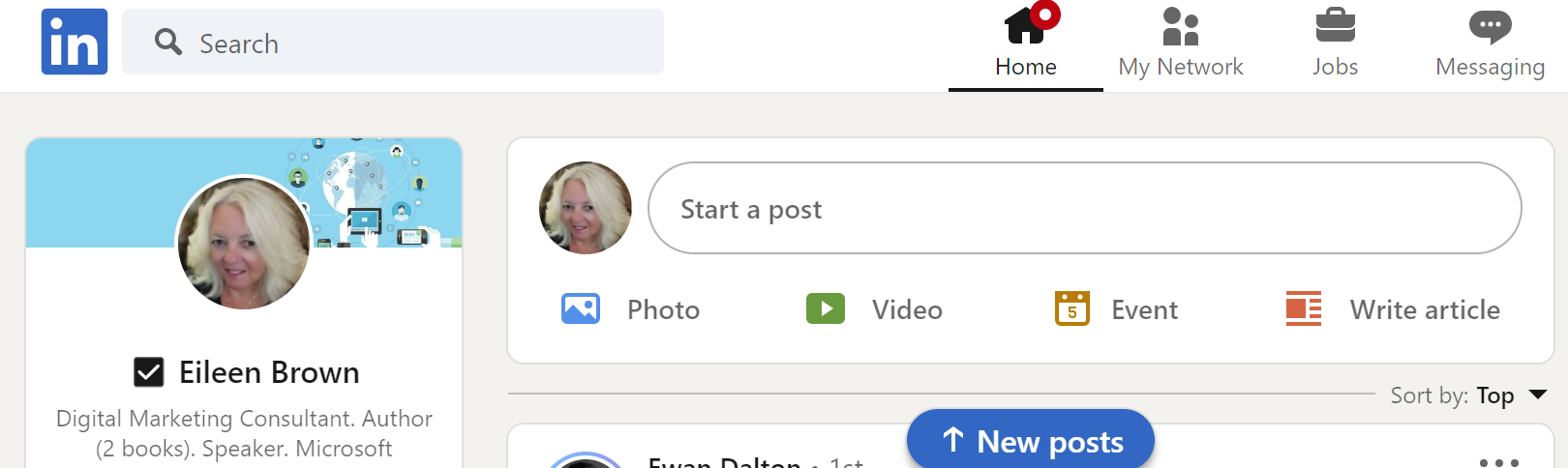
sharing linkedin posts with followers start post screen eileen brown onmsft

\n

It is important to make sure that you have good quality content to share and share content regularly. Getting engagement is often difficult across social media as people scroll by. However, tagging someone with their name in a post is more likely to foster engagement from the person you have tagged.

\n

\n

\n

\n

\n

\n

\n

\n

\n

\n

\n

\n

\n

\n

You can use hashtags to demonstrate the topic of the post. Hashtags will ensure that your content is found when searching for the hashtag, and the algorithm will also recognise the hashtag and surface it in searches.

\n

sharing linkedin posts with followers schedule repost screen eileen brown onmsft

\n

Rich media, i.e. posts with video and images are more likely to get engagement and clicks compared to text postings – as well as thought leadership posts looking forward in your industry. We all want to know what will happen next.

\n

Commenting on newsworthy topics will highlight you as a thought leader in the field and bring followers to hear your thoughts about the industry.

\n
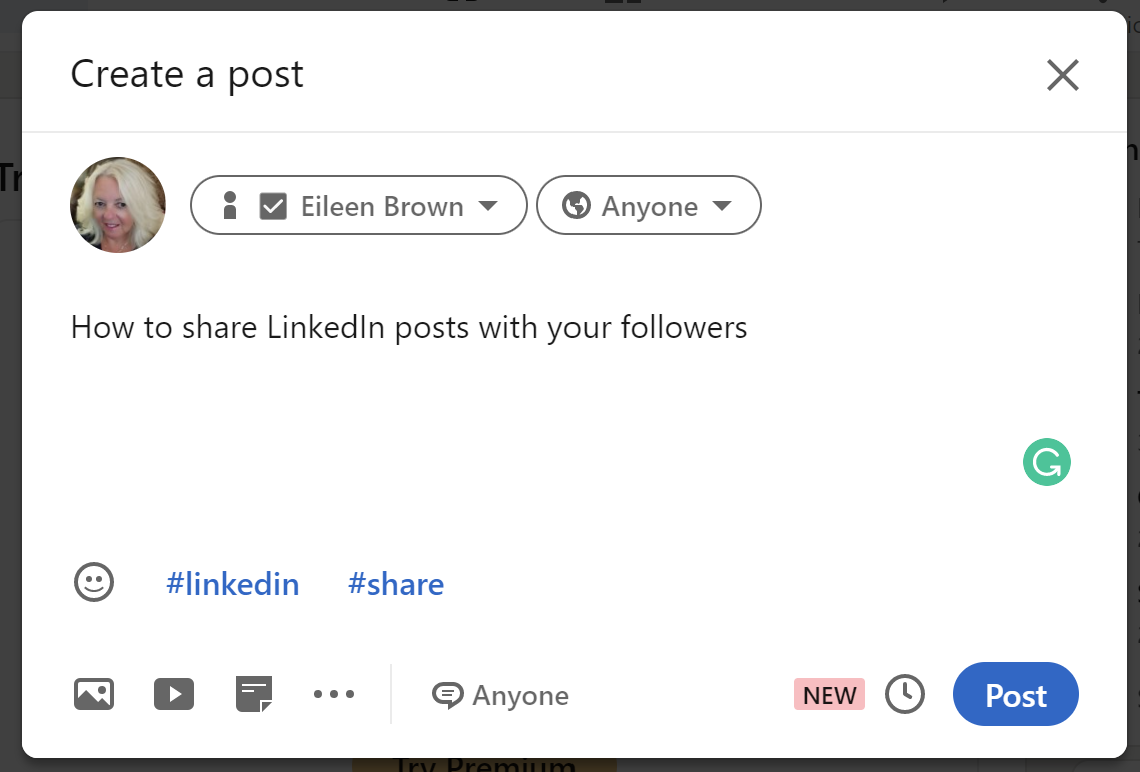
sharing linkedin posts with followers post screen eileen brown onmsft

\n

\n

\n

\n

\n

\n

\n

\n

\n

\n

\n

\n

\n

\n

To post an update, click in the ‘Start a post’ dialog box at the top of your page on the LinkedIn desktop. You will see that you can adjust the audience for the post.

\n
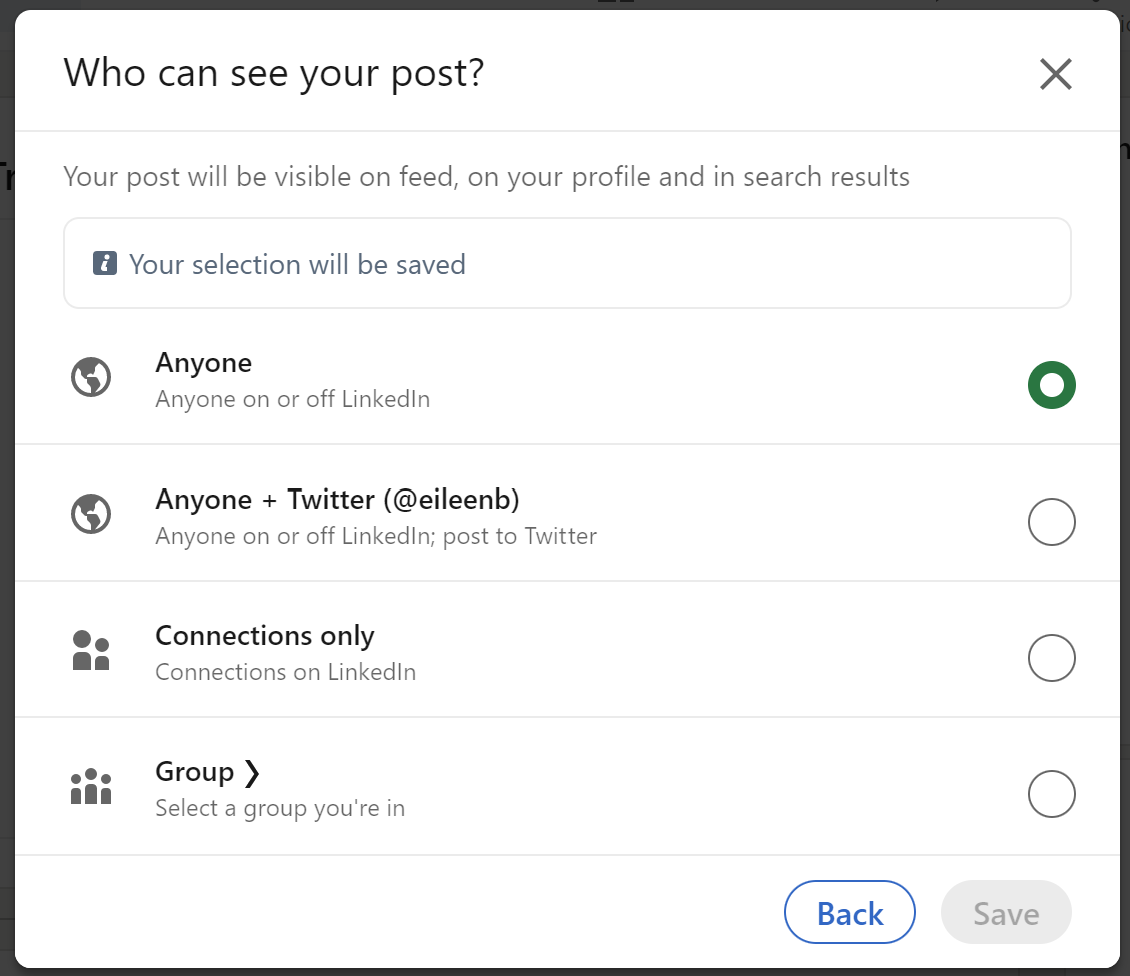
sharing linkedin posts with followers post screen audience eileen brown onmsft

\n

You can share the post with anyone on or off LinkedIn, only your followers, or a particular group you are a member of. If you select the Groups option – a list of all of the groups you are a member of appears for you to choose which group to post to.

\n
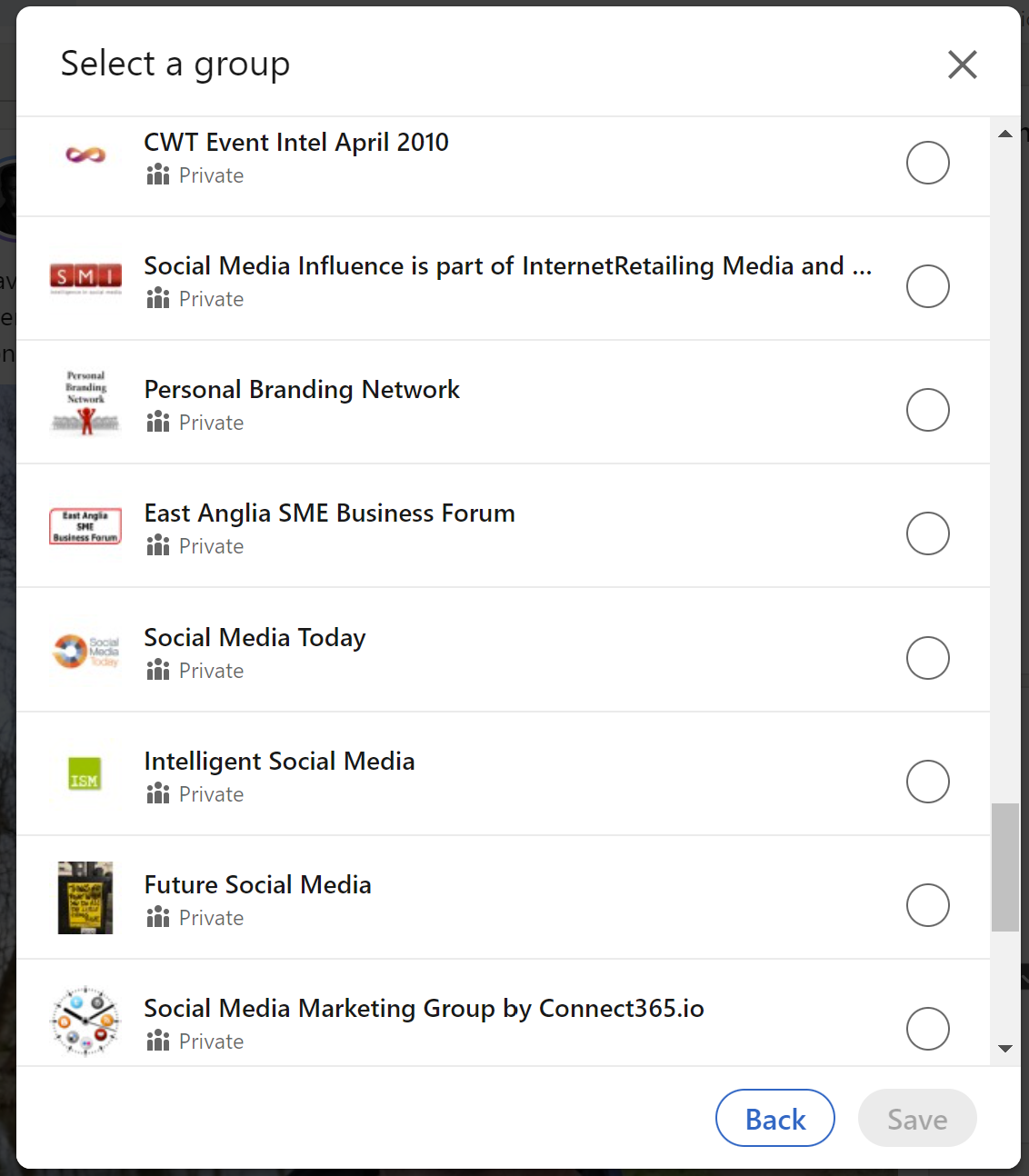
sharing linkedin posts with followers groups post screen eileen brown onmsft

\n

If you have connected your Twitter account to Twitter you can also share your post with your Twitter followers.

\n

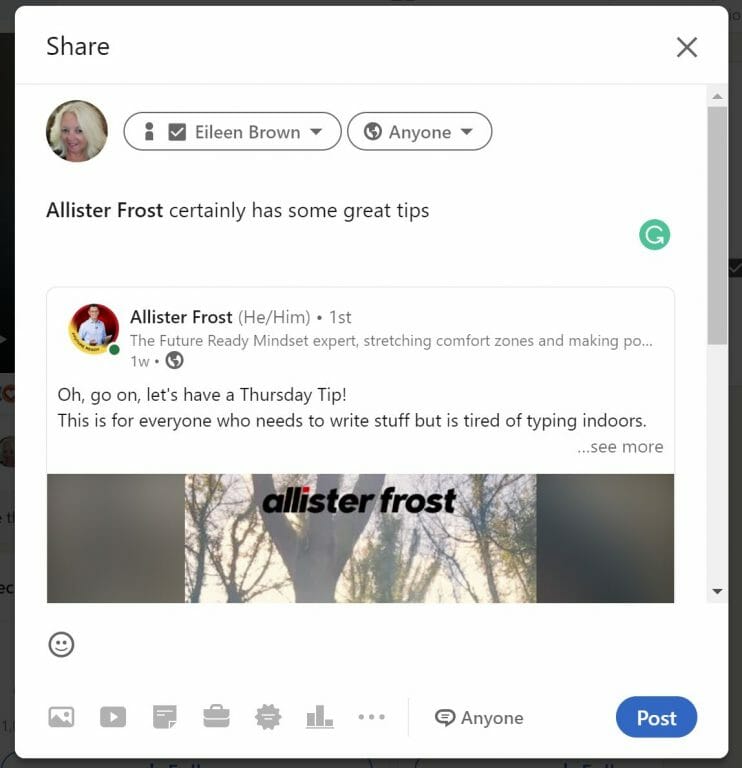
You can choose to share the post with your connections only – which makes this visible to all of your first-degree connections across LinkedIn.

\n

\n

\n

\n

\n

\n

\n
\n

\n

\n

\n

\n

\n

\n

resharing linkedin posts with followers schedule repost screen eileen brown onmsft

\n

You can share other content in addition to mere text. You can click the camera icon to share photos, or the video icon to share videos. If videos are your thing, keep them short and snappy with a great opening sentence, and keep the video to under two minutes if possible.

\n

How to improve LinkedIn engagement

\n

Videos are great for you to share tips about your industry, showcase events you attend or make your point with a demo. These videos do not need to be professionally shot. Hold your phone camera, point it at your face, hit record, and start talking. It is a good idea to use an external microphone and head[hones if possible to get a clearer sound.

\n

You can also share documents across LinkedIn – a great way to get corporate information to your followers.

\n

You can click on the ‘Write Article’ icon to publish posts on your company page – or a page you manage. Remember, headlines are important, so craft them well. If you wouldn’t click on the headline, then there’s a chance that no one else will too. Keep headlines punchy, concise, and meaningful, which will drive more clicks.

\n

Try not to write articles that are too short – or too verbose either. The best articles are between 500 and 1000 words long for the best engagement.

\n

Schedule your posts

\n
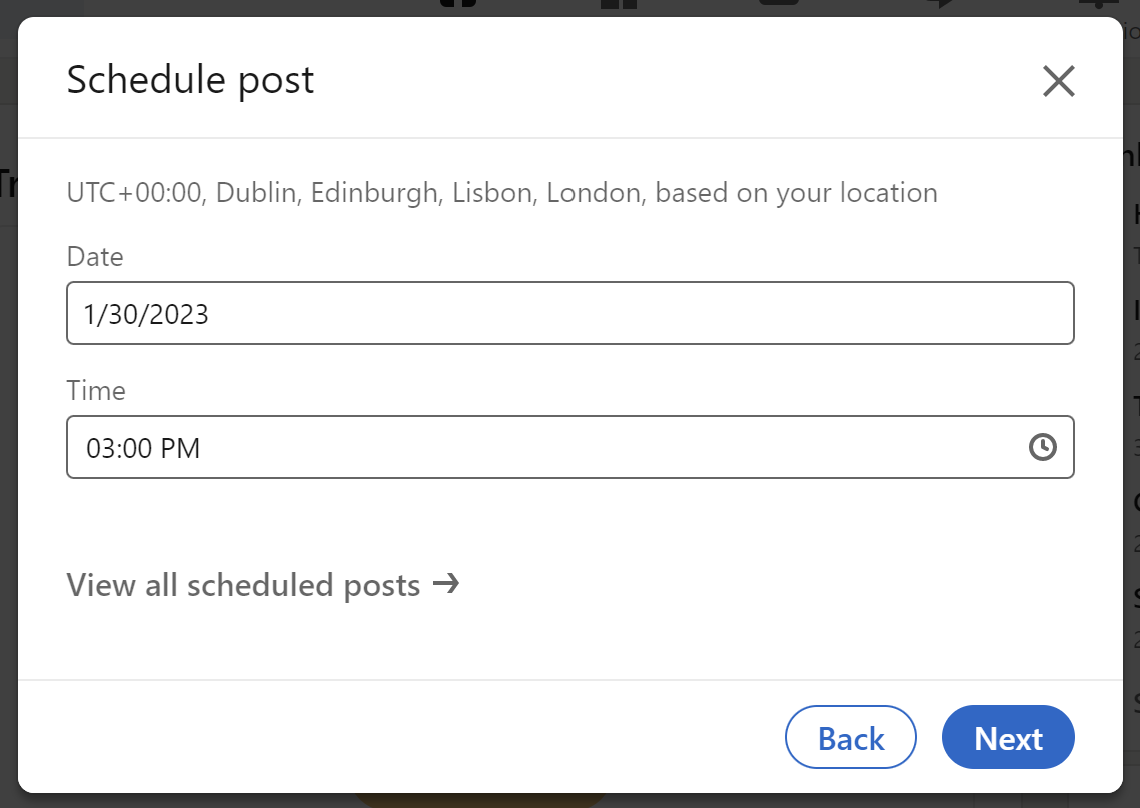
sharing linkedin posts with followers schedule post screen eileen brown onmsft

\n

A nifty feature recently introduced in LinkedIn is the ability to schedule posts. If you batch up your posts and want to make sure that they are sent out regularly, then use the scheduling clock icon in the post window to make sure that the post is sent at the time you choose.

\n
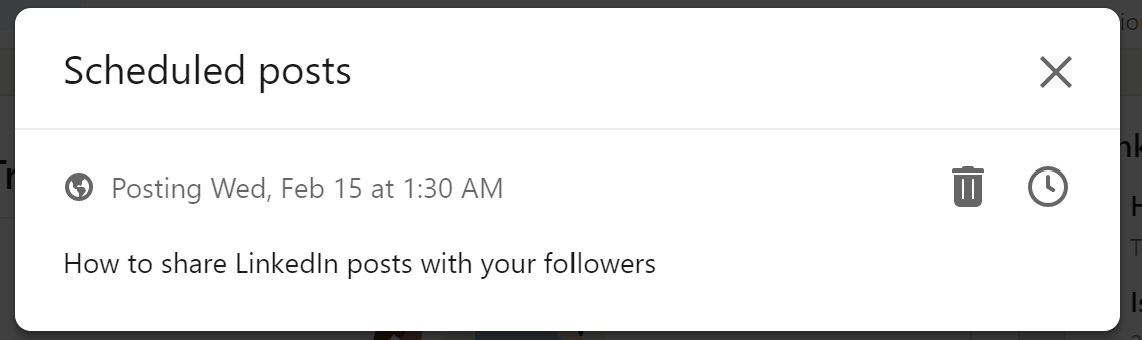
sharing linkedin posts with followers schedule post list screen eileen brown onmsft

\n

LinkedIn topics

\n

So what could you write about? With the raft of layoffs across the tech industry, I have seen a lot of posts from previously laid-off employees offering advice on how to get through the practicalities of a layoff. The posts explain practical things you need to do to maintain connectivity with your co-workers (hint – back up your contacts list so you always have the details of your co-workers – ad make sure that your LinkedIn profile is up to date).

\n

I even saw a post about one of my former colleagues talking about his struggle with his mental health after being let go, and what he had done to mitigate the feeling of not being valued. Posts like these could resonate with your connections who might be struggling too and may appreciate your insights if you have been through a similar event.

\n

With the right tools like a mobile device camera and microphone, you can quickly become an engaging expert on LinkedIn. Sharing insights about your work, and events and engaging the audience will drive more viewers to your profile – and extend your reach.

\n

Related Content:

\n

    \n

  • 6 reasons why LinkedIn is important for your business
  • \n

  • How to stop connection harvesting on LinkedIn
  • \n

  • Ask your connections how they really feel with LinkedIn polls
  • \n

  • Use LinkedIn for video meetings with your network
  • \n

  • Create a meaningful LikedIn URL for your profile
  • \n

  • Make your LinkedIn profile more dinamic with a cover story
  • \n

\n\n

Share this article:
Previous Article Sony reportedly halves PlayStation VR2 sales projections, preorders made were low Next Article Here’s everything new in Microsoft Teams in January 2023

Related Articles

43 Microsoft Edge keyboard shortcuts to remember for stylish and speedy web surfing

October 31, 2023

How to use accessibility features in Microsoft 365 like Narrator, Read aloud and Voice Search easily

October 30, 2023

How to use Windows Backup on Windows 11 for efficient data protection

October 26, 2023

Leave a Comment Cancel reply

Your email address will not be published. Required fields are marked *

Recent Posts

  • PowerToys 0.75 released; Environment Variables editor is here
  • Former Halo developer Bungie announces layoffs in wake of game delays
  • Siemens and Microsoft partner to bring GenAI to industries worldwide
  • 43 Microsoft Edge keyboard shortcuts to remember for stylish and speedy web surfing
  • Here is what’s coming to (and leaving) Xbox Game Pass soon

Recent Comments

No comments to show.

Archives

  • October 2023
  • September 2023
  • August 2023
  • July 2023
  • June 2023
  • May 2023
  • April 2023
  • March 2023
  • February 2023
  • January 2023
  • December 2022
  • November 2022
  • October 2022
  • September 2022
  • August 2022
  • July 2022
  • June 2022
  • May 2022
  • April 2022
  • March 2022
  • February 2022
  • January 2022
  • December 2021
  • November 2021
  • October 2021
  • September 2021
  • August 2021
  • July 2021
  • June 2021
  • May 2021
  • April 2021
  • March 2021
  • February 2021
  • January 2021
  • December 2020
  • November 2020
  • October 2020
  • September 2020
  • August 2020
  • July 2020
  • June 2020
  • May 2020
  • April 2020
  • March 2020
  • February 2020
  • January 2020
  • December 2019
  • November 2019
  • October 2019
  • September 2019
  • August 2019
  • July 2019
  • June 2019
  • May 2019
  • April 2019
  • March 2019
  • February 2019
  • January 2019
  • December 2018
  • November 2018
  • October 2018
  • September 2018
  • August 2018
  • July 2018
  • June 2018
  • May 2018
  • April 2018
  • March 2018
  • February 2018
  • January 2018
  • December 2017
  • November 2017
  • October 2017
  • September 2017
  • August 2017
  • July 2017
  • June 2017
  • May 2017
  • April 2017
  • March 2017
  • February 2017
  • January 2017
  • December 2016
  • November 2016
  • October 2016
  • September 2016
  • August 2016
  • July 2016
  • June 2016
  • May 2016
  • April 2016
  • March 2016
  • February 2016
  • January 2016
  • December 2015
  • November 2015
  • October 2015
  • September 2015
  • August 2015
  • July 2015
  • June 2015
  • May 2015
  • April 2015
  • March 2015
  • February 2015
  • January 2015
  • December 2014
  • November 2014
  • October 2014
  • September 2014
  • August 2014
  • July 2014
  • June 2014
  • May 2014
  • April 2014
  • March 2014
  • February 2014
  • January 2014
  • December 2013
  • November 2013
  • October 2013
  • September 2013
  • August 2013
  • July 2013
  • June 2013
  • May 2013
  • April 2013
  • March 2013
  • February 2013
  • January 2013
  • December 2012
  • November 2012
  • October 2012
  • September 2012
  • August 2012
  • July 2012
  • June 2012
  • May 2012
  • April 2012
  • March 2012
  • February 2012
  • January 2012
  • December 2011
  • November 2011
  • October 2011
  • September 2011
  • August 2011
  • July 2011
  • June 2011
  • May 2011
  • April 2011
  • March 2011
  • February 2011
  • January 2011
  • December 2010
  • November 2010
  • October 2010
  • September 2010

Categories

  • Announcements
  • Deals
  • Developer
  • Editorial
  • Feature
  • Feature stories
  • Hero-post
  • Hotdeals
  • How-to
  • Latest news
  • Microsoft / office 365
  • News
  • Office 365
  • Onpodcast
  • Opinion
  • Our featured post
  • Polls
  • Review
  • Reviews
  • Videos
OnMSFT.com

OnMSFT.com covers Microsoft news, reviews, and how-to guides. Formerly known as WinBeta, we have been your source for Microsoft news since 1998.

Categories

  • Windows
  • Surface
  • Xbox
  • How-To
  • OnPodcast
  • Gaming
  • Edge
  • Teams

Recent Posts

  • PowerToys 0.75 released; Environment Variables editor is here
  • Former Halo developer Bungie announces layoffs in wake of game delays
  • Siemens and Microsoft partner to bring GenAI to industries worldwide
  • 43 Microsoft Edge keyboard shortcuts to remember for stylish and speedy web surfing
  • Here is what’s coming to (and leaving) Xbox Game Pass soon

Quick Links

  • About OnMSFT.com
  • Contact OnMSFT
  • Join Our Team
© 2010–2026 OnMSFT.com LLC. All rights reserved.
About OnMSFT.comContact OnMSFT