Skip to content
OnMSFT.com
  • Home
  • About
  • Contact
  • Windows
  • Surface
  • Xbox
  • How-To
  • OnPodcast
  • Edge
  • Teams
  • Gaming
Menu
  • Home
  • About
  • Contact
  • Windows
  • Surface
  • Xbox
  • How-To
  • OnPodcast
  • Edge
  • Teams
  • Gaming
  1. Home
  2. How-to
  3. Here are 5 Microsoft Edge extensions that you can use with ChatGPT right now

Here are 5 Microsoft Edge extensions that you can use with ChatGPT right now

admin admin
February 8, 2023
3 min read

\n

\n

\n

In this article

\n

\n

  • 5 ChatGPT Microsoft Edge extensions
  • #2 ChatGPT Everywhere
  • #3 ChatGPT for Search Engines
  • #4 WebChatGPT ChatGPT with internet access
  • #5 Merlin – OpenAI ChatGPT powered assistant
  • Conclusion

\n

Microsoft’s Edge is one of the most popular Chromium-based browsers available today, and it is no surprise that developers have created a wide range of Microsoft Edge extensions to enhance its functionality and make it easier to use.

\n

ChatGPT is a cutting-edge language model developed by OpenAI, one of the leading AI research organizations in the world. ChatGPT is trained to generate human-like responses to a wide range of questions and prompts, making it a valuable tool for anyone.

\n

\n

\n

\n

\n

\n

\n

\n

\n

\n

\n

\n

\n

\n

Since Microsoft’s surprise press event, there’s a lot of buzz with what you can do with ChatGPT outside of the new Bing experience and in this guide, we will take a look at some Microsoft Edge extensions that use ChatGPT.

\n

5 ChatGPT Microsoft Edge extensions

\n

Here are 5 Microsoft Edge extensions you can use with ChatGPT right now:

\n

    \n

  1. AIPRM for ChatGPT – Chrome Web Store (google.com)
  2. \n

  3. Get ChatGPT Everywhere (google.com)
  4. \n

  5. ChatGPT for Search Engines – Chrome Web Store (google.com).
  6. \n

  7. WebChatGPT: ChatGPT with internet access – Chrome Web Store (google.com).
  8. \n

  9. Merlin – OpenAI ChatGPT powered assistant – Chrome Web Store (google.com).
  10. \n

\n

#1: AIPRM

\n

chatgptAIPRM for ChatGPT is an extension that allows you to interact with ChatGPT in a more natural and intuitive way. With this extension, you can ask ChatGPT questions and receive answers in real-time, just like you would with a human. AIPRM is perfect for those who want to get the most out of ChatGPT.

\n

#2: ChatGPT Everywhere

\n

5 microsoft edge extensions

\n

ChatGPT Everywhere is another Edge extension that allows you to access to ChatGPT on any website. Using this extension, you can interact with ChatGPT in Gmail, Google, or any other website  without having to open a new browser window.

\n

\n

\n

\n

\n

\n

\n

\n

\n

\n

\n

\n

\n

\n

#3: ChatGPT for Search Engines

\n

5 Microsoft Edge extensions

\n

ChatGPT for Search Engines allows you to use ChatGPT as a search engine. With this Edge extension you can search for information and receive answers from ChatGPT directly in your browser. This extension displays ChatGPT response alongside Bing, DuckDuckGo, or Google search results This extension is valuable for those who want to find information quickly and conveniently.

\n

#4: WebChatGPT: ChatGPT with internet access

\n

chatgpt

\n

WebChatGPT: ChatGPT allows you to interact with ChatGPT and the internet at the same time. You can ask ChatGPT questions and receive answers while also accessing the web. This is a great extension to use if you want to see how ChatGPT interacts with the web.

\n

Check out WebChatGPT on GitHub.

\n

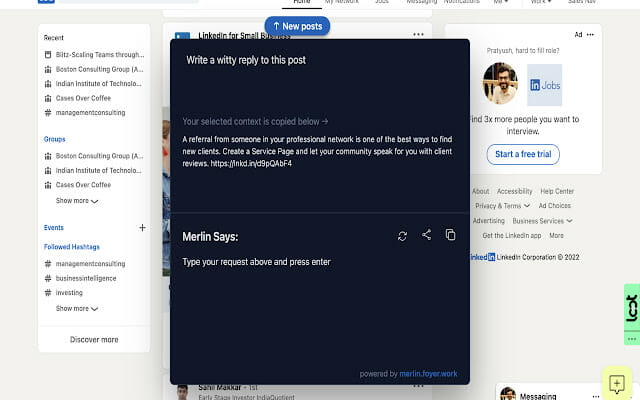
#5: Merlin – OpenAI ChatGPT powered assistant

\n
5 Microsoft Edge extensions

\n

\n

\n

\n

\n

\n

\n

\n

\n

\n

\n

\n

\n

\n

Merlin is an Edge extension that allows you to use ChatGPT as your personal assistant. You can ask Merlin to perform tasks, such as setting reminders, finding information and more. Merlin is a great tool to use for those looking to get the best ChatGPT experience without any of the hassle.

\n

Conclusion

\n

ChatGPT is a powerful tool, but using Microsoft Edge extensions can enhance your experience and make it even more efficient. Whether you want to save time, organize your work, or simply make the most of your ChatGPT experience, these 5 Microsoft Edge extensions are great options. Try them out today and see for yourself how they can improve your interactions with ChatGPT.

\n\n

Share this article:
Previous Article Microsoft Edge gets enhanced PDF experience with built-in Adobe Acrobat Next Article Hogwarts Legacy beats Cyberpunk 2077 Twitch viewership record for a single-player game

Related Articles

43 Microsoft Edge keyboard shortcuts to remember for stylish and speedy web surfing

October 31, 2023

How to use accessibility features in Microsoft 365 like Narrator, Read aloud and Voice Search easily

October 30, 2023

How to use Windows Backup on Windows 11 for efficient data protection

October 26, 2023

Leave a Comment Cancel reply

Your email address will not be published. Required fields are marked *

Recent Posts

  • PowerToys 0.75 released; Environment Variables editor is here
  • Former Halo developer Bungie announces layoffs in wake of game delays
  • Siemens and Microsoft partner to bring GenAI to industries worldwide
  • 43 Microsoft Edge keyboard shortcuts to remember for stylish and speedy web surfing
  • Here is what’s coming to (and leaving) Xbox Game Pass soon

Recent Comments

No comments to show.

Archives

  • October 2023
  • September 2023
  • August 2023
  • July 2023
  • June 2023
  • May 2023
  • April 2023
  • March 2023
  • February 2023
  • January 2023
  • December 2022
  • November 2022
  • October 2022
  • September 2022
  • August 2022
  • July 2022
  • June 2022
  • May 2022
  • April 2022
  • March 2022
  • February 2022
  • January 2022
  • December 2021
  • November 2021
  • October 2021
  • September 2021
  • August 2021
  • July 2021
  • June 2021
  • May 2021
  • April 2021
  • March 2021
  • February 2021
  • January 2021
  • December 2020
  • November 2020
  • October 2020
  • September 2020
  • August 2020
  • July 2020
  • June 2020
  • May 2020
  • April 2020
  • March 2020
  • February 2020
  • January 2020
  • December 2019
  • November 2019
  • October 2019
  • September 2019
  • August 2019
  • July 2019
  • June 2019
  • May 2019
  • April 2019
  • March 2019
  • February 2019
  • January 2019
  • December 2018
  • November 2018
  • October 2018
  • September 2018
  • August 2018
  • July 2018
  • June 2018
  • May 2018
  • April 2018
  • March 2018
  • February 2018
  • January 2018
  • December 2017
  • November 2017
  • October 2017
  • September 2017
  • August 2017
  • July 2017
  • June 2017
  • May 2017
  • April 2017
  • March 2017
  • February 2017
  • January 2017
  • December 2016
  • November 2016
  • October 2016
  • September 2016
  • August 2016
  • July 2016
  • June 2016
  • May 2016
  • April 2016
  • March 2016
  • February 2016
  • January 2016
  • December 2015
  • November 2015
  • October 2015
  • September 2015
  • August 2015
  • July 2015
  • June 2015
  • May 2015
  • April 2015
  • March 2015
  • February 2015
  • January 2015
  • December 2014
  • November 2014
  • October 2014
  • September 2014
  • August 2014
  • July 2014
  • June 2014
  • May 2014
  • April 2014
  • March 2014
  • February 2014
  • January 2014
  • December 2013
  • November 2013
  • October 2013
  • September 2013
  • August 2013
  • July 2013
  • June 2013
  • May 2013
  • April 2013
  • March 2013
  • February 2013
  • January 2013
  • December 2012
  • November 2012
  • October 2012
  • September 2012
  • August 2012
  • July 2012
  • June 2012
  • May 2012
  • April 2012
  • March 2012
  • February 2012
  • January 2012
  • December 2011
  • November 2011
  • October 2011
  • September 2011
  • August 2011
  • July 2011
  • June 2011
  • May 2011
  • April 2011
  • March 2011
  • February 2011
  • January 2011
  • December 2010
  • November 2010
  • October 2010
  • September 2010

Categories

  • Announcements
  • Deals
  • Developer
  • Editorial
  • Feature
  • Feature stories
  • Hero-post
  • Hotdeals
  • How-to
  • Latest news
  • Microsoft / office 365
  • News
  • Office 365
  • Onpodcast
  • Opinion
  • Our featured post
  • Polls
  • Review
  • Reviews
  • Videos
OnMSFT.com

OnMSFT.com covers Microsoft news, reviews, and how-to guides. Formerly known as WinBeta, we have been your source for Microsoft news since 1998.

Categories

  • Windows
  • Surface
  • Xbox
  • How-To
  • OnPodcast
  • Gaming
  • Edge
  • Teams

Recent Posts

  • PowerToys 0.75 released; Environment Variables editor is here
  • Former Halo developer Bungie announces layoffs in wake of game delays
  • Siemens and Microsoft partner to bring GenAI to industries worldwide
  • 43 Microsoft Edge keyboard shortcuts to remember for stylish and speedy web surfing
  • Here is what’s coming to (and leaving) Xbox Game Pass soon

Quick Links

  • About OnMSFT.com
  • Contact OnMSFT
  • Join Our Team
© 2010–2026 OnMSFT.com LLC. All rights reserved.
About OnMSFT.comContact OnMSFT