
Google is testing Gemini in Chrome on Android. In the latest Chrome Canary version, a Gemini panel appears as a bottom sheet that lets users ask questions about open pages.
The interface features a Gemini chat panel with a drag handle, a tab picker, and a “Sharing tabs” section that lists selected pages. Prompts like “@ ask about a tab” and answers that reference more than one page show that Gemini uses tab content. Gemini in Chrome brings AI assistance directly into the browser. It lets users interact with web pages without switching apps.
Gemini in Chrome on Android with multi-tab support
The Gemini panel opens over the current page and can be expanded or collapsed. A “+” button shows a list of open tabs. Users can select one or more tabs to share. After selection, the panel lists the shared tabs and accepts questions about their content. In our testing, responses included details from multiple tabs at once.
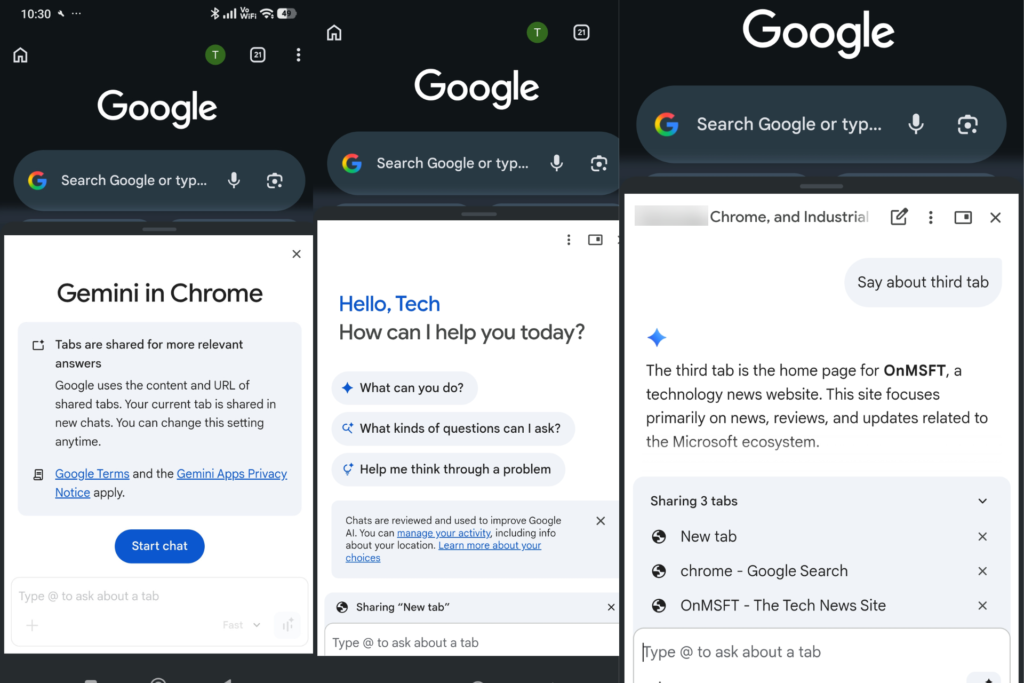
Chrome on Android does not have a built-in AI panel for interacting with open tabs. Gemini is available as a separate app, and Chrome does not allow querying several tabs together. This brings Gemini directly into the browser.
Gemini is currently limited to Chrome Canary on Android and is not available in the stable version. Availability may vary by user. Gemini in Chrome is not yet available on Android phones or tablets, while it is already available on desktop and iOS in select regions.
On desktop, Chrome includes Gemini through a side panel in select regions. The Android version follows a similar layout but uses a bottom sheet for mobile screens.
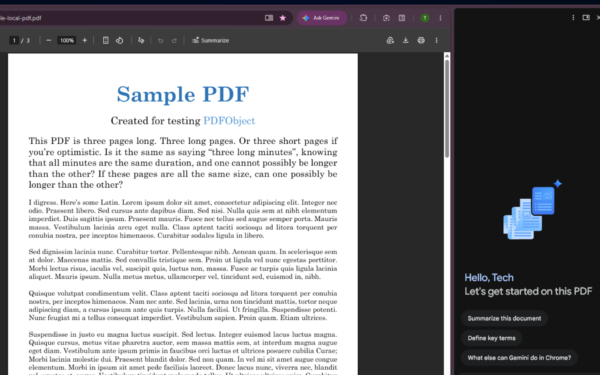
Google is also testing automatic PDF summaries with Gemini in Chrome on desktop.