

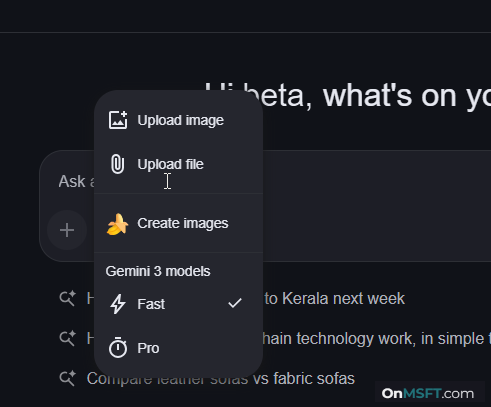
Gemini tests a new way to present models in its compose box in Chrome’s AI Mode. In one version, the picker shows “Auto” and “Pro.” In another, it switches to “Fast” and “Pro.” This tests how these options are named.
It also check whether “Fast” explains the default behavior better than “Auto.” It makes the difference between the two options clearer.
The “Auto” label does not explain what kind of response users will get. It does not tell users what to expect.
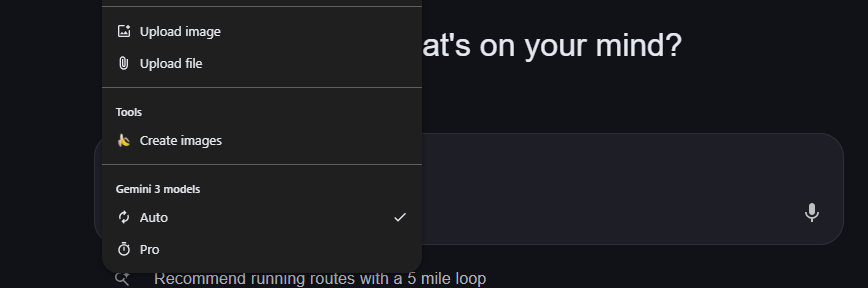
“Fast” is more direct. It delivers quicker replies and makes the default option clear right away. Users can tell what to expect without switching modes or testing responses.
Gemini offers different response styles depending on the selected model:
- Auto: picks a model based on the task
- Fast: gives quicker replies for everyday use
- Pro: handles more detailed or complex queries
Google has added a visual cue for this tier. In Chromium code, a bolt (⚡) icon is linked to what is described as a “Fast model.”
The same icon now shows next to the default option in the picker. It highlights speed and makes the option easier to spot.
Google is trying two approaches here:
- Auto + Pro → simpler labels
- Fast + Pro → clearer labels
Both expose the same two tiers. Only the labels and explanation change. This lets Google compare which version users understand more easily.
Google is also testing Auto Browse on Chrome for Android, a feature that lets Gemini complete tasks for you in the browser.