
Microsoft Edge is testing a new way to control videos without opening the tab. You can scrub through videos directly from the Media controls panel, including on YouTube.
The timeline is now fully interactive, not just a passive progress bar. You can drag it to move forward or backward in the video. The panel shows the current time and total duration. When you hover near either end, you also get quick jumps to move forward or backward by a few seconds.
This makes it easier to skip parts of a video or replay a moment while working across tabs. It also helps when you are following long videos, since you can jump between sections without returning to the original tab.
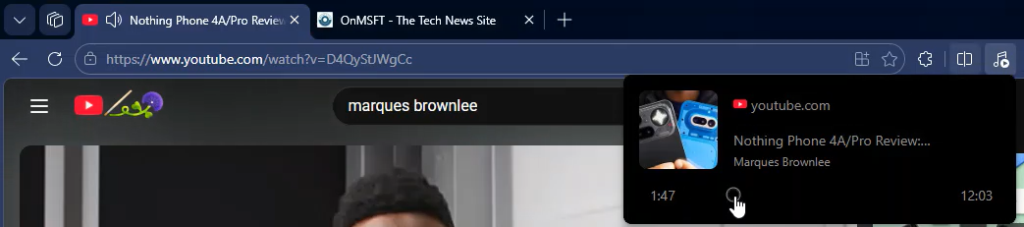
You can already scrub videos in the player itself, but Edge brings the same control to its Media controls panel, so you can seek through videos without switching back to the tab.
The feature works with media playing in the browser, not just YouTube. It can also work with standard HTML5 video players, even when full details like artwork or album information are not visible in the panel.
The same Media controls panel exists in Google Chrome. Chrome already supports basic scrubbing, but Edge goes further with clearer time indicators and quick jump controls that are easier to access.
Edge is also testing a way to reduce on-screen clutter. In pre-release versions of the browser, a new setting lets you turn off hover-based video actions such as picture-in-picture, summarize video, enhance video, and translate audio. You can find it by going to Settings > Appearance > Context menus > Video quick actions, then turning off “Show quick actions when hovering over videos.”

These changes follow other video-related experiments in Microsoft Edge. Copilot can also suggest what to watch next while browsing YouTube.