
Microsoft Edge showed a Copilot prompt over a playing YouTube video, suggesting what to watch next without any new search or input.
Edge does not usually place Copilot prompts over a playing video. Copilot stays in the sidebar unless you open it, and it does not interrupt playback with recommendations. In a separate test, Microsoft is also exploring other behaviors in the browser, such as launching Edge automatically after Windows sign-in.
Edge also shows some Copilot actions automatically. On YouTube pages, a “Summarize” button can appear in the address bar, which generates a summary of the video.
The prompt opens with “Find your next watch.” Copilot can look at recent search results to help pick what to watch next and includes a “Recommend shows” button. It appears as a floating Copilot card near the toolbar and shows on top of the browser during playback instead of inside the sidebar.
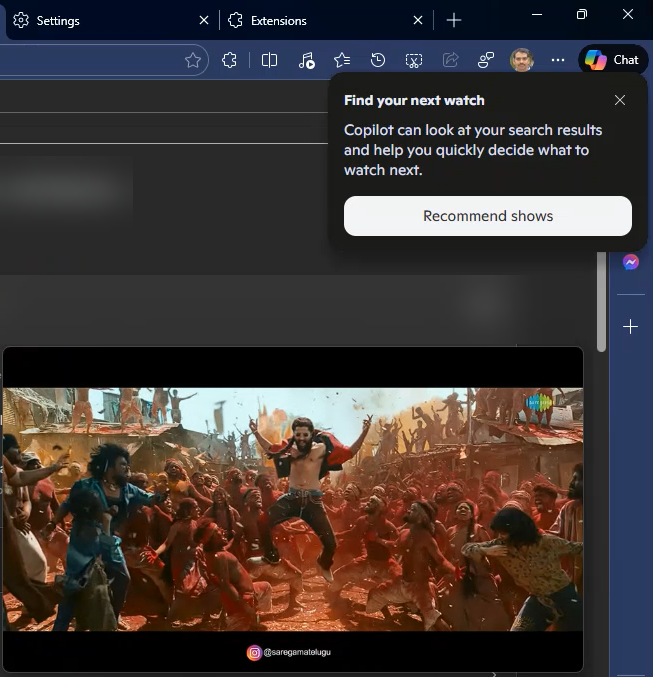
Copilot was already open in the Edge sidebar. The video was running in picture-in-picture while the Settings page was visible in the main tab. The prompt showed suggestions based on recent browsing activity.
The prompt did not return in repeated tests and could not be triggered again, even with the same setup. There is no visible setting for this prompt, so it is not clear what causes it or how often it appears.
The prompt appeared during playback and showed recommendations directly over the video while it was still running. Google Chrome does not show similar prompts during video playback.