
Microsoft has started prompting users in the Canary version of Microsoft Edge with a message that the browser can launch automatically when they sign into Windows. If enabled, Edge opens right after users log into their Windows device.
A new infobar now appears in Edge Canary with the message:
“Edge can now launch when you sign into Windows, so it’s ready when you want to browse.”
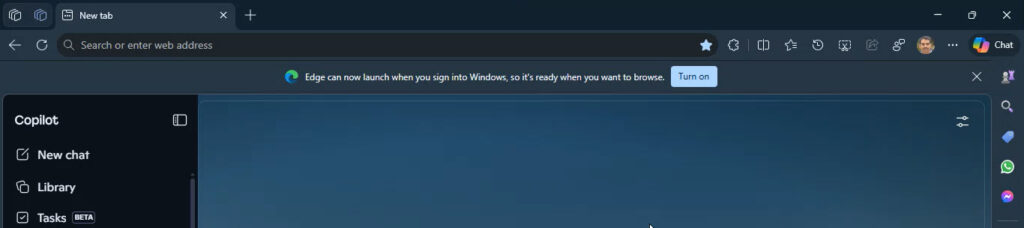
The prompt includes a “Turn on” button. Clicking it enables a new setting in the browser that allows Edge to launch automatically after Windows sign-in.
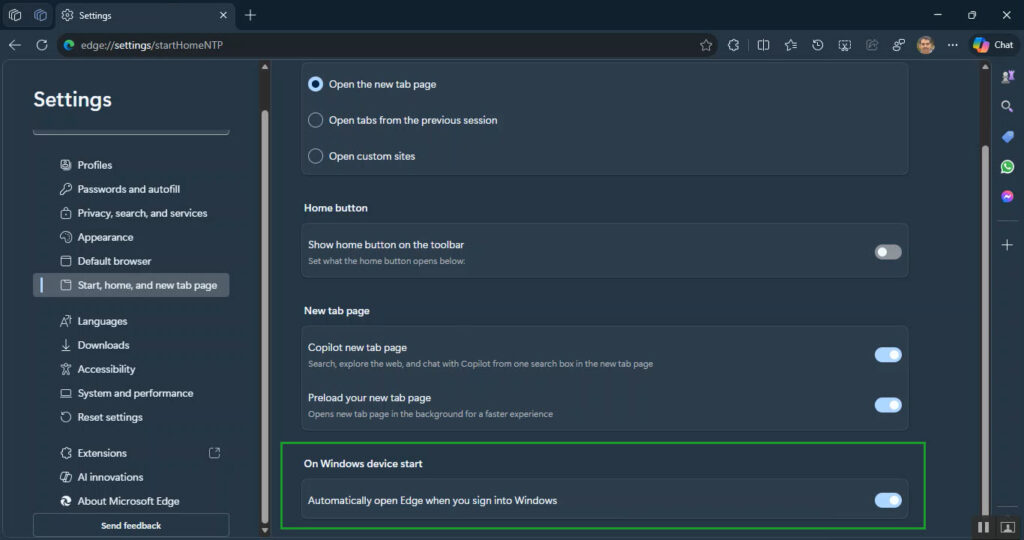
The toggle appears under:
Settings > Start, home, and new tab page > On Windows device start
The setting reads “Automatically open Microsoft Edge when you sign into Windows.” Once turned on, Edge launches automatically when users sign into Windows.
Browsers can include options like this so they start immediately after login, but the feature is optional and can remain disabled.
Microsoft has tested a similar option in the past. The company is now revisiting it in Edge Canary and has added the infobar prompt to surface the setting more clearly.
Google is also testing a similar option in the Canary version of Chrome. Chrome can launch automatically when Windows starts. The timing may be a coincidence, but it may also reflect a browser trend.
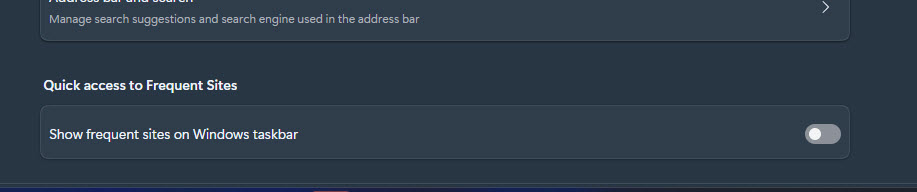
Microsoft regularly tests new features in Edge Canary. The browser recently experimented with an option to show or hide frequently visited sites in the Edge taskbar jump list through a setting called “Show frequent sites on Windows taskbar.”
The feature is still being tested in Edge Canary and may or may not reach the stable browser.