Skip to content
OnMSFT.com
  • Home
  • About
  • Contact
  • Windows
  • Surface
  • Xbox
  • How-To
  • OnPodcast
  • Edge
  • Teams
  • Gaming
Menu
  • Home
  • About
  • Contact
  • Windows
  • Surface
  • Xbox
  • How-To
  • OnPodcast
  • Edge
  • Teams
  • Gaming
  1. Home
  2. News
  3. You can now undo and redo ink strokes from the Draw tab in PowerPoint

You can now undo and redo ink strokes from the Draw tab in PowerPoint

OnMSFT Staff OnMSFT Staff
June 8, 2023
2 min read

Microsoft has announced the availability of major improvements in PowerPoint for the web. The changes will make it easier for users to access important tools. Here’s everything you need to know:

First, the Draw tab has been refreshed and now features a new capability that will allow users to undo and redo ink strokes directly from the Draw tab. Previously, users were forced to navigate through the Home tab to access these capabilities, which was a major deterrent to the user’s productivity.

Undo and Redo buttons now available on the Draw tab

Additionally, Microsoft has also added a new digital ruler that’s designed to help users create and insert straight lines accurately into their presentations. “You can also use the built-in angular display to create accurate angles between lines,” says the company.
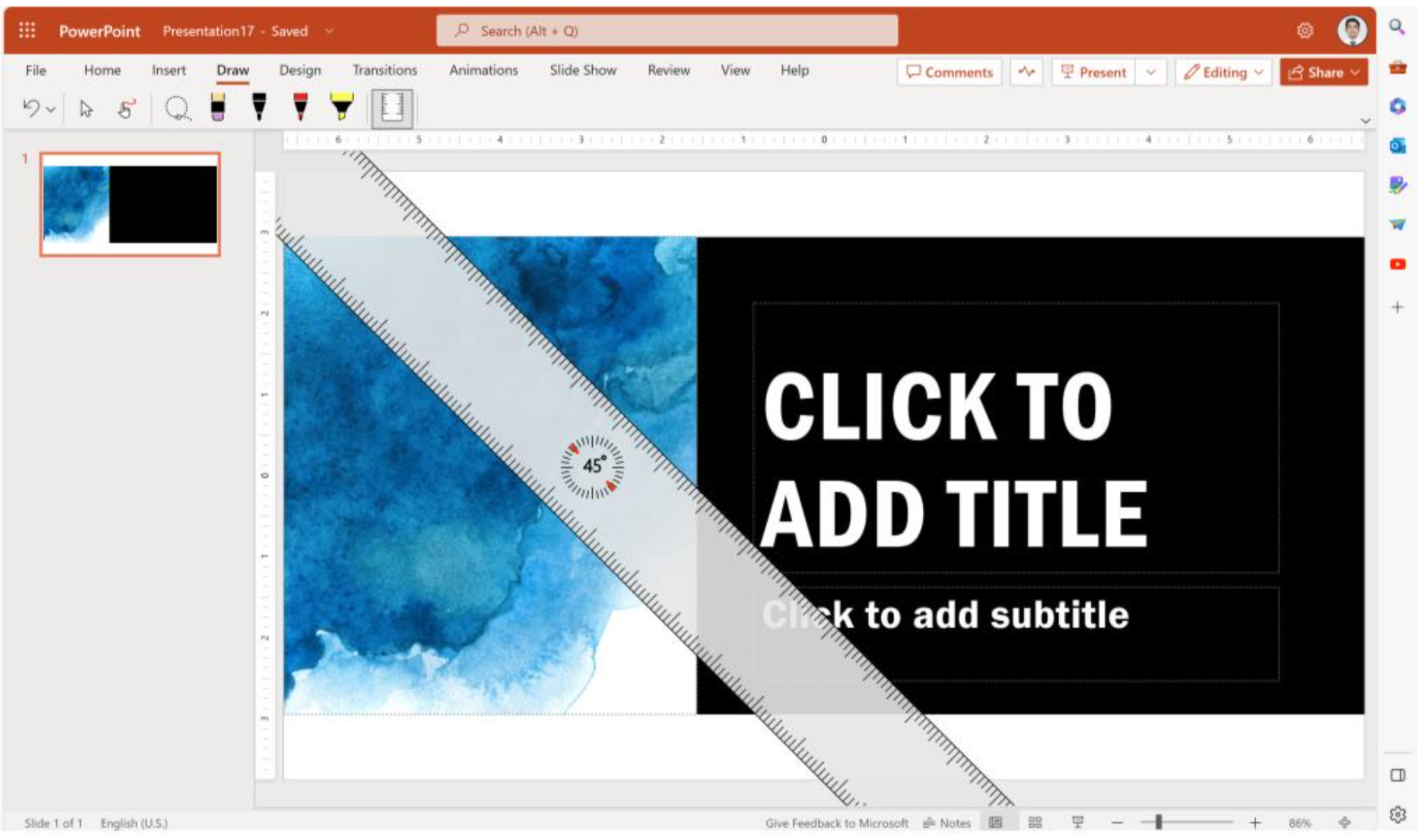
New digital Ruler

And now, it will be easier for users to draw focus during presentations using the laser pointer on the slideshow. Through the feature, you can temporarily ink on slides to highlight important elements in a particular slide. What’s more, you’ll not need to erase the markings, after a few seconds, they’ll automatically disappear, leaving your presentation in its original state.

Finally, Powerpoint for web users will now be able to draw straight lines using their digital pen and mouse easily. You only need to press the Shift key while inking or highlighting your content.

Microsoft has also indicated that users should be able to partially erase strokes using the Point Eraser tool on the Draw tab soon. Let us know which feature you’re excited most about in the comments.


 

Related

Share this article:
Previous Article Microsoft Store Ads expand globally, unveiling new features to empower advertisers and enhance reach Next Article Play Control this weekend with Xbox Free Play Days

Related Articles

Elon Musk Confirms Tesla TeraFab Chip Project Announcement in 7 Days

Elon Musk Plans to Reveal World’s Largest Chip Fab Project Next Week

March 15, 2026

Meta considers major layoffs while pouring billions into AI

March 15, 2026
MacBook Neo Looks Impressive Until You See the 8GB RAM

MacBook Neo Looks Impressive Until You See the 8GB RAM

March 15, 2026

Leave a Comment Cancel reply

Your email address will not be published. Required fields are marked *

Recent Posts

  • Elon Musk Plans to Reveal World’s Largest Chip Fab Project Next Week
  • Meta considers major layoffs while pouring billions into AI
  • MacBook Neo Looks Impressive Until You See the 8GB RAM
  • Instagram Will Stop Supporting Encrypted DMs Starting May 2026
  • Chrome tests Gemini Live voice assistant in a floating overlay panel

Recent Comments

No comments to show.
OnMSFT.com

The Tech News Site

Categories

  • Windows
  • Surface
  • Xbox
  • How-To
  • OnPodcast
  • Gaming
  • Edge
  • Teams

Recent Posts

  • Elon Musk Plans to Reveal World’s Largest Chip Fab Project Next Week
  • Meta considers major layoffs while pouring billions into AI
  • MacBook Neo Looks Impressive Until You See the 8GB RAM
  • Instagram Will Stop Supporting Encrypted DMs Starting May 2026
  • Chrome tests Gemini Live voice assistant in a floating overlay panel

Quick Links

  • About OnMSFT.com
  • Contact OnMSFT
  • Join Our Team
  • Privacy Policy
© 2010–2026 OnMSFT.com LLC. All rights reserved.
About OnMSFT.comContact OnMSFTPrivacy Policy