Skip to content
OnMSFT.com
  • Home
  • About
  • Contact
  • Windows
  • Surface
  • Xbox
  • How-To
  • OnPodcast
  • Edge
  • Teams
  • Gaming
Menu
  • Home
  • About
  • Contact
  • Windows
  • Surface
  • Xbox
  • How-To
  • OnPodcast
  • Edge
  • Teams
  • Gaming
  1. Home
  2. News
  3. Google blocks YouTube videos for Edge users with Strict tracking protection

Google blocks YouTube videos for Edge users with Strict tracking protection

Devesh Beri Devesh Beri
October 10, 2023
2 min read

Google is actively trying to block YouTube video playback for some users who have enabled Microsoft Edge’s strict tracking protection mode. This strict tracking protection mode is designed to enhance privacy by limiting the tracking abilities of websites, including Google, WindowsLatest reported.

Microsoft Edge comes with three levels of tracking protection: Basic, Balanced (Default), and Strict. The Strict mode is the most privacy-focused and may block certain tracking attempts by websites.Screenshot 2023 10 10 at 7.29.29 PM

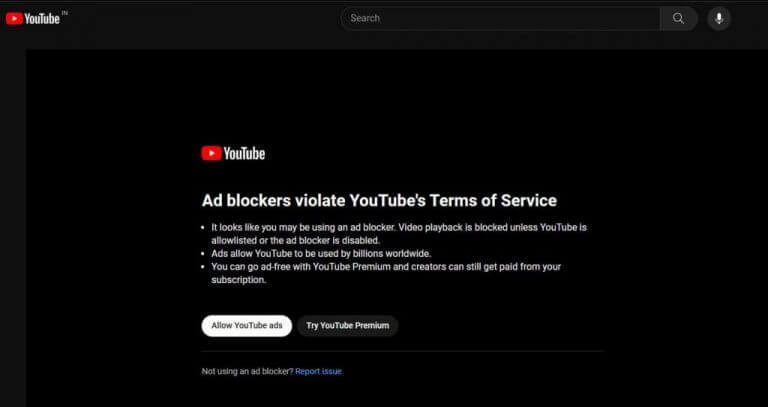
When users with Microsoft Edge’s Strict tracking protection mode try to watch YouTube videos, they may encounter a warning or pop-up message that blocks video playback. This message suggests that an ad blocker may be activated and asks users to either allow YouTube ads or turn off the ad blocker.

Google’s perspective is that ad blockers violate YouTube’s Terms of Service. They argue that ads enable global access to YouTube and support content creators. They encourage users to choose between allowing ads or purchasing YouTube Premium for an ad-free experience.YouTube adblocker
The impact of this situation varies, and not all users with Microsoft Edge’s Strict tracking protection mode experience issues. Some users may be able to watch YouTube videos without any problems. In contrast, others may encounter the ad-blocker pop-up.

In summary, Google appears to be actively targeting users who have enabled Microsoft Edge’s strict tracking protection mode with ad-blocker warnings on YouTube. To resolve this issue and continue watching videos, users can either disable tracking protection or switch to the default tracking protection mode in Microsoft Edge.


Related

Share this article:
Previous Article Microsoft Teams levels up with Copilot: AI-Powered boost for calls and meetings coming soon Next Article Google makes Passkeys default login setting for users

Related Articles

Chrome and Gemini icons representing Gemini Live voice assistant integration in Chrome

Chrome tests Gemini Live voice assistant in a floating overlay panel

March 14, 2026

Chrome’s Organizer feature may sync Gemini and AI conversations across devices

March 14, 2026

After Chrome, Edge tests launching the browser automatically when you sign into Windows

March 13, 2026

Leave a Comment Cancel reply

Your email address will not be published. Required fields are marked *

Recent Posts

  • Chrome tests Gemini Live voice assistant in a floating overlay panel
  • Chrome’s Organizer feature may sync Gemini and AI conversations across devices
  • After Chrome, Edge tests launching the browser automatically when you sign into Windows
  • iPhone Fold Latest Rumors: Display, Cameras, RAM and Price Details Revealed
  • Samsung fears first mobile operating loss due to memory price surge

Recent Comments

No comments to show.
OnMSFT.com

OnMSFT.com covers Microsoft news, reviews, and how-to guides. Formerly known as WinBeta, we have been your source for Microsoft news since 1998.

Categories

  • Windows
  • Surface
  • Xbox
  • How-To
  • OnPodcast
  • Gaming
  • Edge
  • Teams

Recent Posts

  • Chrome tests Gemini Live voice assistant in a floating overlay panel
  • Chrome’s Organizer feature may sync Gemini and AI conversations across devices
  • After Chrome, Edge tests launching the browser automatically when you sign into Windows
  • iPhone Fold Latest Rumors: Display, Cameras, RAM and Price Details Revealed
  • Samsung fears first mobile operating loss due to memory price surge

Quick Links

  • About OnMSFT.com
  • Contact OnMSFT
  • Join Our Team
  • Privacy Policy
© 2010–2026 OnMSFT.com LLC. All rights reserved.
About OnMSFT.comContact OnMSFTPrivacy Policy
