Skip to content
OnMSFT.com
  • Home
  • About
  • Contact
  • Windows
  • Surface
  • Xbox
  • How-To
  • OnPodcast
  • Edge
  • Teams
  • Gaming
Menu
  • Home
  • About
  • Contact
  • Windows
  • Surface
  • Xbox
  • How-To
  • OnPodcast
  • Edge
  • Teams
  • Gaming
  1. Home
  2. News
  3. Yammer adds diverse skin tones to reactions on the web and mobile

Yammer adds diverse skin tones to reactions on the web and mobile

Rabia Noureen Rabia Noureen
January 20, 2021
2 min read

Microsoft has announced a new update for Yammer that brings the ability to choose diverse skin tones for reactions. This new inclusive reactions feature has begun rolling out globally to the web and mobile client, and it will soon be available to all users.

“When designing this feature, we ensured reactions with skin-tones work on both light and dark mode, so users with varying abilities can use this feature as expected. Additionally, we looked beyond our team, to seek input from members of the various employees to ensured our proposal was honed by diverse perspectives,” the company explained.
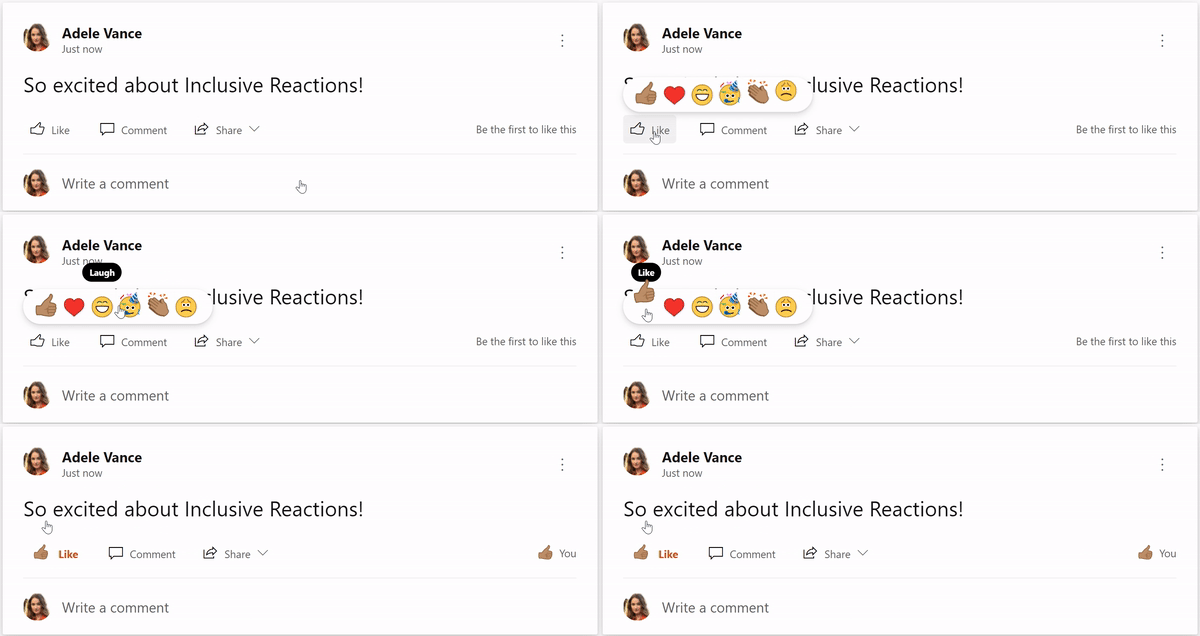
thumbnail image 1 of blog post titled Yammer Reactions are now inclusive

Termed inclusive reactions, the feature allows users to change their skin tone preference through the Yammer Settings panel. Once a user selects a skin tone, the change will be reflected in the Like and Thank reaction icons’ skin tone preferences in the action bar and the summary view. The company says that it conducted in-house research to design this feature so that users “can feel a deeper sense of representation while interacting in new Yammer.”
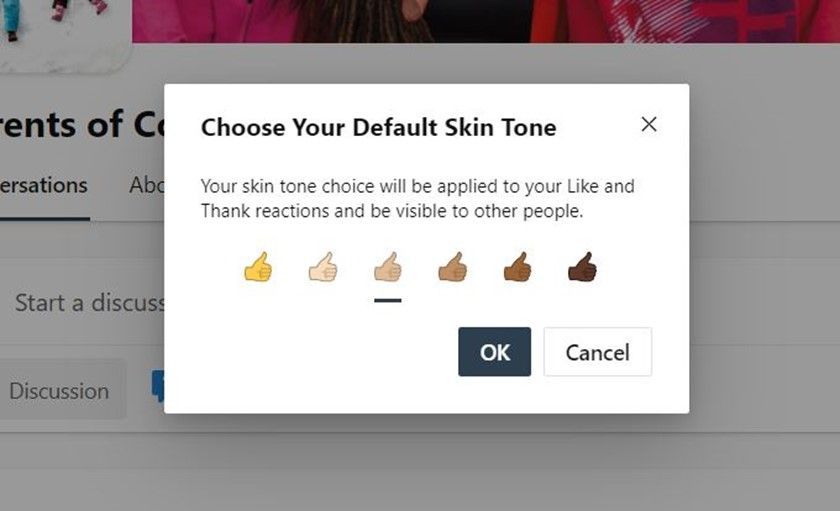
thumbnail image 3 of blog post titled Yammer Reactions are now inclusive

To try out inclusive reactions on the web, click the Settings icon, and select “Choose skin tone for reactions” from the settings panel. In the skin-tone dialog box, choose your skin-tone preference, finally click the OK button to save the changes. On mobile devices, users must tap the “Reaction skin tone” option in Settings to access skin tone options.

Microsoft noted that these preferences would be immediately available in the Yammer integrations in Microsoft Teams, SharePoint, and Outlook. While Yammer is the first app to receive inclusive reactions, the company is working on adding this feature to Microsoft 365 products. Users can head to this support document for more information.


Share This Post:

Tags: Microsoft 365 | Yammer
Share this article:
Tags:
Microsoft 365 Yammer
Previous Article Star Wars Battlefront III rumors have a lot of fans excited for the video game sequel Next Article Microsoft looks to bolster the self-driving car market with new Cruise and GM partnership

Related Articles

YouTube App Shows Ads That Won’t Close During Fullscreen Videos

March 4, 2026
tiktok

TikTok Confirms DMs Will Not Get End-to-End Encryption

March 4, 2026
GPT 5.3

OpenAI GPT-5.3 Instant released, when will you get it, and benchmarks

March 3, 2026

Leave a Comment Cancel reply

Your email address will not be published. Required fields are marked *

Recent Posts

  • YouTube App Shows Ads That Won’t Close During Fullscreen Videos
  • TikTok Confirms DMs Will Not Get End-to-End Encryption
  • OpenAI GPT-5.3 Instant released, when will you get it, and benchmarks
  • MSFT stock price today: Microsoft shares rise, investors watch AI execution
  • Claude is down, but Gemini 3.1 Flash-Lite is rolling out right now

Recent Comments

No comments to show.
OnMSFT.com

OnMSFT.com covers Microsoft news, reviews, and how-to guides. Formerly known as WinBeta, we have been your source for Microsoft news since 1998.

Categories

  • Windows
  • Surface
  • Xbox
  • How-To
  • OnPodcast
  • Gaming
  • Edge
  • Teams

Recent Posts

  • YouTube App Shows Ads That Won’t Close During Fullscreen Videos
  • TikTok Confirms DMs Will Not Get End-to-End Encryption
  • OpenAI GPT-5.3 Instant released, when will you get it, and benchmarks
  • MSFT stock price today: Microsoft shares rise, investors watch AI execution
  • Claude is down, but Gemini 3.1 Flash-Lite is rolling out right now

Quick Links

  • About OnMSFT.com
  • Contact OnMSFT
  • Join Our Team
  • Privacy Policy
© 2010–2026 OnMSFT.com LLC. All rights reserved.
About OnMSFT.comContact OnMSFTPrivacy Policy
